JA
Anker logo
公式取扱説明書

Anker PowerConf S3

54 ページ·3.5 MB·スピーカー·PDF·EN
Anker PowerConf S3
目次 2セクション a) Connect to your PC by using a USB-C cable · b) Connect to your PC or mobile device via Bluetooth pairing 表示非表示
Page 1 of the Anker PowerConf S3 user manual
1ページ · クリックして拡大
1ページ
Anker PowerConf S3 diagram (page 1)
図 1
Page 2 of the Anker PowerConf S3 user manual
2ページ · クリックして拡大
2ページ
Anker PowerConf S3 diagram (page 2)
図 2

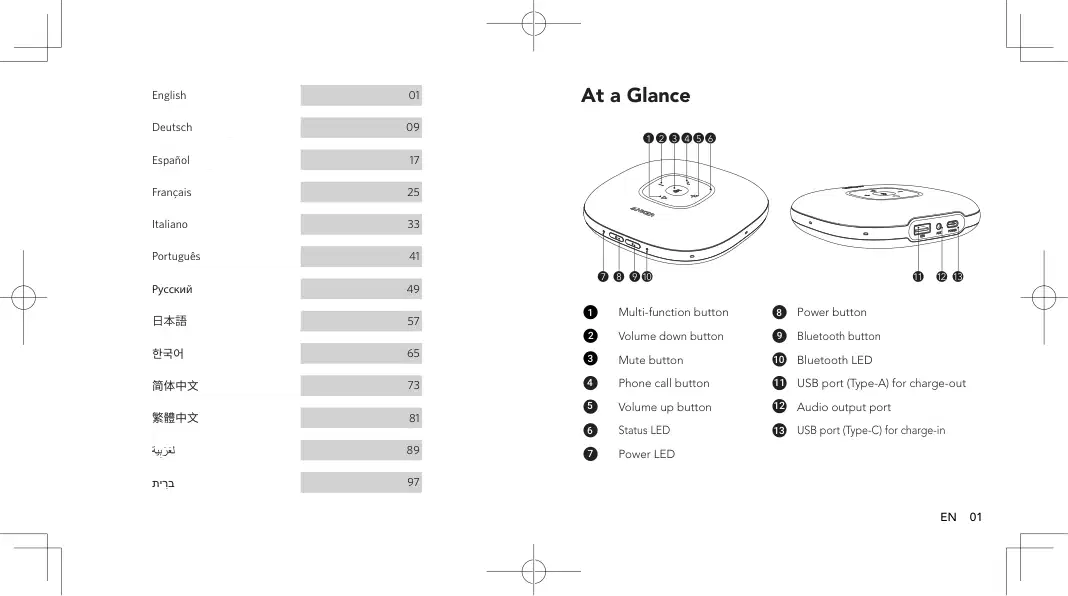
4 Phone call button 11 USB port (Type-A) for charge-out

6 Status LED 13 USB port (Type-C) for charge-in

Page 3 of the Anker PowerConf S3 user manual — b) Connect to your PC or mobile device via Bluetooth pairing
3ページ · クリックして拡大
3ページ
Anker PowerConf S3 — a) Connect to your PC by using a USB-C cable diagram (page 3)
図 3 · a) Connect to your PC by using a USB-C cable
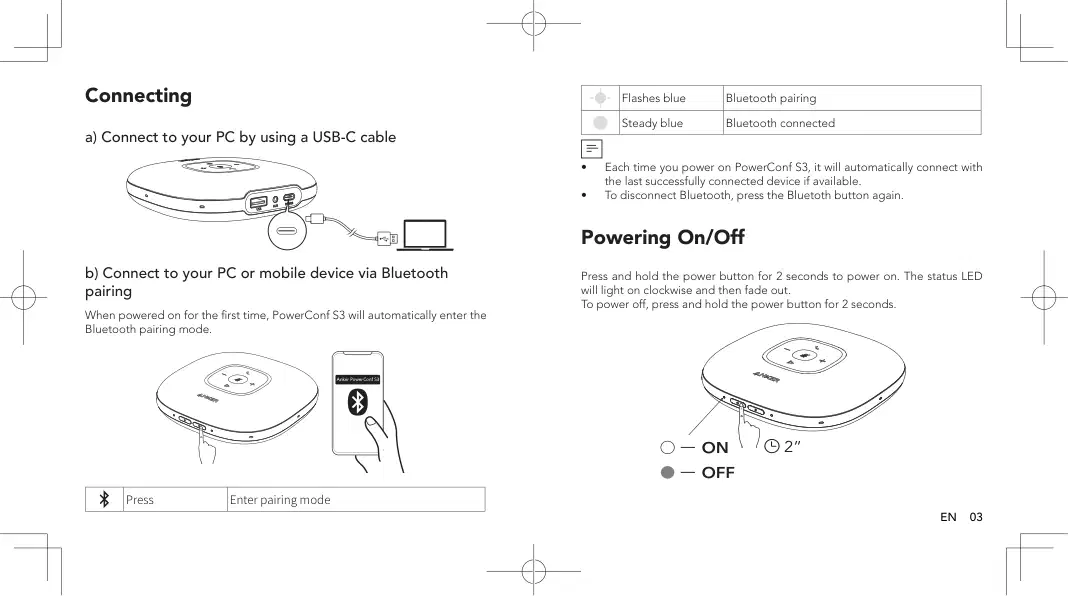
Flashes blueBluetooth pairing Steady blueBluetooth connected

a) Connect to your PC by using a USB-C cable

  • Each time you power on PowerConf S3, it will automatically connect with the last successfully connected device if available.
  • To disconnect Bluetooth, press the Bluetoth button again.

b) Connect to your PC or mobile device via Bluetooth pairing

Press and hold the power button for 2 seconds to power on. The status LED will light on clockwise and then fade out. To power off, press and hold the power button for 2 seconds.

When powered on for the first time, PowerConf S3 will automatically enter the Bluetooth pairing mode.

Page 4 of the Anker PowerConf S3 user manual — a) Connect to your PC by using a USB-C cable
4ページ · クリックして拡大
4ページ
Anker PowerConf S3 — a) Connect to your PC by using a USB-C cable diagram (page 4)
図 4 · a) Connect to your PC by using a USB-C cable
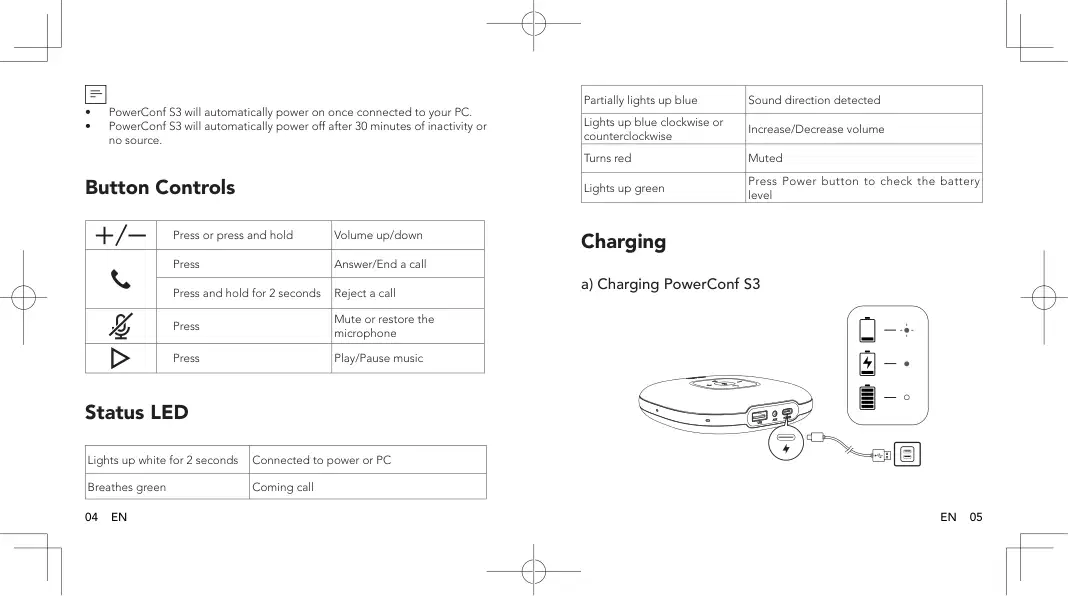
Partially lights up blueSound direction detected Lights up blue clockwise or counterclockwiseIncrease/Decrease volume Turns redMuted Lights up greenPress Power button to check the battery level
  • PowerConf S3 will automatically power on once connected to your PC.
  • PowerConf S3 will automatically power off after 30 minutes of inactivity or no source.
Press or press and holdVolume up/down PressAnswer/End a call Press and hold for 2 secondsReject a call PressMute or restore the microphone PressPlay/Pause music
Lights up white for 2 secondsConnected to power or PC Breathes greenComing call
Page 5 of the Anker PowerConf S3 user manual — a) Connect to your PC by using a USB-C cable
5ページ · クリックして拡大
5ページ
Anker PowerConf S3 — a) Connect to your PC by using a USB-C cable diagram (page 5)
図 5 · a) Connect to your PC by using a USB-C cable
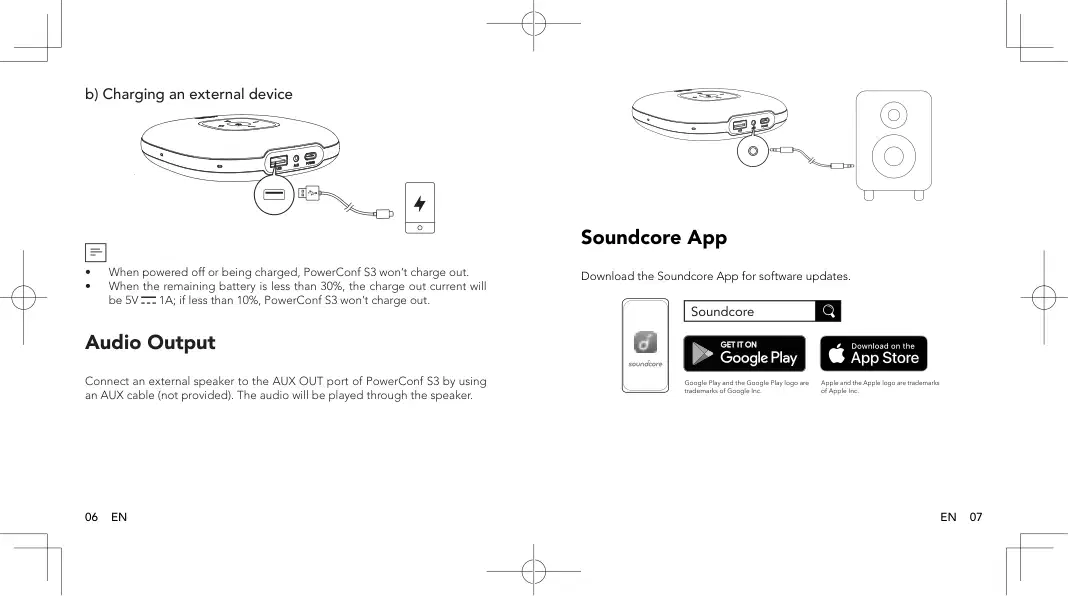
  • When powered off or being charged, PowerConf S3 won’t charge out.
  • When the remaining battery is less than 30%, the charge out current will be 5V 1A; if less than 10%, PowerConf S3 won’t charge out.

Connect an external speaker to the AUX OUT port of PowerConf S3 by using an AUX cable (not provided). The audio will be played through the speaker.

Apple and the Apple logo are trademarks of Apple Inc. Google Play and the Google Play logo are trademarks of Google Inc.

Page 6 of the Anker PowerConf S3 user manual — a) Connect to your PC by using a USB-C cable
6ページ · クリックして拡大
6ページ
Anker PowerConf S3 — a) Connect to your PC by using a USB-C cable diagram (page 6)
図 6 · a) Connect to your PC by using a USB-C cable

Anker PowerConf S3について質問する

ユーザーまたはスタッフが通常1日以内に回答します。あなたの質問が次の人の助けにもなります。

Add your email to get notified when it’s answered — no spam, ever.

0 questions
Anker PowerConf S3に関する質問はまだありません

最初の質問を投稿しましょう。他のユーザーや当チームが回答します。

原本

Anker PowerConf S3 取扱説明書(PDF)

54 ページ·3.5 MB·スピーカー·PDF
上のページをクリックするとここに表示されます
ページ 1 / …
100%
ページを読み込み中…