JA
Focusrite logo
公式取扱説明書

Focusrite MIDI Control (RedNet 4)

15 ページ·123 KB·コントローラー·PDF·EN
Focusrite MIDI Control (RedNet 4)
目次 17セクション MIDI Control for RedNet 4, RedNet MP8R, RedNet X2P, · Red 4Pre, Red 8Pre, Red 8Line and Red 16Line · FFFA001405-06 · Prerequisites · … 表示非表示
Page 1 of the Focusrite MIDI Control (RedNet 4) user manual — FFFA001405-06
1ページ · クリックして拡大
1ページ

MIDI Control for RedNet 4, RedNet MP8R, RedNet X2P,

Red 4Pre, Red 8Pre, Red 8Line and Red 16Line
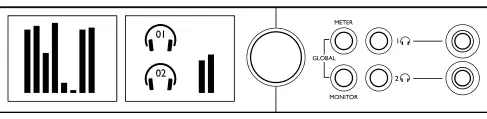
Focusrite MIDI Control (RedNet 4) — MIDI Control for RedNet 4, RedNet MP8R, RedNet X2P, diagram (page 1)
図 1 · MIDI Control for RedNet 4, RedNet MP8R, RedNet X2P,
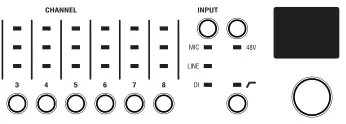
Focusrite MIDI Control (RedNet 4) — MIDI Control for RedNet 4, RedNet MP8R, RedNet X2P, diagram (page 1)
図 2 · MIDI Control for RedNet 4, RedNet MP8R, RedNet X2P,

Version 1.01

FFFA001405-06

Page 2 of the Focusrite MIDI Control (RedNet 4) user manual — Setup in RedNet Control
2ページ · クリックして拡大
2ページ

Prerequisites

  • Supported Mac or Windows PC
  • RedNet 4, RedNet MP8R, RedNet X2P, Red 4Pre, Red 8Pre, Red 8Line or Red 16Line hardware device
  • Compatible MIDI controller (see MIDI Controllers)
  • RedNet Control must be running to send and receive MIDI messages

MIDI Controllers

RedNet Control supports two different MIDI message types:

  • Controller Change (CC)
  • System Exclusive (SysEx)

A compatible controller must be able to send user-programmable CC or

SysEx messages.

Since one of the CC protocol options available is that of the Avid PRE (formerly known as

Digidesign PRE), the devices can be controlled from Pro Tools.

Setup in RedNet Control

There are five settings to consider:

  • MIDI Input Device
  • MIDI Output Device
  • MIDI Input Protocol
  • MIDI Output Protocol
  • MIDI Channel allocation

In RedNet Control, select RedNet Control 2 and choose the Preferences sub menu.

Page 3 of the Focusrite MIDI Control (RedNet 4) user manual — MIDI Channel Allocation
3ページ · クリックして拡大
3ページ

The following options are available:

MIDI Input Device

“RedNet Control” is a software MIDI device that can receive MIDI messages from other software.

All other MIDI input devices will be displayed here. The available devices will vary depending on what MIDI devices you have installed.

Choose the input device you would like to receive MIDI messages from.

MIDI Output Device

“RedNet Control” is a software MIDI device that can send MIDI messages to other software.

All other MIDI output devices will be displayed here. The available devices will vary depending on what MIDI devices you have installed.

Choose the out device you would like to send MIDI messages to.

MIDI Input Protocol

Choose the input protocol RedNet Control shall receive.

MIDI Output Protocol

Choose the input protocol RedNet Control shall send.

MIDI Channel Allocation

By clicking on the “spanner” menu of any RedNet 4, RedNet MP8R, RedNet X2P, Red

4Pre, Red 8Pre, Red 8Line or Red 16Line, a MIDI channel can be selected to which the

unit will respond.

  • The default is “Off”
  • 16 channels are available, allowing a maximum of 16 independent device control paths
  • Two devices should not be set to the same MIDI channel
  • MIDI channel selection is saved with the computer, not the device. Therefore when controlling the same unit from a different computer, the MIDI channel allocation may no longer be the same
Page 4 of the Focusrite MIDI Control (RedNet 4) user manual — Setup with Pro Tools
4ページ · クリックして拡大
4ページ

Setup with Pro Tools

RedNet Control must be installed on the same computer as Pro Tools.

The following settings must be set within RedNet Control:

SettingSelection MIDI Input DeviceRedNet Control MIDI Output DeviceRedNet Control MIDI Input ProtocolAvid Pre (CC) MIDI Output ProtocolAvid Pre (CC) RedNet 4 / RedNet MP8R / RedNet X2P MIDI Channel Allocation1–16

Now set up Pro Tools for PRE control:
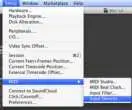
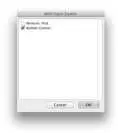
1. Click Setup > MIDI > Input Devices… and ensure the box next to RedNet Control is checked
Focusrite MIDI Control (RedNet 4) — Setup with Pro Tools diagram (page 4)
図 3 · Setup with Pro Tools
Focusrite MIDI Control (RedNet 4) — Setup with Pro Tools diagram (page 4)
図 4 · Setup with Pro Tools
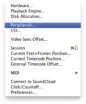
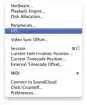
2. Click Setup > Peripherals and click the Mic Preamps tab.
Focusrite MIDI Control (RedNet 4) — Setup with Pro Tools diagram (page 4)
図 5 · Setup with Pro Tools
Page 5 of the Focusrite MIDI Control (RedNet 4) user manual — Setup with Pro Tools
5ページ · クリックして拡大
5ページ

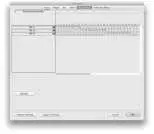
Here you can connect up to nine devices.

Choose Type = PRE

“Receive From” and “Send To” must be set to “RedNet Control” and the same channel number set in RedNet Control.
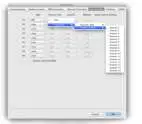
Focusrite MIDI Control (RedNet 4) — Setup with Pro Tools diagram (page 5)
図 6 · Setup with Pro Tools
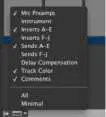
3. Click Setup > I/O and click the Mic Preamps tab
Focusrite MIDI Control (RedNet 4) — Setup with Pro Tools diagram (page 5)
図 7 · Setup with Pro Tools

Here, assign the mic pres to the corresponding input channels.
Focusrite MIDI Control (RedNet 4) — Setup with Pro Tools diagram (page 5)
図 8 · Setup with Pro Tools
Page 6 of the Focusrite MIDI Control (RedNet 4) user manual — CC Protocol
6ページ · クリックして拡大
6ページ

Setup with Pro Tools continued

4. Pro Tools will now control RedNet 4, RedNet MP8R, RedNet X2P, Red 4Pre, Red 8Pre, Red 8Line and Red 16Line devices.
Focusrite MIDI Control (RedNet 4) — Setup with Pro Tools continued diagram (page 6)
図 9 · Setup with Pro Tools continued

For best operation, it is recommended that RedNet 4 / RedNet MP8R / RedNet X2P and

RedNet Control are running before Pro Tools is launched.

CC Protocol

There are two CC protocol options available: Avid PRE (CC) - 3dB steps. See Table A and B. 1dB Step (CC) - 1dB steps. See Table A and C.

CC messages take the format:

Where:

a is the zero-indexed MIDI channel number in hex

cc is the control number in hex

vv is the value in hex

For exampleB4h 19h 0Fh will set the following:

RedNet 4 / RedNet MP8R / RedNet X2P unit on MIDI channel 5 Input gain of mic pre channel 2 to a value of 45dB

Ba cc vv

Page 7 of the Focusrite MIDI Control (RedNet 4) user manual — Setup with Pro Tools continued
7ページ · クリックして拡大
7ページ

Table A – Control numbers and values

CC HexCC DecimalRedNet Mic Pre FunctionRedNet Mic Pre ChannelValues (Hex)RedNet 4RedNet MP8RRedNet X2PRed 4PreRed 8PreRed 8LineRed 16Line 00h0Input Source100h=mic, 01h=line, 02h=instYesYesYesYesYes 01h1Input Impedance100h=2.4K, 01h=10KYes 02h2Pad / Air100h=off, 7Fh=onYesAirAirAirAirAir 04h4+48V100h=off, 7Fh=onYesYesYesYesYesYesYes 05h5Phase100h=off, 7Fh=onYesYesYesYesYesYes 06h6High Pass Filter100h=off, 7Fh=onYesYesYesYesYesYesYes 09h9Input Gain1See Table BYesYesYesYesYesYesYes 10h16Input Source200h=mic, 01h=line, 02h=instYesYesYesYesYes 11h17Input Impedance200h=2.4K, 01h=10KYes 12h18Pad / Air200h=off, 7Fh=onYesAirAirAirAirAir 14h20+48V200h=off, 7Fh=onYesYesYesYesYesYesYes 15h21Phase200h=off, 7Fh=onYesYesYesYesYesYes 16h22High Pass Filter200h=off, 7Fh=onYesYesYesYesYesYesYes 19h25Input Gain2See Table BYesYesYesYesYesYesYes 20h32Input Source300h=mic, 01h=line, 02h=instYesYesYes 21h33Input Impedance300h=2.4K, 01h=10KYes 22h34Pad / Air300h=off, 7Fh=onYesAirAir 24h36+48V300h=off, 7Fh=onYesYesYesYes 25h37Phase300h=off, 7Fh=onYesYesYes 26h38High Pass Filter300h=off, 7Fh=onYesYesYesYes 29h41Input Gain3See Table BYesYesYesYes 30h48Input Source400h=mic, 01h=line, 02h=instYesYesYes 31h49Input Impedance400h=2.4K, 01h=10KYes 32h50Pad / Air400h=off, 7Fh=onYesAirAir 34h52+48V400h=off, 7Fh=onYesYesYesYes 35h53Phase400h=off, 7Fh=onYesYesYes 36h54High Pass Filter400h=off, 7Fh=onYesYesYesYes 39h57Input Gain4See Table BYesYesYesYes
Page 8 of the Focusrite MIDI Control (RedNet 4) user manual — Setup with Pro Tools continued
8ページ · クリックして拡大
8ページ

Table A – Control numbers and values continued
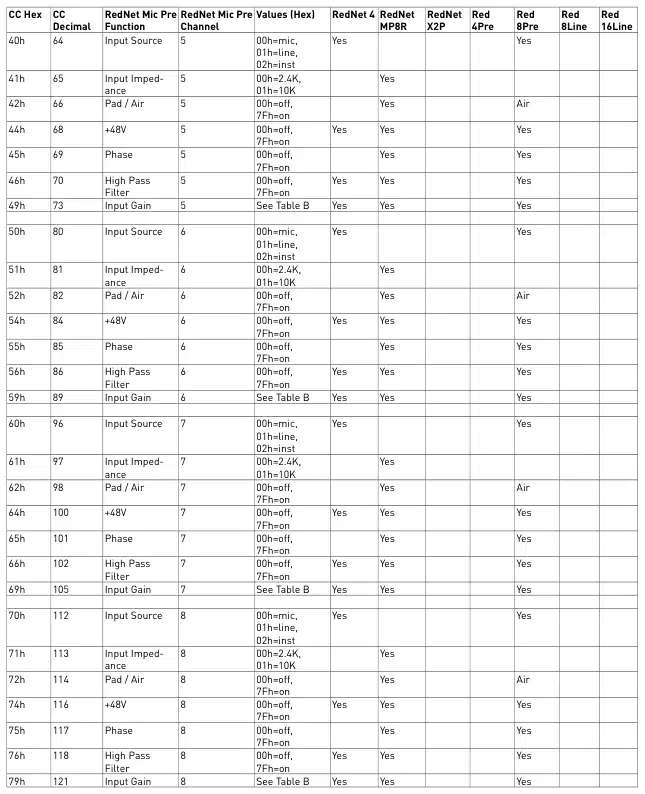
CC HexCC DecimalRedNet Mic Pre FunctionRedNet Mic Pre ChannelValues (Hex)RedNet 4RedNet MP8RRedNet X2PRed 4PreRed 8PreRed 8LineRed 16Line 40h64Input Source500h=mic, 01h=line, 02h=instYesYes 41h65Input Impedance500h=2.4K, 01h=10KYes 42h66Pad / Air500h=off, 7Fh=onYesAir 44h68+48V500h=off, 7Fh=onYesYesYes 45h69Phase500h=off, 7Fh=onYesYes 46h70High Pass Filter500h=off, 7Fh=onYesYesYes 49h73Input Gain5See Table BYesYesYes 50h80Input Source600h=mic, 01h=line, 02h=instYesYes 51h81Input Impedance600h=2.4K, 01h=10KYes 52h82Pad / Air600h=off, 7Fh=onYesAir 54h84+48V600h=off, 7Fh=onYesYesYes 55h85Phase600h=off, 7Fh=onYesYes 56h86High Pass Filter600h=off, 7Fh=onYesYesYes 59h89Input Gain6See Table BYesYesYes 60h96Input Source700h=mic, 01h=line, 02h=instYesYes 61h97Input Impedance700h=2.4K, 01h=10KYes 62h98Pad / Air700h=off, 7Fh=onYesAir 64h100+48V700h=off, 7Fh=onYesYesYes 65h101Phase700h=off, 7Fh=onYesYes 66h102High Pass Filter700h=off, 7Fh=onYesYesYes 69h105Input Gain7See Table BYesYesYes 70h112Input Source800h=mic, 01h=line, 02h=instYesYes 71h113Input Impedance800h=2.4K, 01h=10KYes 72h114Pad / Air800h=off, 7Fh=onYesAir 74h116+48V800h=off, 7Fh=onYesYesYes 75h117Phase800h=off, 7Fh=onYesYes 76h118High Pass Filter800h=off, 7Fh=onYesYesYes 79h121Input Gain8See Table BYesYesYes
Focusrite MIDI Control (RedNet 4) — Setup with Pro Tools continued diagram (page 8)
図 10 · Setup with Pro Tools continued
Page 9 of the Focusrite MIDI Control (RedNet 4) user manual — Setup with Pro Tools continued
9ページ · クリックして拡大
9ページ

Setup with Pro Tools continued

Table B – Avid PRE (CC) Gain Values

HexDecimalPro Tools dBRedNet 4 dB (Mic)RedNet 4 dB (Line & Inst)RedNet MP8R dBRedNet X2P dBRed 4Pre dBRed 8Pre dBRed 8Line dBRed 16Line dB 00h00001000000 01h13831038888 02h26861068888 03h39991099999 04h4121212121212121212 05h5151515151515151515 06h6181818181818181818 07h7212121212121212121 08h8242424242424242424 09h9272727272727272727 0Ah10303030303030303030 0Bh11333333333333333333 0Ch12363636363636363636 0Dh13393939393939393939 0Eh14424242424242424242 0Fh15454545454545454545 10h16484848484848484848 11h17515151515151515151 12h18545454545454545454 13h19575754575757575757 14h20606054606060606060 15h21636354636363636363 16h22666354656663636363 17h23696354656863636363

When RedNet Control receives a MIDI message from Pro Tools, which is not supported by a device, the same message will be returned with the value set to “Off”

Page 10 of the Focusrite MIDI Control (RedNet 4) user manual — Setup with Pro Tools continued
10ページ · クリックして拡大
10ページ

Table C – 1dB Step (CC) Gain Values

HexDecimalRedNet 4 dB (Mic)RedNet 4 dB (Line & Inst)RedNet MP8R dBRedNet X2P dBRed 4Pre dBRed 8Pre dBRed 8Line dBRed 16Line dB 00h0001000000 01h1111111111 02h2221222222 03h3331333333 04h4441444444 05h5551555555 06h6661666666 07h7771777777 08h8881888888 09h9991999999 0Ah101010201010101010 0Bh111111211111111111 0Ch121212221212121212 0Dh131313231313131313 0Eh141414241414141414 0Fh151515251515151515 10h161616261616161616 11h171717271717171717 12h181818281818181818 13h191919291919191919 14h202020302020202020 15h212121312121212121 16h222222322222222222 17h232323332323232323 18h242424342424242424 19h252525352525252525 1Ah262626362626262626 1Bh272727372727272727 1Ch282828382828282828 1Dh292929392929292929 1Eh303030403030303030 1Fh313131413131313131 20h323232423232323232 21h333333433333333333 22h343434443434343434
Page 11 of the Focusrite MIDI Control (RedNet 4) user manual — Setup with Pro Tools continued
11ページ · クリックして拡大
11ページ

Table C – 1dB Step (CC) Gain Values

HexDecimalRedNet 4 dB (Mic)RedNet 4 dB (Line & Inst)RedNet MP8R dBRedNet X2P dBRed 4Pre dBRed 8Pre dBRed 8Line dBRed 16Line dB 23h353535453535353535 24h363636463636363636 25h373737473737373737 26h383838483838383838 27h393939493939393939 28h404040504040404040 29h414141514141414141 2Ah424242524242424242 2Bh434343534343434343 2Ch444444544444444444 2Dh454545554545454545 2Eh464646564646464646 2Fh474747574747474747 30h484848584848484848 31h494949594949494949 32h505050605050505050 33h515151615151515151 34h525252625252525252 35h535353635353535353 36h545454645454545454 37h555554655555555555 38h565654655656565656 39h575754655757575757 3Ah585854655858585858 3Bh595954655959595959 3Ch606054656060606060 3Dh616154656161616161 3Eh626254656262626262 3Fh636354656363636363 40h646354656463636363 41h656354656563636363 42h666354656663636363 43h676354656763636363 44h686354656863636363
Page 12 of the Focusrite MIDI Control (RedNet 4) user manual — SysEx Protocol
12ページ · クリックして拡大
12ページ

SysEx Protocol

Many devices can send and receive programmable SysEx messages. Please configure your controller according to the manufacturer’s instructions using the following protocol.

The following tables show the format of each control message.

Table D – SysEx message format

Func.Start SysExManufacturer ID (Focusrite / Novation)S/WRedNet ControlVersionDevice TypeDevice IndexMic Pre ChannelParameterParameter valueEnd SysEx Byte value (Hex)F0h00h20h29h7Eh02h00h02h / 04h / 08h / 0Eh / 0Fh / 11h / 10h00h – 0Fh (corresponds to MIDI channel 1 – 16 assigned to unit in RedNet Control00h – 07h for channels 1–8 7Fh – for unit-wide parametersSee Table E and FF7h Byte value (Dec)24003241126202 / 4 / 8 / 14 / 15 17 / 160 – 15 (corresponds to MIDI channel 1 – 16 assigned to unit in RedNet Control0 – 7 for channels 1–8 127 for unit-wide parameters247 NotesThis will form the beginning of all messagesThis will end each message
  • The Manufacturer ID used (00h 20h 29h) is that of Novation, the sister brand to Focusrite
  • The version field may change in future RedNet Control releases. Compatibility between different versions is not guaranteed
  • 02h / 2 is the device type needed to use a RedNet X2P
  • 04h / 4 is the device type needed to use a RedNet 4
  • 08h / 8 is the device type needed to use a RedNet MP8R
  • 0Eh / 14 is the device type needed to use a Red 4Pre
  • 0Fh / 15 is the device type needed to use a Red 8Pre
  • 11h / 17 is the device type needed to use a Red 8Line
  • 10h / 16 is the device type needed to use a Red 16Line
Page 13 of the Focusrite MIDI Control (RedNet 4) user manual — SysEx Protocol continued
13ページ · クリックして拡大
13ページ

SysEx Protocol continued

Table E – SysEx channel parameters and parameter values

Parameter Parameter Byte (hex)

Gain 00h RedNet X2P: 00h-44h, RedNet 4: 00h-3Fh, RedNet MP8R: 0Ah- 42h, Red 4Pre: 00h-3Fh, Red 8Pre: 00h-3Fh, Red 8Line: 00h-3Fh Red 16Line: 00h-3Fh,

RedNet X2P: 0-68dB, RedNet 4: 0-63dB, RedNet MP8R: 10- 65dB Red 4Pre: 0-63dB, Red 8Pre: 0-63dB, Red 8Line: 0-63dB Red 16Line: 0-63dB,

Input Source 01h 00h = mic, 01h = line, 02h = inst 0 = mic, 1 = line, 2 = inst

Phantom Power 02h 00h = Off, any other value = On

0 = Off, any other value = On

High Pass Filter 03h 00h = Off, any other value = On

0 = Off, any other value = On

Input Impedance 05h 00h = 2.4K, any other value = 10K

0 = 2.4K, any other value = 10K

Pad 07h 00h = Off, any other value = On

0 = Off, any other value = On

Air 08h 00h = Off, any other value = On

0 = Off, any other value = On

Phase 09h 00h = Off, any other value = On

0 = Off, any other value = On

Gain Compensation 0Eh 00h = Off, any other value = On

0 = Off, any other value = On

Parameter Value (hex) · Parameter Value (dec)

Page 14 of the Focusrite MIDI Control (RedNet 4) user manual — SysEx Protocol continued
14ページ · クリックして拡大
14ページ

Table F – SysEx unit-wide parameters

Parameter Parameter Byte (hex) Parameter Value

Restore Defaults 00h Any

Identify Unit 01h Any

Clear Overs 02h Any

04h 00h = 0dB, 03h = 3dB, 06h = 6dB

Device Lock 05h 00h = unlock, 01h = lock

For example, to send a message of:

Of RedNet 4 assigned MIDI channel 2

The following message would be sent:

F0h 00h 20h 29h 7Eh 02h 00h 04h 01h 07h 00h 2Dh F7h

Or to Identify RedNet MP8R assigned MIDI channel 6, the following message would be

sent:

F0h 00h 20h 29h 7Eh 02h 00h 08h 05h 7Fh 00h 01h F7h

Show 4 more labels / short text on this page
Gain Compensation Headroom · Set gain · To 45 dB · On channel 8
Page 15 of the Focusrite MIDI Control (RedNet 4) user manual — Troubleshooting
15ページ · クリックして拡大
15ページ

Troubleshooting

For a list of FAQs and general troubleshooting tips, our Help Centre is a valuable resource. This can be found here: focusritepro.zendesk.com

If any problem cannot be resolved, or if you have a query, please contact our Customer Support team using the contact details found here.

Focusrite Customer Support:

Emailfocusriteprosupport@ focusrite.com
Phone (UK)+44 (0)1494 836 384
Phone (USA)+1 (310) 450 8494
情報源

参考資料・リンク

この取扱説明書で参照されているリンク(メーカー、サポート、ダウンロード等)。

Focusrite MIDI Control (RedNet 4)について質問する

ユーザーまたはスタッフが通常1日以内に回答します。あなたの質問が次の人の助けにもなります。

Add your email to get notified when it’s answered — no spam, ever.

0 questions
Focusrite MIDI Control (RedNet 4)に関する質問はまだありません

最初の質問を投稿しましょう。他のユーザーや当チームが回答します。

原本

Focusrite MIDI Control (RedNet 4) 取扱説明書(PDF)

15 ページ·123 KB·コントローラー·PDF
上のページをクリックするとここに表示されます
ページ 1 / …
100%
ページを読み込み中…