User Manual
Benutzerhandbuch | Manuel de l’utilisateur | Manuale utente Manual de usuario | Manual do Usuário | 取扱説明書 | 사용 설명서
Product Number A3911, A3911L, A3911R رقم المنتج
Bluetooth Headphones / Soundcore Liberty Neo
用户手册 | 使用者手冊 | Руководство пользователя
מדריך למשתמש | دليل المستخدم
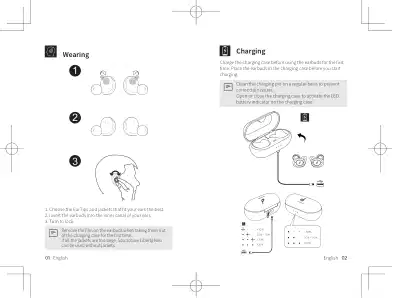
Wearing
Charge the charging case before using the earbuds for the first time. Place the earbuds in the charging case before you start charging.
Clean the charging pin on a regular basis to prevent connection issues. Open or close the charging case to activate the LED battery indicator on the charging case.
Remove the film on the earbuds when taking them out of the charging case for the first time. If all the jackets are too large, Soundcore Liberty Neo can be used without jackets.
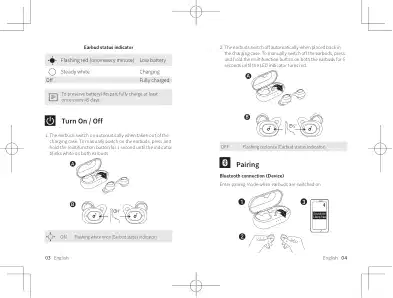
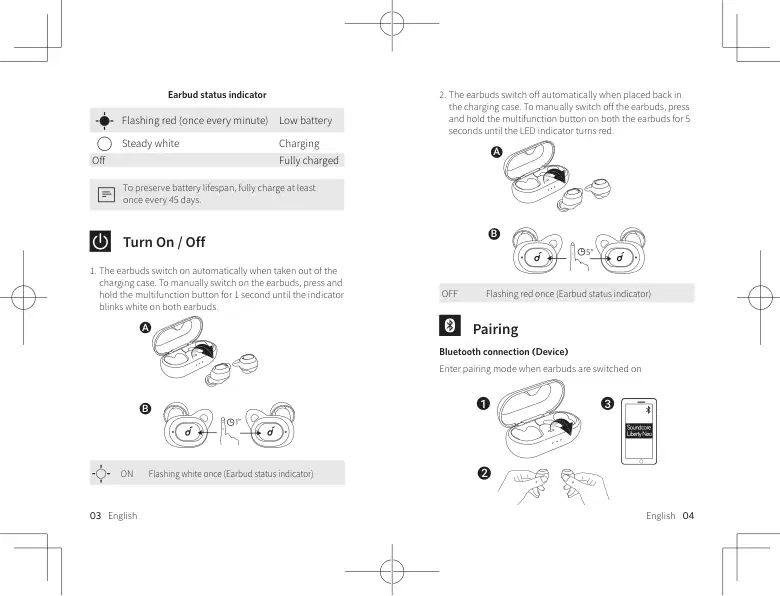
To preserve battery lifespan, fully charge at least once every 45 days.
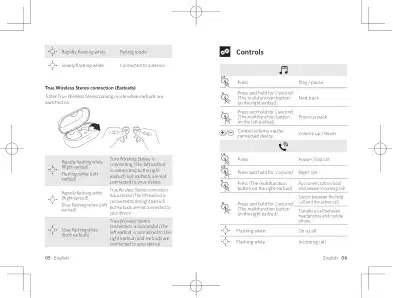
Rapidly flashing white Pairing mode
Slowly flashing white Connected to a device
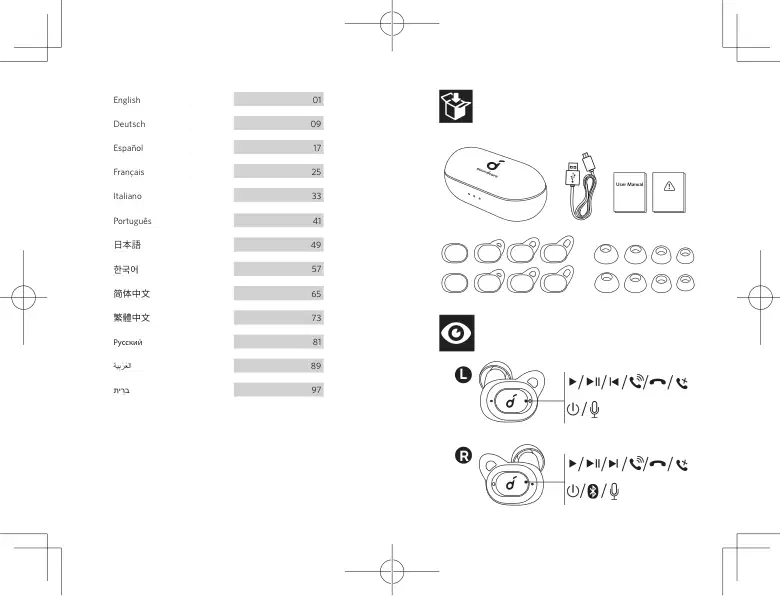
Press Play / pause
True Wireless Stereo connection (Earbuds)
1” Press and hold for 1 second (The multifunction button on the right earbud)
Enter True Wireless Stereo pairing mode when earbuds are switched on.
Press and hold for 1 second (The multifunction button on the left earbud)
Control volume via the connected device Volume up / down
True Wireless Stereo is connecting (The left earbud is connecting to the right earbud) but earbuds are not connected to your device
Press Answer / End call
Rapidly flashing white (Right earbud)
Flashing white (Left earbud)
Press and hold for 1 second Reject call
R Press (The multifunction button on the right earbud)
Put current call on hold and answer incoming call
True Wireless Stereo connection is successful (The left earbud is connected to the right earbud) but earbuds are not connected to your device
Rapidly flashing white (Right earbud)
Switch between the held call and the active call
Slow flashing white (Left earbud)
1” Press and hold for 1 second (The multifunction button on the right earbud)
Transfer a call between headphones and mobile phone
True Wireless Stereo connection is successful (The left earbud is connected to the right earbud) and earbuds are connected to your device
Slow flashing white (Both earbuds)
Flashing white On a call
Flashing white Incoming call

the button. 3. Take both earbuds out of the charging case at the same time, the left earbud will automatically connect to the right earbud. The connection is successful if the left earbud flashes slowly and the right earbud flashes rapidly. If the connection was unsuccessful, repeat steps 2-3 until the connection is successful. 4. Open the Bluetooth menu on your mobile device, search for “Soundcore Liberty Neo”, then tap to select it.
L R Double click the multifunction button on either one of the earbuds
Activate Siri / other voice control software
Specifications
Specifications are subject to change without notice.
Earbud Input Rating 5 V 0.3 A Charging Box Input Rating 5 V 0.5 A Charging time 1.5 hours Playtime (varies by volume level and content)
Weight (product net weight) 51 g / 1.8 oz Impedance 16 Ω Driver (full range) 6 mm × 2 Frequency response 20 Hz - 20 KHz Bluetooth version V5.0 Range 10 m / 33 ft
Reset the earbuds if you can only hear sound on one side:
Please note that your rights under applicable law governing the sale of consumer goods remain unaffected by the warranties given in this Limited Warranty.
ユーザーまたはスタッフが通常1日以内に回答します。あなたの質問が次の人の助けにもなります。
最初の質問を投稿しましょう。他のユーザーや当チームが回答します。