JA
Anker logo
公式取扱説明書

Anker PowerConf C300 Full HD Webcam (A3361)

65 ページ·2.6 MB·Webカメラ·PDF·EN
Anker PowerConf C300 Full HD Webcam (A3361)
目次 14セクション Anker PowerConf C300 · USER MANUAL · Portugues do Brasil 67 · English 01 · … 表示非表示
Page 1 of the Anker PowerConf C300 Full HD Webcam (A3361) user manual — Anker PowerConf C300
1ページ · クリックして拡大
1ページ

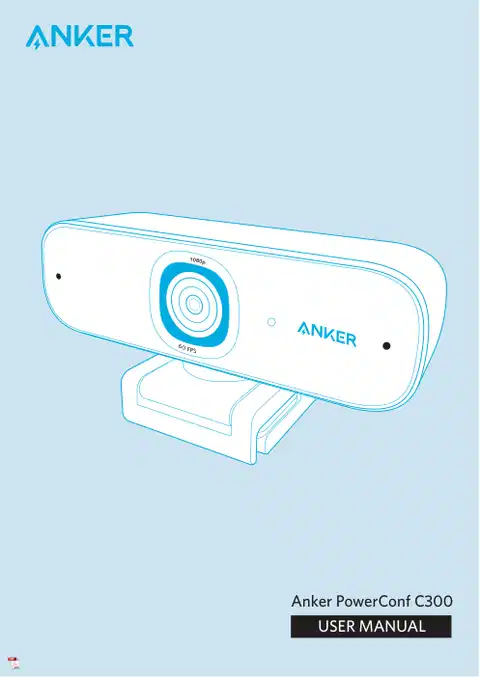
Anker PowerConf C300

USER MANUAL

Page 2 of the Anker PowerConf C300 Full HD Webcam (A3361) user manual — Portugues do Brasil 67
2ページ · クリックして拡大
2ページ

Portugues do Brasil 67

English 01

Pусский73 Slovenský Jazyk 79 79 Türkçe 85 85 日本語 91 91 한국어 97 97 简体中文 103 103 繁體中文109 ةيبِ َرَعل 115 115 תירבע 121 ִ ִ 121
Čeština07 Dansk 13 13 Deutsch 19 19 Español 25 25 Suomi 31 31 Français 37 37 Italiano 43 43 Nederlands 49 49 Norsk 55 55 Język polski 61 61
Page 3 of the Anker PowerConf C300 Full HD Webcam (A3361) user manual — 01 EN
3ページ · クリックして拡大
3ページ

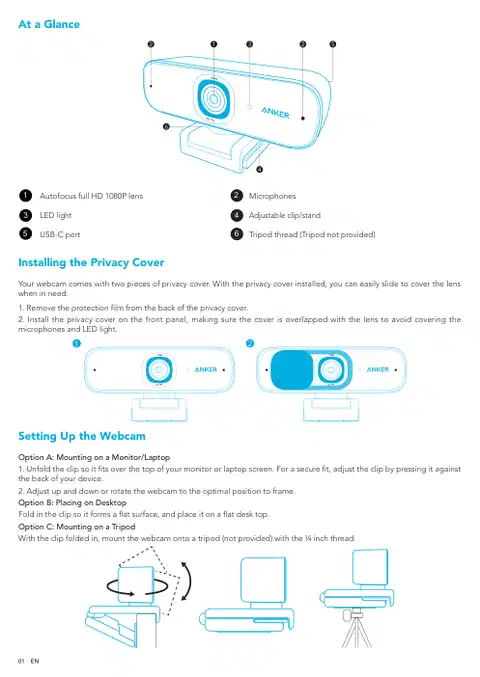
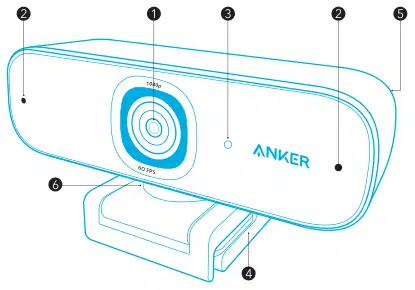
At a Glance

Anker PowerConf C300 Full HD Webcam (A3361) — At a Glance diagram (page 3)
図 1 · At a Glance

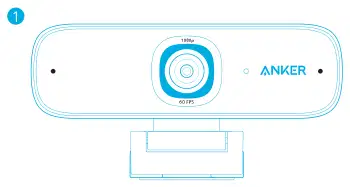
1 Autofocus full HD 1080P lens 2 Microphones

3 LED light 4 Adjustable clip/stand

5 USB-C port 6 Tripod thread (Tripod not provided)

Installing the Privacy Cover

Your webcam comes with two pieces of privacy cover. With the privacy cover installed, you can easily slide to cover the lens when in need.
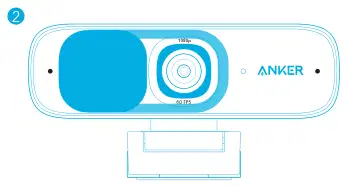
1. Remove the protection film from the back of the privacy cover. 2. Install the privacy cover on the front panel, making sure the cover is overlapped with the lens to avoid covering the microphones and LED light.
Anker PowerConf C300 Full HD Webcam (A3361) — Installing the Privacy Cover diagram (page 3)
図 2 · Installing the Privacy Cover
Anker PowerConf C300 Full HD Webcam (A3361) — Installing the Privacy Cover diagram (page 3)
図 3 · Installing the Privacy Cover

Setting Up the Webcam

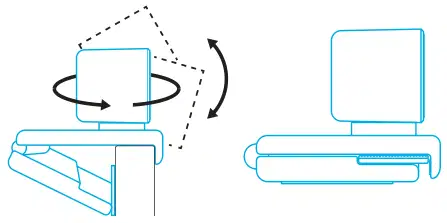
Option A: Mounting on a Monitor/Laptop 1. Unfold the clip so it fits over the top of your monitor or laptop screen. For a secure fit, adjust the clip by pressing it against the back of your device. 2. Adjust up and down or rotate the webcam to the optimal position to frame. Option B: Placing on Desktop Fold in the clip so it forms a flat surface, and place it on a flat desk top. Option C: Mounting on a Tripod With the clip folded in, mount the webcam onto a tripod (not provided) with the ¼ inch thread.
Anker PowerConf C300 Full HD Webcam (A3361) — Setting Up the Webcam diagram (page 3)
図 4 · Setting Up the Webcam

01 EN

Page 4 of the Anker PowerConf C300 Full HD Webcam (A3361) user manual — EN 02
4ページ · クリックして拡大
4ページ

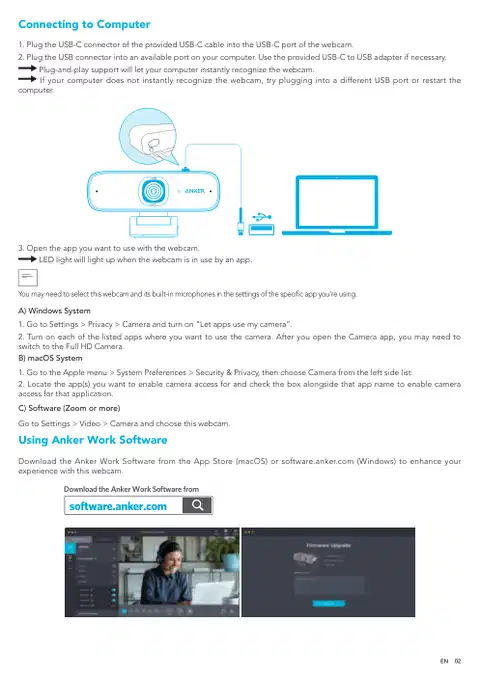
Connecting to Computer

1. Plug the USB-C connector of the provided USB-C cable into the USB-C port of the webcam. 2. Plug the USB connector into an available port on your computer. Use the provided USB-C to USB adapter if necessary.

Plug-and-play support will let your computer instantly recognize the webcam. If your computer does not instantly recognize the webcam, try plugging into a different USB port or restart the computer.

3. Open the app you want to use with the webcam. LED light will light up when the webcam is in use by an app.

You may need to select this webcam and its built-in microphones in the settings of the specific app you’re using.

1. Go to Settings > Privacy > Camera and turn on “Let apps use my camera”. 2. Turn on each of the listed apps where you want to use the camera. After you open the Camera app, you may need to switch to the Full HD Camera. B) macOS System
1. Go to the Apple menu > System Preferences > Security & Privacy, then choose Camera from the left side list. 2. Locate the app(s) you want to enable camera access for and check the box alongside that app name to enable camera access for that application.

C) Software (Zoom or more)

Go to Settings > Video > Camera and choose this webcam.

Using Anker Work Software

Download the Anker Work Software from the App Store (macOS) or software.anker.com (Windows) to enhance your experience with this webcam.

Download the Anker Work Software from
software.anker.com

Anker PowerConf C300 Full HD Webcam (A3361) — software.anker.com diagram (page 4)
図 5 · software.anker.com
Anker PowerConf C300 Full HD Webcam (A3361) — software.anker.com diagram (page 4)
図 6 · software.anker.com

EN 02

A) Windows System

Page 5 of the Anker PowerConf C300 Full HD Webcam (A3361) user manual — 03 EN
5ページ · クリックして拡大
5ページ

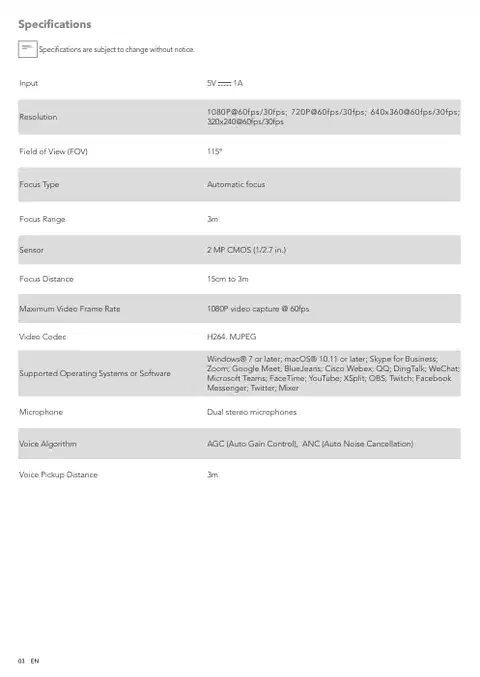
Specifications

Specifications are subject to change without notice.

Resolution1080P@60fps/30fps; 720P@60fps/30fps; 640x360@60fps/30fps; 320x240@60fps/30fps Field of View (FOV) 115° Focus TypeAutomatic focus Focus Range 3m Sensor2 MP CMOS (1/2.7 in.) Focus Distance 15cm to 3m Maximum Video Frame Rate1080P video capture @ 60fps Video Codec H264. MJPEG Supported Operating Systems or SoftwareWindows® 7 or later; macOS® 10.11 or later; Skype for Business; Zoom; Google Meet; BlueJeans; Cisco Webex; QQ; DingTalk; WeChat; Microsoft Teams; FaceTime; YouTube; XSplit; OBS; Twitch; Facebook Messenger; Twitter; Mixer Microphone Dual stereo microphones Voice AlgorithmAGC (Auto Gain Control), ANC (Auto Noise Cancellation)

Voice Pickup Distance 3m

03 EN

Input 5V 1A

情報源

参考資料・リンク

この取扱説明書で参照されているリンク(メーカー、サポート、ダウンロード等)。

Anker PowerConf C300 Full HD Webcam (A3361)について質問する

ユーザーまたはスタッフが通常1日以内に回答します。あなたの質問が次の人の助けにもなります。

Add your email to get notified when it’s answered — no spam, ever.

0 questions
Anker PowerConf C300 Full HD Webcam (A3361)に関する質問はまだありません

最初の質問を投稿しましょう。他のユーザーや当チームが回答します。

原本

Anker PowerConf C300 Full HD Webcam (A3361) 取扱説明書(PDF)

65 ページ·2.6 MB·Webカメラ·PDF
上のページをクリックするとここに表示されます
ページ 1 / …
100%
ページを読み込み中…