JA
Onn logo
公式取扱説明書

Onn 32" HD LED TV

6 ページ·532 KB·テレビ·PDF·EN
Onn 32" HD LED TV
目次 7セクション Quick Start Guide · Setup Wizard Customer Support & Warranty · Online Chat: Email: · · Menu Language: · … 表示非表示
Page 1 of the Onn 32" HD LED TV user manual — Quick Start Guide
1ページ · クリックして拡大
1ページ

Quick Start Guide

Page 2 of the Onn 32" HD LED TV user manual — Quick Start Guide
2ページ · クリックして拡大
2ページ
Onn 32" HD LED TV — Quick Start Guide diagram (page 2)
図 1 · Quick Start Guide

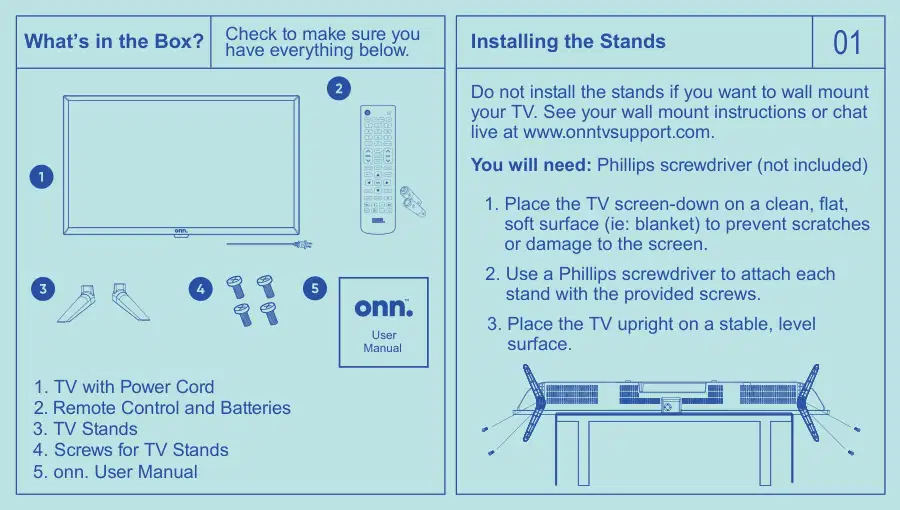
Do not install the stands if you want to wall mount your TV. See your wall mount instructions or chat live at www.onntvsupport.com

1. Place the TV screen-down on a clean, flat, soft surface (ie: blanket) to prevent scratches or damage to the screen.
2. Use a Phillips screwdriver to attach each stand with the provided screws.
3. Place the TV upright on a stable, level surface.
1. TV with Power Cord 2. Remote Control and Batteries 3. TV Stands 4. Screws for TV Stands 5. onn. User Manual
Page 3 of the Onn 32" HD LED TV user manual — Quick Start Guide
3ページ · クリックして拡大
3ページ
Onn 32" HD LED TV — Quick Start Guide diagram (page 3)
図 2 · Quick Start Guide
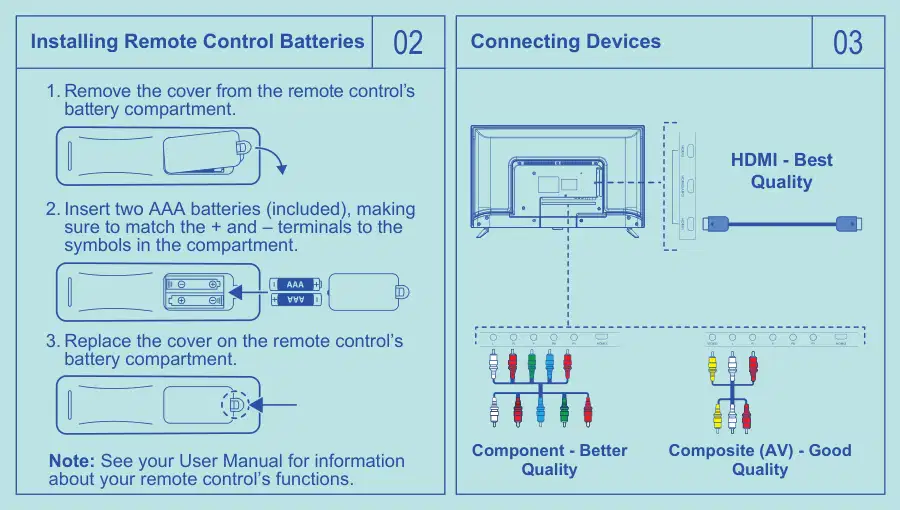
1. Remove the cover from the remote control’s battery compartment.
2. Insert two AAA batteries (included), making sure to match the + and – terminals to the symbols in the compartment.
3. Replace the cover on the remote control’s battery compartment.

HDMI3 L R Y Pb Pr HDMI3 L R VIDEO Y Pb Pr

Page 4 of the Onn 32" HD LED TV user manual — Quick Start Guide
4ページ · クリックして拡大
4ページ
Onn 32" HD LED TV — Quick Start Guide diagram (page 4)
図 3 · Quick Start Guide
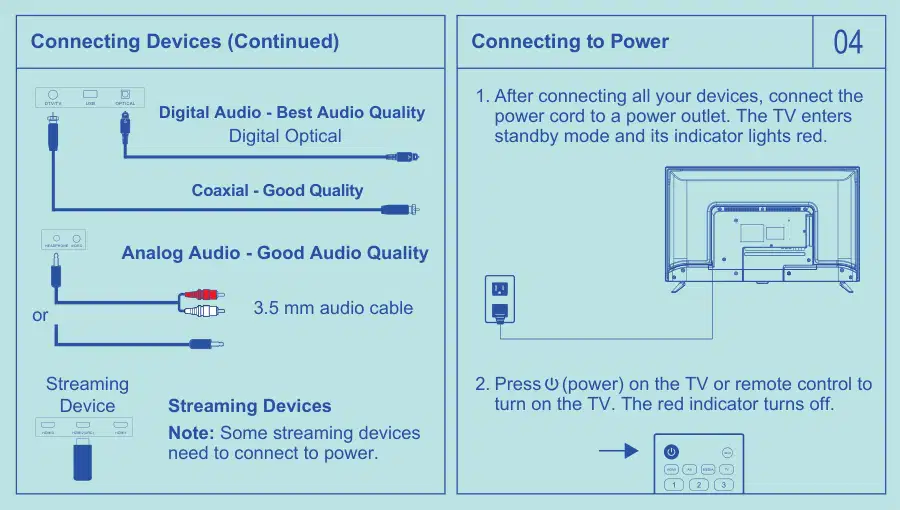
1. After connecting all your devices, connect the power cord to a power outlet. The TV enters standby mode and its indicator lights red.
2. Press (power) on the TV or remote control to turn on the TV. The red indicator turns off.

HDMI3 HDMI2(ARC) HDMI1 Note: Some streaming devices need to connect to power.

Page 5 of the Onn 32" HD LED TV user manual — 9am - 9pm EST daily
5ページ · クリックして拡大
5ページ

Setup Wizard Customer Support & Warranty

Press the buttons on your remote to select or change a setting. When you’re finished, press MENU to exit the Setup Wizard.

Online Chat: Email:

www.onntvsupport.com

customerservice@onntvsupport.com

· Menu Language:

Select the language you want to be displayed in the menu. The default language is English.

Customer Support:

Air/Cable: Select whether you want to watch with an antenna (Air) or through a cable jack (Cable). Auto Scan: Search and store available channels automatically.

844-334-2355

9am - 9pm EST daily

See your User Manual for answers on operating, customizing, and troubleshooting.

Onn 32" HD LED TV — 9am - 9pm EST daily diagram (page 5)
図 4 · 9am - 9pm EST daily

We recommend keeping your TV box for the duration of your warranty (one year). See your User Manual for details.

© 2019 onn. All Rights Reserved.

· · ·

Page 6 of the Onn 32" HD LED TV user manual — Setup Wizard Customer Support & Warranty
6ページ · クリックして拡大
6ページ

8 5 4 2 0 1

We’d love to hear from you. Scan with your Walmart app and let us know what you think.

6 4 8 1 1 3 1 2 8 4 1 3

Onn 32" HD LED TVについて質問する

ユーザーまたはスタッフが通常1日以内に回答します。あなたの質問が次の人の助けにもなります。

Add your email to get notified when it’s answered — no spam, ever.

0 questions
Onn 32" HD LED TVに関する質問はまだありません

最初の質問を投稿しましょう。他のユーザーや当チームが回答します。

原本

Onn 32" HD LED TV 取扱説明書(PDF)

6 ページ·532 KB·テレビ·PDF
上のページをクリックするとここに表示されます
ページ 1 / …
100%
ページを読み込み中…