



Model 1725M-BTS
Soundbar Demonstrator
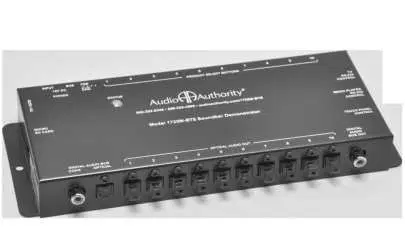


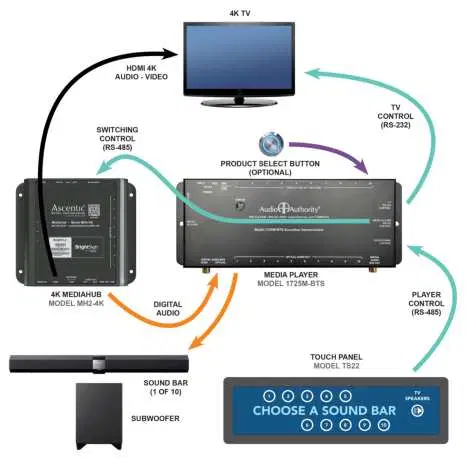
Introduction The Audio Authority® 1725M-BTS is a custom switching system that can control a compatible media player, such as a BrightSign® Model XD1033, and interact with a custom touchscreen, or an Audio Authority TouchSelect touch panel to demonstrate soundbars.
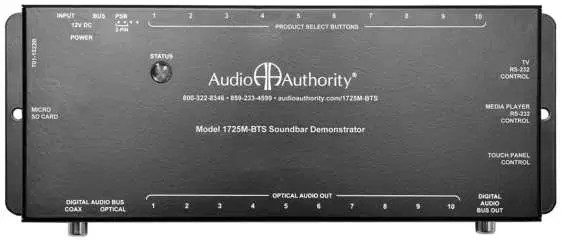
Push-Buttons The 1725M-BTS is designed to work with a control panel and/or product select buttons (PSBs). If you have both methods connected, the switching activity is shown in the control panel and the push-buttons. PSBs are only capable of selecting soundbar outputs. The 1725M-BTS is compatible with 2-wire or 4-wire push-buttons. When using 2-wire switches, use the two pins on the right for PSB ports (see page 3).
TouchSelect Panels The Touch Panel Control port on the 1725M-BTS is connected via Cat 5 cable (wired T-568A) to the TouchSelect touch panel. Any standard network cable is adequate.
PUSH-BUTTONS ARE AVAILABLE IN MANY STYLES AND COLORS.
Media Player The Media Player RS-232 Control port on the 1725M-BTS is connected to the media player via an adapter, DB9F to RJ-45 cable (PN: 801-252) or 3.5 mm to RJ-45 (PN: 801-373).
TV The TV RS-232 Control port on the 1725M-BTS is connected the RS-232C connector on the TV via a DB9F to RJ-45 cable (PN: 801-252).
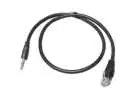
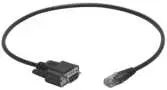
DB9F TO RJ-45 CABLE PN: 801-252
Power Connect the 12V power adapter to the Power Input. The power Bus Out may be connected to another device, within the capacity of the power supply. The 1725M-BTS requires 600mA.
Source Connect a Toslink® cable from the 1725M-BTS Optical Audio Out to each soundbar. Connect a compatible media player via Toslink cable to the 1725M-BTS Digital Audio Bus Optical input. The Digital Audio Bus Out coax connection may be used to route the media player audio signal to an additional device.

DIGITAL AUDIO
COAX INPUT
POWER BUS OUT
DIGITAL AUDIO OPTICAL INPUT
PSB PIN CONFIGURATIONS
PRODUCT SELECT BUTTONS ( 2-WIRE )
PRODUCT SELECT BUTTONS ( 4-WIRE )
10 SOUNDBAR DIGITAL AUDIO CONNECTIONS
10 PRODUCT SELECT BUTTONS
4-WIRE 2-WIRE
DIGITAL AUDIO
COAX BUS
OUTPUT
TOUCH PANEL CONTROL PORT
MEDIA PLAYER
TV RS-232 CONTROL PORT
RS-232 CONTROL PORT

Apply power to the 1725M-BTS. The 1725M-BTS power LED lights and flashes to indicate that it is ready for operation. Press a lit product select button (PSB) or the touch panel to select an output. The selected channel passes digital audio from the input device. Select other product positions, or press the button of a selected product to turn it off.

752-730 Rev. 20210310
この取扱説明書で参照されているリンク(メーカー、サポート、ダウンロード等)。
ユーザーまたはスタッフが通常1日以内に回答します。あなたの質問が次の人の助けにもなります。
最初の質問を投稿しましょう。他のユーザーや当チームが回答します。