Nebula Connect App 11
Using Nebula Solar / Nebula Solar Portable 15

Read all instructions before you use this device. Do not make any changes or create settings that are not described in this manual. If physical injury, loss of data or damage is caused by failure to follow instructions, the warranty does not apply.
Setup · Power Supply

disconnected from the power outlet.

Adapter Remote Control 2 x AAA Batteries Quick Start Guide
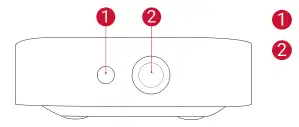
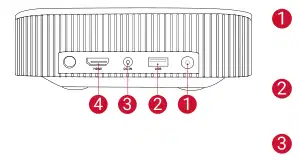
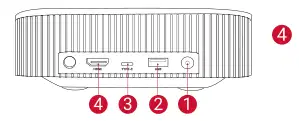
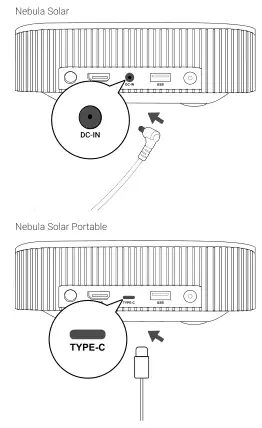
DC Input (Nebula Solar) USB-C Charging Port (Nebula Solar Portable) HDMI Input Port

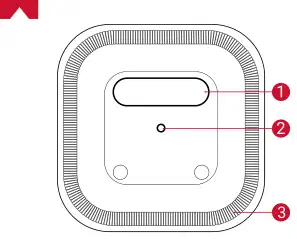
Solar / Solar Portable nameplate
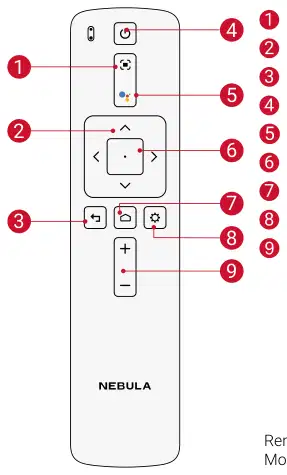
Power On / Off
Press to activate Google Assistant
Confirm the selected content
Volume up / down

Nebula Solar:
Button LED Status Description
Solid blue Power on / operating in projector mode
Solid yellow Standby in projector mode
Ready to pair / Bluetooth is pairing / Bluetooth disconnected (Bluetooth speaker mode)
Solid blue Bluetooth connected (Bluetooth speaker mode)
Nebula Solar Portable:
Button LED Status Description
Solid blue Power on / operating in projector mode
Solid yellow Standby in projector mode
Solid green Fully charged
Flashing red Low battery
Ready to pair / Bluetooth is pairing / Bluetooth disconnected (Bluetooth speaker mode)
Solid blue Bluetooth connected (Bluetooth speaker mode)

Place this device on a stable, flat surface, and squarely point it to face the projection surface. For best results, the projection surface should be white and flat. The distance between this device and the projection surface must be a minimum of 30 inches (0.8 meters) and a maximum of 120 inches (3.18 meters) to get a projection image from 30 to 120 inches.
There is a nameplate on the back panel of Nebula Solar / Nebula Solar Portable. Open the nameplate to use it as a stand. After use, close the nameplate.

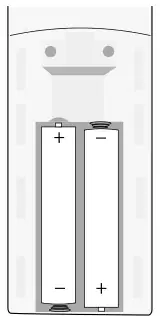
The remote control comes with two AAA batteries.
①For first-time use, slide to open the battery compartment and install two AAA
batteries.

② To replace the battery, unlock and open the battery compartment, insert a new
battery matching the polarity (+/-) as indicated, and then close and lock the battery compartment.
① Connect Nebula Nebula Solar / Nebula Solar Portable to the power outlet by using
the provided power adapter.

② Nebula Solar: Press to turn it on.
Nebula Solar Portable: Press and hold for 2s to turn it on.
③ Angle the projector towards a suitable projection surface or wall. The built-in
autofocus automatically adjusts the protector's image focus. Or you can press on the remote control to manually adjust the focus.


④ When using for the first time, follow the on-screen instructions to complete the basic
set-up.

To easily control this device, we recommend downloading the Nebula Connect app. With this app, you can operate your mouse using your phone screen.
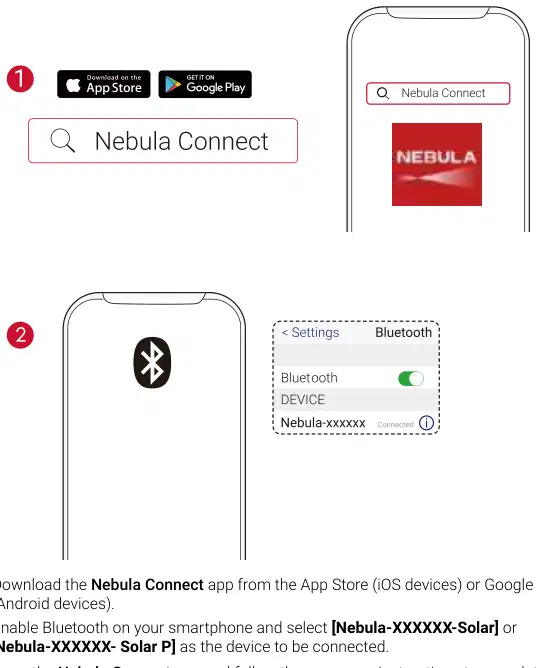
① Download the Nebula Connect app from the App Store (iOS devices) or Google Play
② Enable Bluetooth on your smartphone and select [Nebula-XXXXXX-Solar] or
[Nebula-XXXXXX- Solar P] as the device to be connected.
③ Open the Nebula Connect app and follow the on-screen instructions to complete the
connection setup.

Follow the on-screen instructions to complete the setup process. Option 1. Quick setup Android phone users can follow the instructions to quickly set up Android TV with your Android phone.
Option 2. Set up Nebula Solar / Nebula Solar Portable For iOS users, follow the instructions to complete the process.
① Skip the quick setup process. ② Connect Nebula Solar / Nebula Solar Portable to the network. ③ Sign in with your Google account.
Your Nebula Solar / Nebula Solar Portable will be powered by Android TV after finishing the setup process.
Go through the setup process when you turn on Nebula Solar / Nebula Solar Portable for the first time.
This device can be connected to the Internet via a wireless (Wi-Fi) connection.
① On the home page, select > [Network & Internet] and press . ② Follow the on-screen instructions to complete the network connection.
① On the home page, select > [Projector Settings] and press .
[Brightness] / [Image Mode]
[Color Temperature] [Normal] / [Cool] / [Warm]
[Wall Color] [White] / [Red] / [Orange] / [Blue] / [Green] / [Cyan] / [Yellow] / [Purple]
Press Enter to select 3D effect.

[Keystone Correction] Enable / disable auto keystone correction.
[Auto Focus Correction] Press Enter to run auto focus correction. Set to On by default.
[HDR] Enable / disable HDR effect.
[Auto]: Automatically detects whether the projector is inverted. Automatically switch between these options.
[Front Projection]: The projector is located in front of the projection surface.
[Rear Projection]: The projector is located behind the projection surface.
[Inverted Front Projection]: The projector is hanging from the ceiling in an upside down position. The image is rotated by 180 degrees.
[Inverted Rear Projection]: The projector is hanging from the ceiling in an upside down position behind the projection surface. The image is rotated by 180 degrees and horizontally mirrored.
Audio format can be changed via the Audio Settings.
① On the home page, select > [Audio Settings] and and press .
Auto change digital audio format Enable or disable automatic digital audio format change between PCM and RAW.
Choose HDMI as the input source. You can also change CEC settings.
① On the home page, select > [HDMI] and and press .
CEC Settings Press Enter to change CEC settings.
HDMI When an HDMI device is connected, the projector will start playing content on the HDMI devices.
HDMI 2.0 On / Off
[Zoom] [70-100%] · [Projector Mode]

You can use Nebula Solar / Nebula Solar Portable as a standalone Bluetooth speaker. To switch to Bluetooth speaker mode, you have two options:
① A. Press to switch to Bluetooth speaker mode.
B. On the home page, select > [Bluetooth Speaker Mode] and press .
② Enable Bluetooth on your smartphone and select [Nebula Solar] or [Nebula Solar P]
as the device to be connected.
③ Follow the on-screen instructions to complete Bluetooth connection or quit the
Bluetooth speaker mode.
① On the home page, select > [Apps], and press .
② Select an app and check the current version, open or force stop, check the storage
used, clear data or cache, or enable or disable notifications and permissions.
On the home page, select to find more setting options.
[About] Check the device information and firmware version.
[Date & time] Manually set the date and time.
[Language] Select the on-screen language.
[Keyboard] Select the keyboard language type.
[Sound] Select the audio output source and sound format.
[Storage] Check the device storage and removable storage.
[Reset] All data from your device’s internal storage will be erased.
[Automatic date & time] Enable or disable automatic date and time.
[Set date] Manually set date.
[Set time] Manually set time.
[Set time zone] Set a time zone.
[Use 24-hour format] Enable or disable 24-hour format.
[Device Preferences] · [Date & Time]

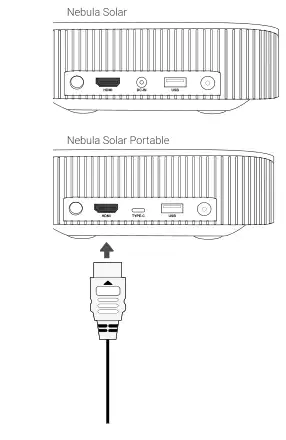
Nebula Solar / Nebula Solar Portable can be connected to various HDMI playback devices such as a TV box, TV stick, DVD player, set-top box (STB), gaming consoles or other devices.
To play from HDMI playback devices:
① Connect Nebula Solar / Nebula Solar Portable to an HDMI playback device with an
HDMI cable (not included). • It will automatically start HDMI playback once connected to an HDMI playback device.
With Nebula Solar / Nebula Solar Portable, you can enjoy music, video, and pictures that are stored on a USB drive.

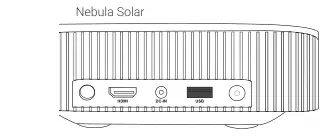
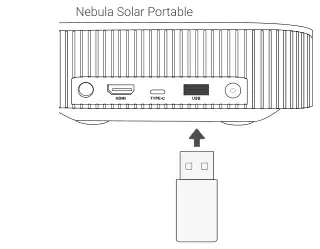
To play from a USB drive:
① Download the ES File Explorer from Google Play.
② Insert a USB drive into the USB port.
③ Select videos or photos from the USB drive that you want to play, and press
④ Press to stop playback.
You can connect Bluetooth devices to Nebula Solar / Nebula Solar Portable.
① On the home page, select > [Remotes & Accessories] and press .
② Select Add accessories.
③ Pair your projector with the device to be connected.
④ Follow the on-screen instructions to complete the Bluetooth connection.
You can wirelessly cast photos, videos, and music from your phone or computer right to your Nebula Solar / Nebula Solar Portable.

① Play a YouTube video clip on your phone and then tap the cast icon on the video screen.
② Select the device “D2130” or “D2131” you want to cast to.

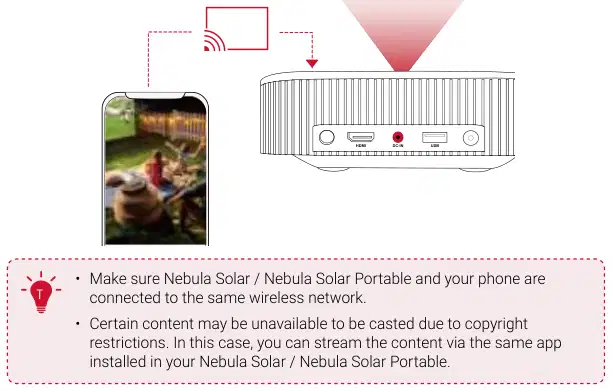
Nebula Solar / Nebula Solar Portable also supports Google features. Once connected to a wireless network, you can access online services, enjoy movies, music and pictures, and browse online. Aside from the pre-installed apps, you can also install any other apps from Google Play, and talk to the Google Assistant to do certain tasks.
To talk to the Google Assistant:
① Make sure you’ve followed the steps in the section “Connect Bluetooth Accessories”
to connect your remote control to Nebula Solar / Nebula Solar Portable. Once connected, the LED indicator on the remote control turns solid red.
② Press on the remote control to talk to the Google Assistant.

Specifications and design are subject to change without notice.
Power supply: 19V 3A Power consumption: < 57W Standby power consumption: < 0.5W Display technology: FHD 1920 × 1080p DLP Light source: RGB LED Projection image size: 30-120 inch Resolution: 1920 × 1080p Brightness: 400 ANSI Lumens Contrast ratio: 1000:1 Throw ratio: 1.2 Throw distance: 0.8m to 3.18m CPU: Quad-core ARM Cortex-A55 OS: Android TV 9.0 RAM: 2GB DDR ROM: 8GB eMMC Speaker drivers: 3W × 2 Wi-Fi: IEEE802.11a/b/g/n/ac Dual Frequency 2.4G/5G Bluetooth version: V4.2 USB file system: FAT32 / NTFS / exFAT Recommended ambient: 41°F to 95°F / 5°C to 35°C Relative humidity: 15% ~ 85% (non- condensing) Storage temperature and humidity: < 149°F / 65°C, < 90% humidity Dimensions (H*D): 192.25 × 192 × 58.65 mm / 7.6 × 7.6 × 2.3 inch Weight: 1 kg / 35.2 oz
Power supply: 20V 3.25A Power consumption: < 65W Standby power consumption: < 0.5W Display technology: FHD 1920 × 1080p DLP Light source: RGB LED Projection image size: 30-120 inch Resolution: 1920 × 1080p Brightness: 400 ANSI Lumens Contrast ratio: 1000:1 Throw ratio: 1.2 Throw distance: 0.8m to 3.18m CPU: Quad-core ARM Cortex-A55 OS: Android TV 9.0 RAM: 2GB DDR ROM: 8GB eMMC Speaker drivers: 3W × 2 Wi-Fi: IEEE802.11a/b/g/n/ac Dual Frequency 2.4G/5G Bluetooth version: V4.2 USB file system: FAT32 / NTFS / exFAT Recommended ambient: 41°F to 95°F / 5°C to 35°C Relative humidity: 15% ~ 85% (non- condensing) Storage temperature and humidity: < 149°F / 65°C, < 90% humidity Dimensions (H*D): 192.25 × 192 × 58.65 mm / 7.6 × 7.6 × 2.3 inch Weight: 1.4 kg / 49.4 oz

① Fail to turn on the projector with the remote control?
② The remote control doesn’t work?
④ Cannot connect to a Wi-Fi network?
⑤ How do I update the firmware?
③ Blurred image?

This product complies with the radio interference requirements of the European Community.
Hereby, Anker Innovations Limited. declares that this device is in compliance with the essential requirements and other relevant provisions of Directive 2014/53/EU. For the Declaration of Conformity, visit the Web site www.SeeNebula.com
RF exposure information for D2130/D2131: The Maximum Permissible Exposure (MPE) level has been calculated based on a distance of d=20 cm between the device and the human body. To maintain compliance with RF exposure requirements, use products that maintain a 20cm distance between the device and human body.
Wifi Operating Frequency Range (for D2130/D2131): 2412~2472 MHz(2.4G);5150~5250 MHz, 5725~5850 MHz (5G)
Wifi Max Output Power (for D2130): 18.47 dBm(ERIP for 2.4G); 20.95 dBm(ERIP for 5G)
Wifi Max Output Power (for D2131): 18.22 dBm(ERIP for 2.4G); 21.22 dBm(ERIP for 5G)
BT Operating Frequency Range (for D2130/D2131): 2402~2480 MHz

RF warning statement for D0413: The device has been evaluated to meet general RF exposure requirements. The device can be used in portable exposure conditions without restriction. Bluetooth Operating Frequency Range (for D0413): 2402~2480 MHz; Bluetooth Max Output Power (for D0413): 4.346 dBm Anker Innovations Deutschland GmbH | Georg-Muche-Strasse 3-5, 80807 Munich, Germany Anker Technology (UK) Ltd | Suite B, Fairgate House, 205 Kings Road, Tyseley, Birmingham, B11 2AA, United Kingdom
Your product is designed and manufactured with high quality materials and components, which can be recycled and reused.
This symbol means the product must not be discarded as household waste, and should be delivered to an appropriate collection facility for recycling. Proper disposal and recycling helps protect natural resources, human health and the environment. For more information on disposal and recycling of this product, contact your local municipality, disposal service, or the shop where you bought this product.
Declaration of Conformity

FCC Notice This device complies with Part 15 of the FCC Rules. Operation is subject to the following two conditions: (1) this device may not cause harmful interference, and (2) this device must accept any interference received, including interference that may cause undesired operation.
Warning: Changes or modifications not expressly approved by the party responsible for compliance could void the user's authority to operate the equipment. Note: This equipment has been tested and found to comply with the limits for a Class B digital device, pursuant to Part 15 of the FCC Rules. These limits are designed to provide reasonable protection against harmful interference in a residential installation. This equipment generates uses and can radiate radio frequency energy and, if not installed and used in accordance with the instructions, may cause harmful interference to radio communications. However, there is no guarantee that interference will not occur in a particular installation. If this equipment does cause harmful interference to radio or television reception, which can be determined by turning the equipment off and on, the user is encouraged to try to correct the interference by one or more of the following measures: (1) Reorient or relocate the receiving antenna. (2) Increase the separation between the equipment and receiver. (3) Connect the equipment into an outlet on a circuit different from that to which the receiver is connected. (4) Consult the dealer or an experienced radio/TV technician for help.
FCC Radiation Exposure Statement:
The device has been evaluated to meet general RF exposure requirements. The device can be used in fixed/mobile exposure condition. The min separation distance is 20cm.
The following importer is the responsible party Company Name: Fantasia Trading LLC Address: 5350 Ontario Mills Pkwy, Suite 100, Ontario, CA 91764 Telephone:1-800-988-7973

HDMI, and HDMI logo and High-Definition Multimedia Interface are trademarks or registered trademarks of HDMI licensing LLC in the United States and other countries.
The Bluetooth® word mark and logos are registered trademarks owned by Bluetooth SIG, Inc. Other trademarks and trade names are those of their respective owners.
Manufactured under license from Dolby Laboratories. Dolby, Dolby Audio,Pro Logic, and the double-D symbol are trademarks of Dolby Laboratories.
Android, Android TV, and Google Assistant
Google, Android, Android TV, Chromecast and other related marks and logos are trademarks of Google LLC.
30-Day Money-Back Guarantee for Any Reason
You may return your undamaged product and packaging within 30 days of purchase to receive a FULL REFUND for any reason. If the reason for return isn’t quality-related, the customer must pay for the return shipping..
12-Month Warranty for Quality-Related Issues
Nebula’s products are warrantied to be free from material and workmanship defects for 12 months from the date of purchase. Within this period, Nebula will provide a replacement and cover any return shipping costs for products that fail in normal use.
Please Note: Any provided shipping labels must be used within 20 days from the date they’re issued by Nebula Support.

Inhaltsverzeichnis
Verwendung des Nebula Solar / Nebula Solar Portable 37
この取扱説明書で参照されているリンク(メーカー、サポート、ダウンロード等)。
ユーザーまたはスタッフが通常1日以内に回答します。あなたの質問が次の人の助けにもなります。
最初の質問を投稿しましょう。他のユーザーや当チームが回答します。