COB30WW


REMOTE CONTROLLER
BLACK OUT Mode Press off existing modes. Press return the last modes.

AUTO Mode Automatic mode will enable you to run the automatic programs on the product. To turn on Automatic mode: 1. Press on the remote controller. 2. Press or
> to choose between the different auto programs.
SOUND Mode Sound-Active mode will enable the product to respond to the music. To turn on Sound-Active mode: 1. Press on the remote controller. 2. Press or
> to choose between the different sound programs.
STROBE Mode To adjust the strobe speed of the automatic program and the sound active program. 1. Press on the remote controller. 2. Press or
> to either increase or decrease the speed of the program. 3. Press again to turn off the strobe.
SPEED Mode To adjust the speed of the automatic program and the sound active program. 1. Press on the remote controller. 2. Press or
> to either increase or decrease the speed of the program.
SENSI TI VI TY Mode To adjust sound sensitivity for in Sound-Active mode 1. Press on the remote controller. 2. Press or
> to either increase or decrease sound sensitivity.
DMX / % Mode To enable DMX or disallow DMX on the product. Press on the remote controller, the product work on the DMX controlling modes.
MANUAL Mode 1. Press on the remote controller. 2. Press (white) to choose your colour. 3. Press again (white) close your colour. 4. Press or
> to either increase or decrease the percentage of each colour.
FADE/ UNI T Mode To adjust the FADE speed of the automatic program, the sound active program and the manual mode. 1. Press on the remote controller. 2. Press again to turn off the Fade mode. NUMBER 1~9 To adjust the brightness value of the automatic program, the Sound active program and Manual Mode. Press digit to to change different brightness on the device.

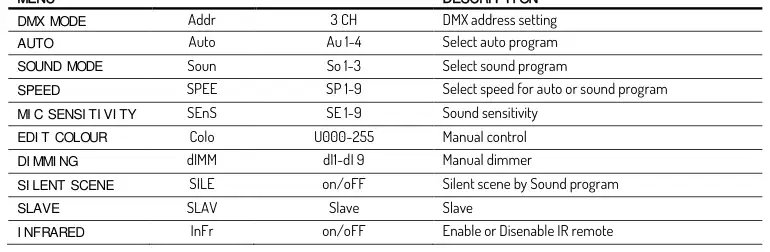
SPEED SPEE SP 1-9 Select speed for auto or sound program
MI C SENSI TI VI TY SEnS SE 1-9 Sound sensitivity
SI LENT SCENE SILE on/oFF Silent scene by Sound program
I NFRARED InFr on/oFF Enable or Disenable IR remote
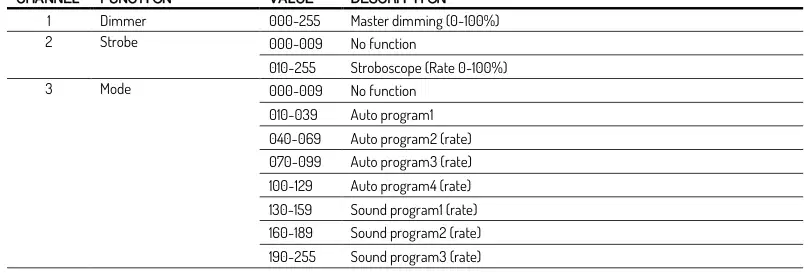
1 Dimmer 000-255 Master dimming (0-100%) 2 Strobe 000-009 No function
010-255 Stroboscope (Rate 0-100%) 3 Mode 000-009 No function
190-255 Sound program3 (rate)

3 Channel s


ユーザーまたはスタッフが通常1日以内に回答します。あなたの質問が次の人の助けにもなります。
最初の質問を投稿しましょう。他のユーザーや当チームが回答します。