
05/08/2021 07:15
How do I pair my Jabra Pro 925/935 headset with my mobile device?
You can pair your Jabra Pro 925/935 headset with your mobile device in two ways.
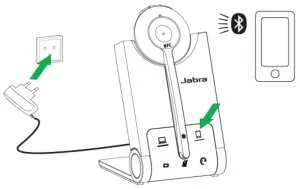
To pair using the headset base, follow these steps.
1. Turn on the Bluetooth setting on your mobile device. 2. Connect your Jabra Pro base to a power supply. 3. Wear the headset. 4. To enter pairing mode, tap the Mobile device icon on the base. Pairing mode is announced in the headset, and the icon lights up. 5. To pair, go to the Bluetooth menu on your mobile device and select the Jabra Pro 925/935 from the list of available devices. Enter "0000" (four zeros) if you are asked for a pin code.

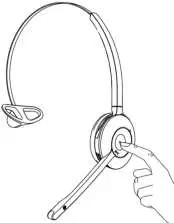
To pair using the headset, follow these steps.
https://www.jabra.com/supportpages/jabra-pro-935/935-15-509-205/faq/c9030f3a-6cf2- 4b74-a72d-a908f2502330 Page 1 of 2

05/08/2021 07:15
Optionally, try using the Bluetooth Pairing Guide which provides detailed steps for pairing with a mobile device.
https://www.jabra.com/supportpages/jabra-pro-935/935-15-509-205/faq/c9030f3a-6cf2- 4b74-a72d-a908f2502330 Page 2 of 2
この取扱説明書で参照されているリンク(メーカー、サポート、ダウンロード等)。
ユーザーまたはスタッフが通常1日以内に回答します。あなたの質問が次の人の助けにもなります。
最初の質問を投稿しましょう。他のユーザーや当チームが回答します。