JA
Apple logo
公式取扱説明書

Apple Wireless CarPlay Adapter (iPhone)

10 ページ·134 KB·スマートフォン·PDF·ENDEFRITNLJA
Apple Wireless CarPlay Adapter (iPhone)
目次 9セクション ユーザーマニュアル · 無線CarPlayのアダプター · 最初に読んでください · 車がCarPlayを持っているか、またはないことを確認する方法 · … 表示非表示
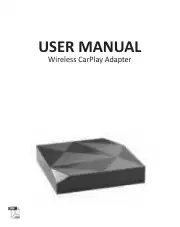
Page 1 of the Apple Wireless CarPlay Adapter (iPhone) user manual — 無線CarPlayのアダプター
1ページ · クリックして拡大
1ページ

ユーザーマニュアル

無線CarPlayのアダプター

Apple Wireless CarPlay Adapter (iPhone) — 無線CarPlayのアダプター diagram (page 1)
図 1 · 無線CarPlayのアダプター
Page 2 of the Apple Wireless CarPlay Adapter (iPhone) user manual — ユーザーマニュアル
2ページ · クリックして拡大
2ページ
Page 2 of the Apple Wireless CarPlay Adapter (iPhone) user manual — ユーザーマニュアル
Page 3 of the Apple Wireless CarPlay Adapter (iPhone) user manual — 最初に読んでください
3ページ · クリックして拡大
3ページ

最初に読んでください

このアダプタは、Apple CarPlayを内蔵した工場の自動車マルチメディアシステムでワイヤレスに使用するためにiPhone用に設計されています。 車の確認方法は、Apple CarPlayの次のページをご覧ください。 しかし、内蔵のCarPlayですべての車がこのアダプタに収まることはできません。 アダプター使用中に問題が生じた場合は、お気軽にご相談ください。

機能:OEM Apple CarPlayをワイヤレスApple Carplayに変換する 互換性車: OEM Apple CarPlayと iPhone:iOS 10 以降を実行 コントロールOEMのタッチ画面、ハンドルおよびジョイスティック制御 入力パワーUSB 5V 接続性WiFi の & Bluetooth
Page 4 of the Apple Wireless CarPlay Adapter (iPhone) user manual — 車がCarPlayを持っているか、またはないことを確認する方法
4ページ · クリックして拡大
4ページ

車がCarPlayを持っているか、またはないことを確認する方法

1. 本物の工場の落雷ケーブルで車USBポートにiPhone(iOS 10またはnewerを実行)を接続します。 iPhoneに次のような通知がポップアップしている場合は、あなたの車はApple CarPlayで構築されています。
Apple Wireless CarPlay Adapter (iPhone) — 車がCarPlayを持っているか、またはないことを確認する方法 diagram (page 4)
図 2 · 車がCarPlayを持っているか、またはないことを確認する方法
2. 車のステレオメニューにCarPlayアイコンがある場合、あなたの車がApple Carplayの内蔵を持っていること。
3. 車のディーラーに連絡して、助けを借りてください。

または

Page 5 of the Apple Wireless CarPlay Adapter (iPhone) user manual — 箱の何
5ページ · クリックして拡大
5ページ

箱の何

USBケーブル(AタイプC~)※1

USBケーブル(C~Cタイプ)※1

無線アダプタ*1・取扱説明書※1

Page 6 of the Apple Wireless CarPlay Adapter (iPhone) user manual — 接続図
6ページ · クリックして拡大
6ページ

接続図

工場 USB Aポート

工場 USB CポートタイプC Type-C

このページでは4つのラベル/ショートテキストを表示
タイプC USB-A・アダプタ・アダプター
Page 7 of the Apple Wireless CarPlay Adapter (iPhone) user manual — ワイヤレスカープレイの使い方
7ページ · クリックして拡大
7ページ

ワイヤレスカープレイの使い方

  • iPhoneのWiFiとBluetoothをオンにして、" AUTO-xxxx "という名前のBluetoothにペアリング
  • iPhoneのポップアップ通知で「ペア・アロー・ユース・カープレイ」をタップ
  • 数秒後にCarPlayをワイヤレスで接続します。
Apple Wireless CarPlay Adapter (iPhone) — ワイヤレスカープレイの使い方 diagram (page 7)
図 3
このページでは4つのラベル/ショートテキストを表示
Bluetooth・名・ファームウェア・バージョン
Page 8 of the Apple Wireless CarPlay Adapter (iPhone) user manual — ファームウェアのアップデートと問題報告
8ページ · クリックして拡大
8ページ

ファームウェアのアップデートと問題報告

ファームウェアの更新は、すべての機能がうまく動作する際推奨されません。

Apple Wireless CarPlay Adapter (iPhone) — ファームウェアのアップデートと問題報告 diagram (page 8)
図 4
Apple Wireless CarPlay Adapter (iPhone) — ファームウェアのアップデートと問題報告 diagram (page 8)
図 5

問題報告・確認・更新

Page 9 of the Apple Wireless CarPlay Adapter (iPhone) user manual — 更新・報告の方法
9ページ · クリックして拡大
9ページ

更新・報告の方法

  • iPhoneがワイヤレスカープレイに接続すると、iPhoneのブラウザで192.168.1.101を入力し、「アップデート」をタップします。
  • iPhoneがワイヤレスカープレイに接続できない場合は、マニュアルでアダプターのWiFiネットワーク[ AUTO-xxxx]に参加してパスワードは88888888です
  • 次に、iPhoneのブラウザで192.168.1.101を入力し、「更新」をタップします。
  • 同じWebインターフェイスでは、車が作る、モデル年を記入し、問題の詳細を確認したり、「送信」をタップして問題を報告することもできます。 成功通知が表示された後、スクリーンショットを撮ってメールを送ってください。 可能な限り早く修正いたします。
Page 10 of the Apple Wireless CarPlay Adapter (iPhone) user manual — 更新・報告の方法
10ページ · クリックして拡大
10ページ
Page 10 of the Apple Wireless CarPlay Adapter (iPhone) user manual — 更新・報告の方法

Apple Wireless CarPlay Adapter (iPhone)について質問する

ユーザーまたはスタッフが通常1日以内に回答します。あなたの質問が次の人の助けにもなります。

Add your email to get notified when it’s answered — no spam, ever.

0 questions
Apple Wireless CarPlay Adapter (iPhone)に関する質問はまだありません

最初の質問を投稿しましょう。他のユーザーや当チームが回答します。

原本

Apple Wireless CarPlay Adapter (iPhone) 取扱説明書(PDF)

10 ページ·134 KB·スマートフォン·PDF
上のページをクリックするとここに表示されます
ページ 1 / …
100%
ページを読み込み中…