





JA
Pyle logo
公式取扱説明書

Pyle HDMI Video Capture Card (PLINK1)

6 ページ·179 KB·ビデオキャプチャーカード·PDF·EN
Pyle HDMI Video Capture Card (PLINK1)
目次 5セクション PLINK1 · (CTIA) · Work with OBS on windows · What’s in the Box: · … 表示非表示
Page 1 of the Pyle HDMI Video Capture Card (PLINK1) user manual — PLINK1
1ページ · クリックして拡大
1ページ
Pyle HDMI Video Capture Card (PLINK1) — PLINK1 diagram (page 1)
図 1
Pyle HDMI Video Capture Card (PLINK1) — PLINK1 diagram (page 1)
図 2
Pyle HDMI Video Capture Card (PLINK1) — PLINK1 diagram (page 1)
図 3
Pyle HDMI Video Capture Card (PLINK1) — PLINK1 diagram (page 1)
図 4
Pyle HDMI Video Capture Card (PLINK1) — PLINK1 diagram (page 1)
図 5
Pyle HDMI Video Capture Card (PLINK1) — PLINK1 diagram (page 1)
図 6

PLINK1

HDMI Video Capture Card 1080p 60fps, Game Capture Card, 4K HDMI to USB, for Teaching, Game Recording, Broadcast Live, Record via DSLR, Portal TV Recorder, Game Console


Pyle HDMI Video Capture Card (PLINK1) — PLINK1 diagram (page 1)
図 7
Pyle HDMI Video Capture Card (PLINK1) — PLINK1 diagram (page 1)
図 8
Pyle HDMI Video Capture Card (PLINK1) — PLINK1 diagram (page 1)
図 9
Pyle HDMI Video Capture Card (PLINK1) — PLINK1 diagram (page 1)
図 10
Pyle HDMI Video Capture Card (PLINK1) — PLINK1 diagram (page 1)
図 11
Pyle HDMI Video Capture Card (PLINK1) — PLINK1 diagram (page 1)
図 12
Pyle HDMI Video Capture Card (PLINK1) — PLINK1 diagram (page 1)
図 13
Page 2 of the Pyle HDMI Video Capture Card (PLINK1) user manual — (CTIA)
2ページ · クリックして拡大
2ページ
Pyle HDMI Video Capture Card (PLINK1) — (CTIA) diagram (page 2)
図 14
Pyle HDMI Video Capture Card (PLINK1) — (CTIA) diagram (page 2)
図 15

Introduction With PLINK1 HDMI Video Capture Card, just plug to your PC (Windows, Mac, Android), no need install driver, you can use any 3rd party software to capture or stream your HD game, or other HD video source. The PLINK1 HDMI Video Capture Card allows you input and output 4Kp60 HDMI signal, and also capture/live stream1080P60 video.

1. PC: To connect to computer USB port
2. Mute switch and LED: Press switch, red LED will be on, and background

sound of HDMI video will be muted

3. LINE IN: 3.5mm audio line input
4. Headset: 3.5mm audio for line output to earphone and microphone input

(CTIA)

5. HDMI Input: Connect to video source with HDMI cable
6. HDMI Output: Connect to TV or Monitor with HDMI cable to display video
7. LED: Blue LED will be on when connect to computer, and flash when device

This product can expose you to a chemical or group of chemicals, which may include “Nickel Carbonate” which is known in the state of California to cause cancer, birth defects, or other reproductive harm. For more info, go to https://www.p65warnings.ca.gov/


Pyle HDMI Video Capture Card (PLINK1) — (CTIA) diagram (page 2)
図 16
Pyle HDMI Video Capture Card (PLINK1) — (CTIA) diagram (page 2)
図 17

source · running

Page 3 of the Pyle HDMI Video Capture Card (PLINK1) user manual — Work with OBS on windows
3ページ · クリックして拡大
3ページ
Pyle HDMI Video Capture Card (PLINK1) — Work with OBS on windows diagram (page 3)
図 18 · Work with OBS on windows
Pyle HDMI Video Capture Card (PLINK1) — Work with OBS on windows diagram (page 3)
図 19 · Work with OBS on windows

Work with OBS on windows

1. Go to obsproject.com/download to download OBS Studio according to your

computer’s operating system, and install it on your computer.

Connect USB port of PLINK1 HDMI Video Capture Card to computer, and

connect to video source with HDMI cable. Windows will install the driver

automatically, and you will see “Pyle PLINK1” in device manager.

2. Run OBS Studio, Click “ + ” icon under “ Sources ” window, and select “ Video

Capture Device”, you can create one name you want. A window will appear,

please select “Pyle PLINK1” in the drop box next to “Device”.

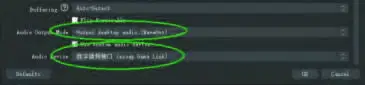
3. Set Audio Output Mode to “ Output desktop audio ” (WaveOut).

Tick “Use custom audio device”, and select “Pyle PLINK1” in the drop box next

to “Audio Device”:
Pyle HDMI Video Capture Card (PLINK1) — Work with OBS on windows diagram (page 3)
図 20 · Work with OBS on windows
4. Set the video latency for make the audio and video synchronized. Right click

“Video Capture Device” then click “Filters”. Click to add “Video Delay (Async)”.

Set it to 470ms (You can adjust it smaller or bigger until you found the audio

and video synchronized):

Pyle HDMI Video Capture Card (PLINK1) — Work with OBS on windows diagram (page 3)
図 21 · Work with OBS on windows
Pyle HDMI Video Capture Card (PLINK1) — Work with OBS on windows diagram (page 3)
図 22 · Work with OBS on windows
Pyle HDMI Video Capture Card (PLINK1) — Work with OBS on windows diagram (page 3)
図 23 · Work with OBS on windows

Pyle PLINK1

Page 4 of the Pyle HDMI Video Capture Card (PLINK1) user manual — What’s in the Box:
4ページ · クリックして拡大
4ページ
Pyle HDMI Video Capture Card (PLINK1) — What’s in the Box: diagram (page 4)
図 24 · What’s in the Box:
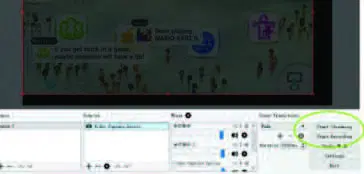
5. Now you can recording or streaming video:
Pyle HDMI Video Capture Card (PLINK1) — What’s in the Box: diagram (page 4)
図 25 · What’s in the Box:

For other applications, the settings are similar as above, just run the application

then choose video capture device to “Pyle PLINK1”. And also need to set for

synchronous problem, please learn more from other ways.

Working with OBS on Mac is similar as above on Windows:

Download and install OBS studio, then do the same settings.

This product is mainly used in Microsoft systems, not recommended for MAC

systems.

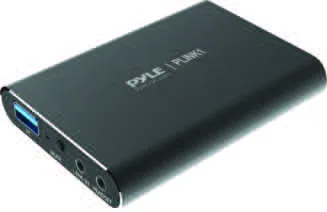
What’s in the Box:

  • HDMI External Capture Device
  • USB Cable
Pyle HDMI Video Capture Card (PLINK1) — What’s in the Box: diagram (page 4)
図 26 · What’s in the Box:
Pyle HDMI Video Capture Card (PLINK1) — What’s in the Box: diagram (page 4)
図 27 · What’s in the Box:
Page 5 of the Pyle HDMI Video Capture Card (PLINK1) user manual — What’s in the Box:
5ページ · クリックして拡大
5ページ
Pyle HDMI Video Capture Card (PLINK1) — What’s in the Box: diagram (page 5)
図 28 · What’s in the Box:
Pyle HDMI Video Capture Card (PLINK1) — What’s in the Box: diagram (page 5)
図 29 · What’s in the Box:
  • Features:
  • Full HDMI Game Capture Device with Streaming Function
  • Hi-Resolution Capture Up to 1080p 60fps, 4Kp60fps HDMI Input and
  • Pass-through Recording up to 1920*1080@60FPS.
  • Plug & Play: No Driver Installation Required
  • Direct-to-Computer Audio & Video Record Ability
  • Support Most of 3rd Party Software for Capturing and Livestreaming Use
  • Supports Voice Commentary
  • Stream Live or Manage Your Recorded Media to Social Media & YouTube
  • Capture and Livestream Video from Game Console PC, Mobile, Set-Top Box,

DSLR, Camcorder, Action Cam, etc. • Use for Live Broadcasts, Conference Rooms, Video Recording, Teaching

  • Recording, Medical Imaging, Game Entertainment, Live Broadcasting, etc.
  • Play, Record, and Livestream Games Simultaneously
  • Multi-Language Support
  • Compatible with PC, Mac, Linux
  • Rich Audio Interface, Microphone and Line input, Earphone Output.
  • Special MUTE Design Can Directly Turn Off HDMI Audio to Highlight the

Sound of External Line In or Microphone in the Game

  • Technical Specs:
  • Recording Quality: 1080p / 60 fps
  • USB Interface: USB
  • Power Supply: USB/500mA
  • Video Connection Interface: HDMI
  • Operating system: Windows 7,8,10, Mac, OS X 10.9 or Later, Linux
  • Requirement: PC: Intel Core i5-3400 + NVIDIA GT630, NB: Intel Core i7-3537U

2.0 GHz + NVIDIA GT735, Mac: i5 quad-core or above, VGA card supporting

  • DirectX 10, Sound card, 4GB RAM
  • Audio/Video Support: HDMI
  • Product Dimensions (L x W x H): 3.7’’ × 2.7’’ × 0.7’’ -inches
Pyle HDMI Video Capture Card (PLINK1) — What’s in the Box: diagram (page 5)
図 30 · What’s in the Box:
Page 6 of the Pyle HDMI Video Capture Card (PLINK1) user manual — Questions? Issues? We are here to help! Phone: (1) 718-535-1800 Email: support@pyleusa.com
6ページ · クリックして拡大
6ページ
Pyle HDMI Video Capture Card (PLINK1) — Questions? Issues? We are here to help! Phone: (1) 718-535-1800 Email: support@pyleusa.com diagram (page 6)
図 31 · Questions? Issues? We are here to help! Phone: (1) 7…
Pyle HDMI Video Capture Card (PLINK1) — Questions? Issues? We are here to help! Phone: (1) 718-535-1800 Email: support@pyleusa.com diagram (page 6)
図 32 · Questions? Issues? We are here to help! Phone: (1) 7…
Pyle HDMI Video Capture Card (PLINK1) — Questions? Issues? We are here to help! Phone: (1) 718-535-1800 Email: support@pyleusa.com diagram (page 6)
図 33 · Questions? Issues? We are here to help! Phone: (1) 7…
Pyle HDMI Video Capture Card (PLINK1) — Questions? Issues? We are here to help! Phone: (1) 718-535-1800 Email: support@pyleusa.com diagram (page 6)
図 34 · Questions? Issues? We are here to help! Phone: (1) 7…
Pyle HDMI Video Capture Card (PLINK1) — Questions? Issues? We are here to help! Phone: (1) 718-535-1800 Email: support@pyleusa.com diagram (page 6)
図 35 · Questions? Issues? We are here to help! Phone: (1) 7…
Pyle HDMI Video Capture Card (PLINK1) — Questions? Issues? We are here to help! Phone: (1) 718-535-1800 Email: support@pyleusa.com diagram (page 6)
図 36 · Questions? Issues? We are here to help! Phone: (1) 7…

Questions? Issues? We are here to help! Phone: (1) 718-535-1800 Email: [email protected]

Pyle HDMI Video Capture Card (PLINK1) — Questions? Issues? We are here to help! Phone: (1) 718-535-1800 Email: support@pyleusa.com diagram (page 6)
図 37 · Questions? Issues? We are here to help! Phone: (1) 7…
Pyle HDMI Video Capture Card (PLINK1) — Questions? Issues? We are here to help! Phone: (1) 718-535-1800 Email: support@pyleusa.com diagram (page 6)
図 38 · Questions? Issues? We are here to help! Phone: (1) 7…
Pyle HDMI Video Capture Card (PLINK1) — Questions? Issues? We are here to help! Phone: (1) 718-535-1800 Email: support@pyleusa.com diagram (page 6)
図 39 · Questions? Issues? We are here to help! Phone: (1) 7…
Pyle HDMI Video Capture Card (PLINK1) — Questions? Issues? We are here to help! Phone: (1) 718-535-1800 Email: support@pyleusa.com diagram (page 6)
図 40 · Questions? Issues? We are here to help! Phone: (1) 7…
Pyle HDMI Video Capture Card (PLINK1) — Questions? Issues? We are here to help! Phone: (1) 718-535-1800 Email: support@pyleusa.com diagram (page 6)
図 41 · Questions? Issues? We are here to help! Phone: (1) 7…
情報源

参考資料・リンク

この取扱説明書で参照されているリンク(メーカー、サポート、ダウンロード等)。

Pyle HDMI Video Capture Card (PLINK1)について質問する

ユーザーまたはスタッフが通常1日以内に回答します。あなたの質問が次の人の助けにもなります。

Add your email to get notified when it’s answered — no spam, ever.

0 questions
Pyle HDMI Video Capture Card (PLINK1)に関する質問はまだありません

最初の質問を投稿しましょう。他のユーザーや当チームが回答します。

原本

Pyle HDMI Video Capture Card (PLINK1) 取扱説明書(PDF)

6 ページ·179 KB·ビデオキャプチャーカード·PDF
上のページをクリックするとここに表示されます
ページ 1 / …
100%
ページを読み込み中…