JA
Thermaltake logo
公式取扱説明書

Thermaltake Desk Cooler (DS100)

1 ページ·320 KB·扇風機·PDF·EN
Thermaltake Desk Cooler (DS100)
目次 8セクション ARGENT DS100 · Desk Cooler · Parts List · Installation Guide · … 表示非表示
Page 1 of the Thermaltake Desk Cooler (DS100) user manual — © 2021 Thermaltake Technology Co., Ltd. All Rights Reserved. www.thermaltake.com
1ページ · クリックして拡大
1ページ

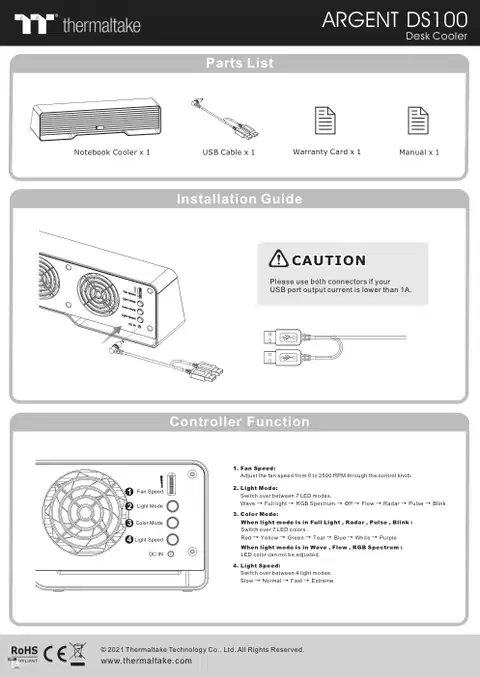
ARGENT DS100

Desk Cooler

Parts List

Installation Guide

CAUTION CAUTION

Please use both connectors if your USB port output current is lower than 1A.

Controller Function

1. Fan Speed: Adjust the fan speed from 0 to 2500 RPM through the control knob.
2. Light Mode: Switch over between 7 LED modes.

Wave → Full light → RGB Spectrum → Off → Flow → Radar → Pulse → Blink

3. Color Mode:

When light mode is in Full Light , Radar , Pulse , Blink : Switch over 7 LED colors .

Red → Yellow → Green → Teal → Blue → White → Purple

When light mode is in Wave , Flow , RGB Spectrum : LED color can not be adjusted.

DC IN

4. Light Speed: Switch over between 4 light modes.

Slow → Normal → Fast → Extreme

© 2021 Thermaltake Technology Co., Ltd. All Rights Reserved. www.thermaltake.com

Show 4 more labels / short text on this page
Fan Speed · Light Mode · Color Mode · Light Speed

Thermaltake Desk Cooler (DS100)について質問する

ユーザーまたはスタッフが通常1日以内に回答します。あなたの質問が次の人の助けにもなります。

Add your email to get notified when it’s answered — no spam, ever.

0 questions
Thermaltake Desk Cooler (DS100)に関する質問はまだありません

最初の質問を投稿しましょう。他のユーザーや当チームが回答します。

原本

Thermaltake Desk Cooler (DS100) 取扱説明書(PDF)

1 ページ·320 KB·扇風機·PDF
上のページをクリックするとここに表示されます
ページ 1 / …
100%
ページを読み込み中…