For further information, please go to www.mi.com Manufactured for: Xiaomi Communications Co., Ltd. Manufactured by: Dreame (Tianjin) Information Technology Co., Ltd. (a Mi Ecosystem company) Address: Room 2112-1-1, South District, Finance and Trade Center, No.6975 Yazhou Road, Dongjiang Bonded Port Area, Tianjin Pilot Free Trade Zone, Tianjin, China
Para más información, visite la página web www.mi.com Fabricado para: Xiaomi Communications Co., Ltd. Fabricado por: Dreame (Tianjin) Information Technology Co., Ltd. (una compañía de Mi Ecosystem) Dirección: Room 2112-1-1, South District, Finance and Trade Center, No.6975 Yazhou Road, Dongjiang Bonded Port Area, Tianjin Pilot Free Trade Zone, Tianjin, China
Manuale utente Mi Vacuum Cleaner G9 · 49
Per ulteriori informazioni, visitare il sito www.mi.com Fabbricato per: Xiaomi Communications Co., Ltd. Fabbricato da: Dreame (Tianjin) Information Technology Co., Ltd. (una società Mi Ecosystem) Indirizzo: Room 2112-1-1, South District, Finance and Trade Center, No.6975 Yazhou Road, Dongjiang Bonded Port Area, Tianjin Pilot Free Trade Zone, Tianjin, Cina
Mi Handstaubsauger G9 Benutzerhandbuch · 97
Pour en savoir plus, rendez-vous sur le site www.mi.com Fabriqué pour: Xiaomi Communications Co., Ltd. Fabricant: Dreame (Tianjin) Information Technology Co., Ltd. (une société Mi Ecosystem) Adresse: Room 2112-1-1, South District, Finance and Trade Center, No.6975 Yazhou Road, Dongjiang Bonded Port Area, Tianjin Pilot Free Trade Zone, Tianjin, Chine
Für weitere Informationen besuchen Sie bitte www.mi.com Hergestellt für: Xiaomi Communications Co., Ltd. Hersteller: Dreame (Tianjin) Information Technology Co., Ltd. (ein Unternehmen von Mi Ecosystem) Adresse: Room 2112-1-1, South District, Finance and Trade Center, No.6975 Yazhou Road, Dongjiang Bonded Port Area, Tianjin Pilot Free Trade Zone, Tianjin, China
Mi 무선청소기 G9 사용 설명서 · 169
Дополнительную информацию см. на веб-сайте www.mi.com Изготовлено для: Сяоми Техкоммуникации Ко., Лтд. (Китай) Изготовитель: Dreame (Tianjin) Information Technology Co., Ltd. (компания Mi Ecosystem) Адрес: Room 2112-1-1, South District, Finance and Trade Center, No.6975 Yazhou Road, Dongjiang Bonded Port Area, Tianjin Pilot Free Trade Zone, Tianjin, China (Тяньцзинь, Китай)
詳細については、www.mi.com をご覧ください。 販売元:Xiaomi Communications Co., Ltd. 製造元:Dreame (Tianjin) Information Technology Co., Ltd. (Mi Ecosystem 企業) 所在地:Room 2112-1-1, South District, Finance and Trade Center, No.6975 Yazhou Road, Dongjiang Bonded Port Area, Tianjin Pilot Free Trade Zone, Tianjin, China
A/S 가 필요하시면 구매처나 현지 공식 A/S 센터로 연락하거나 www.mi.com/kr/ 에 방문하여 확인하십시오. 의뢰업체: Xiaomi Communications Co., Ltd. 제조업체: Dreame (Tianjin) Information Technology Co., Ltd. (Mi 에코시스템 컴퍼니) 주소: Room 2112-1-1, South District, Finance and Trade Center, No.6975 Yazhou Road, Dongjiang Bonded Port Area, Tianjin Pilot Free Trade Zone, Tianjin, China
Made in China

This product is for household use only. Read this manual carefully before use, and retain it for future reference.
This appliance can be used by children aged from 8 years and above and persons with reduced physical,sensory or mental capabilities or lack of experience and knowledge if they have been given supervision or instruction concerning use of the appliance in a safe way and understand the hazards involved. Children shall not play with the appliance. Cleaning and user maintenance shall not be made by children without supervision. The appliance is only to be used with the power supply unit provided with the appliance. The vacuum cleaner is not a toy. Children may not play with or operate this product. Please exercise caution when using the vacuum cleaner near children. Do not allow children to clean or maintain the vacuum cleaner unless supervised by a parent or guardian. Only use the vacuum cleaner on dry indoor surfaces. Do not install, charge, or use this product outdoors, such as in bathrooms, or near a pool. Do not touch the plug or any part of the vacuum cleaner with wet hands. To reduce the risk of fire, explosion, or personal injury, check to make sure the lithium-ion battery and charger are undamaged before use. Do not use the vacuum cleaner if either the battery or charger is damaged. The high torque brush bar, mini electric brush, battery, extension rod, and the vacuum cleaner are electrically conductive and should not be immersed in water or other liquid. Make sure all parts are thoroughly dry after you carry out cleaning on them. To prevent injury caused by moving parts, turn off the vacuum cleaner before cleaning the high torque brush bar and mini electric brush. The high torque brush bar, dust compartment, and filter must all be properly installed before using the vacuum cleaner.

Only use the BLJ24W308080P-V battery charger provided with the appliance. Only use the P2045-7S1P-BC/P2046-7S1P-BC/P2046-7S1P-BCA battery pack provided with the appliance. If the charger or battery becomes damaged, it must be replaced with a genuine component purchased from the manufacturer or after-sales service department. Do not use the vacuum cleaner to pick up flammable or combustible liquids, such as gasoline, bleach, ammonia, or drain cleaners; nor other liquids like water. Do not use the vacuum cleaner to pick up drywall particles, ashes like fireplace ash, or smoking or burning materials such as coal, cigarette butts or matches. Do not use the vacuum cleaner to pick up sharp or hard objects, such as glass, nails, screws, or coins, which may damage the product. Keep hair, loose clothing, fingers, and other parts of the body away from the vacuum cleaner's openings and moving parts. Do not point the suction opening, extension rod, or other accessories at your eyes or ears or put them in your mouth. Do not put any object into the vacuum cleaner's openings, nor use the vacuum cleaner with any opening blocked. Keep free of dust, lint, hair, or other items which may reduce airflow. Do not rest the vacuum cleaner against a chair, table, or other unstable surfaces, as this may cause damage to the product or personal injury. If the vacuum cleaner malfunctions because of being knocked over or damaged, please contact the authorized service department. Never attempt to disassemble the vacuum cleaner on your own. Only use the original charger to charge the product in environments with an ambient temperature of 0°C to 40°C. Otherwise, the battery may damage.
The dust compartment cover, pre-filter, cyclone assembly, and HEPA filter must all be properly installed prior to using the vacuum cleaner. Make sure the vacuum cleaner is unplugged when not used for extended periods as well as prior to performing any maintenance or repairs. Please be extra careful when using the vacuum cleaner to clean stairs. Fire Hazard Warning: Do not apply any type of fragrance to the vacuum cleaner's filter. These types of products are known to contain flammable chemicals which may cause the vacuum cleaner to catch fire. When battery is not in use, keep it away from all metal objects, such as paper clips, coins, keys, nails, or screws. Shorting the battery terminals together increases the risk of fire or burns. Under abusive conditions, liquid may be ejected from the battery. Avoid contacting with liquid, as it may cause irritation or burns. If contact occurs, flush with water. If liquid contacts eyes, seek medical help. DO NOT expose the battery and appliance to fire as it may cause explosion. DO NOT expose or submerge the battery and appliance in any water, salt water, or other liquids. Please strictly follow the instructions in this user manualwhen using the vacuum cleaner. Users are responsible for any loss or damage that may arise from improper use of the vacuum cleaner.
We Dreame (Tianjin) Information Technology Co., Ltd., hereby, declare that this equipment is in compliance with the applicable Directives and European Norms, and amendments. The full text of the EU declaration of conformity is available at the following internet address: http://www.mi.com/global/service/support/declaration.html For detailed e-manual, please go to www.mi.com/global/service/userguide


High Torque Brush Bar
Mini Electric Brush 2-in-1 Brush Nozzle 2-in-1 Charging & Storage Mount
(includes screw × 2, wall plug × 2, and

Installing the 2-in-1 Charging & Storage Mount

Insert until it clicks into place Insert until it clicks into place
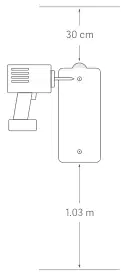
Extended Dock You can simultaneously charge the replaceable battery* when charging the vacuum cleaner on the 2-in-1 charging & storage mount.

Extended Dock Charging Plate
* The replaceable battery is not included and purchased separately.
Mounting Template · Screw Wall Plug · Sticker

How to Use
Fully charge the vacuum cleaner before using it for the first time. This will take about 3.5 hours. The vacuum cleaner cannot be used while charging. Vacuuming at the highest suction level for a prolonged period will cause the battery to heat up, which may increase the charging time. Before charging the vacuum cleaner, it is better to cool it down for 30 minutes.
2-in-1 Brush Nozzle: For vacuuming curtains, sofas, vehicle interiors, coffee tables, etc.
Crevice Nozzle: For vacuuming narrow crevices and areas around doors, windows, baseboards, corners, stairs, etc.


Once the vacuum cleaner is fully charged, the indicator will turn off after 5 minutes, and the vacuum cleaner will then enter the energy-saving mode.
Mini Electric Brush: For vacuuming dirt, pet hair, and other stubborn debris from sofas, bedding, and other fabric surfaces.
High Torque Brush Bar: For cleaning different types of flooring such as wood, marble, tile, and carpet.


If any rotating part becomes stuck, the vacuum cleaner may shut off automatically. Remove any trapped foreign objects, then resume use. When the motor runs overheated, the vacuum cleaner will automatically shut off. Wait until the battery temperature returns to normal, then resume use.
The high torque brush bar can be attached directly to the vacuum cleaner.
Charging the vacuum cleaner with the charger Charging the vacuum cleaner on the charging mount

Cleaning the Vacuum Cleaner Cleaning the Dust Compartment, Pre-filter, and Cyclone Assembly
Always use genuine parts to keep your warranty from being voided. If the filter, extension rod, or high torque brush bar becomes clogged, the vacuum cleaner will stop working shortly. To restore its functionality, clean the clogged component. If the vacuum cleaner will not be used for an extended period, fully charge it and disconnect it from the power then store it in a cool, low-humidity environment away from direct sunlight. To avoid over-discharging the battery, recharge the vacuum cleaner at least once every three months.
Wipe the vacuum cleaner with a soft, dry cloth.

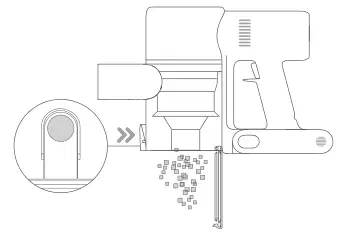


Pre-filter Cyclone Assembly Dust Compartment 1
Do not use detergents, polishes, or air fresheners to clean the dust compartment. Do not clean the dust compartment, pre-filter, or cyclone assembly in a dishwasher or washing machine, nor attempt to dry any component in a tumble dryer, oven, microwave, or near an open fire.
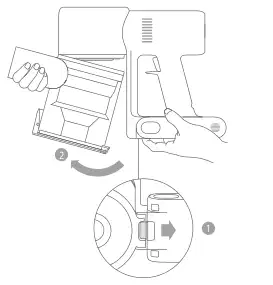
Dust Compartment Release Switch
The dust compartment should be rinsed out at least once a month. The pre-filter and cyclone assembly should be cleaned once every 3 to 4 months.



Only use clean water to clean the filter. Do not use detergent. Do not attempt to clean the HEPA filter with a brush or finger.
2 Insert until it clicks into place
Dust Compartment Release Switch


Battery Pack
The vacuum cleaner contains a removable rechargeable lithium- ion battery pack which has a limited number of recharge cycles. After extended use, the battery pack may no longer hold a charge. If this happens, it means the battery pack has reached the end of its life cycle and needs to be replaced.

>90°

The lithium-ion battery pack contains substances that are hazardous to the environment. Before disposing of the vacuum cleaner, please first remove the battery pack, then discard, or recycle it in accordance with local laws and regulations of the country or region it is used in.
All products bearing this symbol are waste electrical and electronic equipment (WEEE as in directive 2012/19/EU) which should not be mixed with unsorted household waste. Instead, you should protect human health and the environment by handing over your waste equipment to a designated collection point for the recycling of waste electrical and electronic equipment, appointed by the government or local authorities. Correct disposal and recycling will help prevent potential negative consequences to the environment and human health. Please contact the installer or local authorities for more information about the location as well as terms and conditions of such collection points.


It is out of battery or has low battery. Fully charge the vacuum cleaner, then resume use.
It enters into overheat protection mode triggered by a blockage.
Wait until the vacuum cleaner cools down, then reactivate it.
The vacuum cleaner will stop working if any error occurs, and the indicator will blink white. Please refer to the information below for your solution.
Clear any blockages from suction opening or airway passage.
The dust compartment is full and/or the filter is clogged.
Indicator Status Indicator Descritpion Possible Cause Solution
The high torque brush bar and/or the extension rod are blocked.
Clear any blockages from the high torque brush bar and/or the extension rod.
The main suction opening or the extension rod is blocked.
Clear any blockages in the main suction opening or the extension rod.
The first indicator blinks white for 5 seconds, then goes off. Recharge soon.
The first indicator is red after turning on the vacuum cleaner.
Vacuum cleaner stops working suddently.
The first and second indicators blink white for 5 seconds simultaneously, then go off.
Refer to "Cleaning the High Torque Brush Bar" in the Care & Maintenance section for directions on how to remove hair and other debris caught in the roller brush.
The first indicator blinks red when charging the vacuum cleaner.
Only use the original charger to charge the vacuum cleaner.
The charger is not connected to the vacuum cleaner.
The battery indicator does not light up while charging.
The battery is fully charged and went into sleep mode.
All of the three indicators blink white for 5 seconds simultaneously, then go off.
Check if any blockages caught in the dust compartment, extension rod, and/or high torque brush bar.
If the problem still persists after ruling out the above two possibilities, please contact after- sales service for help.
Wait until the battery temperature normalizes, then resume use.
The battery temperature is too low or too high.
ユーザーまたはスタッフが通常1日以内に回答します。あなたの質問が次の人の助けにもなります。
最初の質問を投稿しましょう。他のユーザーや当チームが回答します。