JA
Pivo logo
公式取扱説明書

Pivo Pod Active Smartphone Camera Mounting Pod (NPVS)

32 ページ·1.3 MB·カメラ・写真用品·PDF·EN
Pivo Pod Active Smartphone Camera Mounting Pod (NPVS)
目次 4セクション Packaging Manual_2020.05.11_EN · Packaging Manual_2020.05.11_DE · Blank Page · Blank Page 表示非表示
Page 1 of the Pivo Pod Active Smartphone Camera Mounting Pod (NPVS) user manual — EN
1ページ · クリックして拡大
1ページ

EN

Quick Start Guide

Page 2 of the Pivo Pod Active Smartphone Camera Mounting Pod (NPVS) user manual — POD Overview
2ページ · クリックして拡大
2ページ

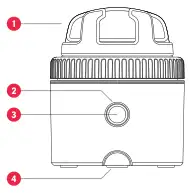
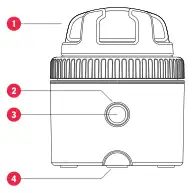
POD Overview

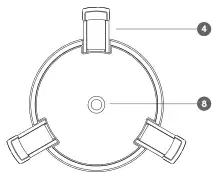
Pivo Pod Active Smartphone Camera Mounting Pod (NPVS) — POD Overview diagram (page 2)
図 1 · POD Overview
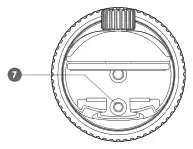
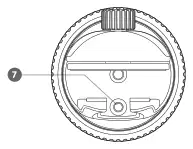
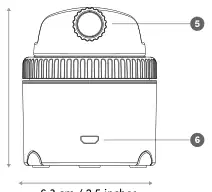
Pivo Pod Active Smartphone Camera Mounting Pod (NPVS) — POD Overview diagram (page 2)
図 2 · POD Overview

7.3 cm / 2.9 inches

6.3 cm / 2.5 inches

1. Smartphone Holder 2. LED Indicator 3. Power Button 4. Extendable Legs
5. Grip Fastener 6. Micro USB charging port 7. Bubble Level 8. 1/4” Screw Thread
Page 3 of the Pivo Pod Active Smartphone Camera Mounting Pod (NPVS) user manual — Packaging Manual_2020.05.11_EN
3ページ · クリックして拡大
3ページ
Pivo Pod Active Smartphone Camera Mounting Pod (NPVS) — Packaging Manual_2020.05.11_EN diagram (page 3)
図 3 · Packaging Manual_2020.05.11_EN
Pivo Pod Active Smartphone Camera Mounting Pod (NPVS) — Packaging Manual_2020.05.11_EN diagram (page 3)
図 4 · Packaging Manual_2020.05.11_EN
Height (without mount)5cm /2 inches Bluetooth: BLE 4.0
Maximum load1kg Battery: 500 mAh
Weight176g / 6.2 ounces Charging: Micro USB, 5VDC, 0.5A
Page 4 of the Pivo Pod Active Smartphone Camera Mounting Pod (NPVS) user manual — Charging the POD
4ページ · クリックして拡大
4ページ

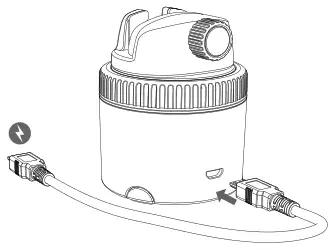
Charging the POD

Pivo Pod Active Smartphone Camera Mounting Pod (NPVS) — Charging the POD diagram (page 4)
図 5 · Charging the POD
Page 5 of the Pivo Pod Active Smartphone Camera Mounting Pod (NPVS) user manual — LED Indicator Status
5ページ · クリックして拡大
5ページ

LED Indicator Status

Power On/ Ready for device pairing

Low battery, not charged

Show 12 more labels / short text on this page
Power Off · Blinking Red · Blinking Blue · Connected to phone · Blue · Charging · Red · Fully charged · No light · Blinking red · Pairing Remote mode · Blinking white
Page 6 of the Pivo Pod Active Smartphone Camera Mounting Pod (NPVS) user manual — Download PIVO APP
6ページ · クリックして拡大
6ページ

Quick Start Guide

Pivo Pod Active Smartphone Camera Mounting Pod (NPVS) — Quick Start Guide diagram (page 6)
図 6 · Quick Start Guide

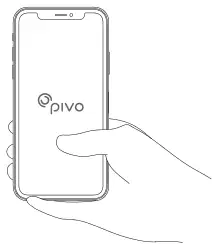
Download PIVO APP

Page 7 of the Pivo Pod Active Smartphone Camera Mounting Pod (NPVS) user manual — Create an account
7ページ · クリックして拡大
7ページ

Create an account

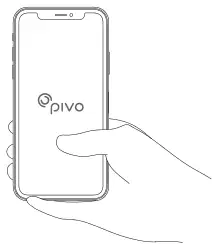
1. Open Pivo APP and tap “ Yes, I got Pivo ”
2. Create a Pivo account using a valid email address

- Tap Create account under the Log in button - Fill out the Sign up form - Confi rm your registration by email

3. Go back to the App and Log in into your new account - Tap “ Allow ” permission to microphone, photo album and voice recognition
Page 8 of the Pivo Pod Active Smartphone Camera Mounting Pod (NPVS) user manual — Pair your smartphone
8ページ · クリックして拡大
8ページ

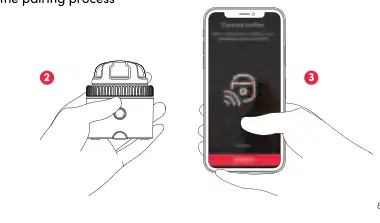
Pair your smartphone

1. Turn your smartphone on and enable the Bluetooth settings
2. Press and hold the power button for 3 seconds until the LED light turns BLUE
3. In the App, tap “Connect” and follow the instructions on the screen to fi nish the pairing process
Pivo Pod Active Smartphone Camera Mounting Pod (NPVS) — Pair your smartphone diagram (page 8)
図 7 · Pair your smartphone
Page 9 of the Pivo Pod Active Smartphone Camera Mounting Pod (NPVS) user manual — Position your phone
9ページ · クリックして拡大
9ページ

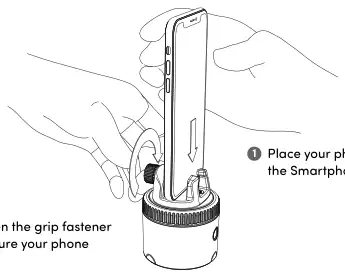
Position your phone

Pivo Pod Active Smartphone Camera Mounting Pod (NPVS) — Position your phone diagram (page 9)
図 8 · Position your phone

Place your phone onto the Smartphone holder

Tighten the grip fastener to secure your phone 2

Page 10 of the Pivo Pod Active Smartphone Camera Mounting Pod (NPVS) user manual — Visualize settings and menu
10ページ · クリックして拡大
10ページ

Visualize settings and menu

Swipe to the left to visualize settings

Swipe to the right to visualize the menu

Pivo Pod Active Smartphone Camera Mounting Pod (NPVS) — Visualize settings and menu diagram (page 10)
図 9 · Visualize settings and menu
Pivo Pod Active Smartphone Camera Mounting Pod (NPVS) — Visualize settings and menu diagram (page 10)
図 10 · Visualize settings and menu

* For detailed tutorials about how to use each mode, please visit help.getpivo.com

Page 11 of the Pivo Pod Active Smartphone Camera Mounting Pod (NPVS) user manual — Remote Overview
11ページ · クリックして拡大
11ページ

Remote Overview

Rotate clockwise Decrease speed

Rotate clockwise 1 round

Rotate counter-clockwise 1 round

Stop rotating/ Cancel shooting (may vary depending on the capture mode)

Toggle between photo/video mode (may vary depending on capture mode)

** For detailed information and manual about how to use the remote, please visit help.getpivo.com

Capture photo/start recording · Increase speed · Rotate counter-clockwise

Page 12 of the Pivo Pod Active Smartphone Camera Mounting Pod (NPVS) user manual — Pairing the Remote
12ページ · クリックして拡大
12ページ

Pairing the Remote

The Remote comes already paired and ready to use. However, if the Remote becomes disconnected or if the batteries are replaced, the Remote needs to be paired as follows:

Pivo Pod Active Smartphone Camera Mounting Pod (NPVS) — Pairing the Remote diagram (page 12)
図 11 · Pairing the Remote

Press the power button 3 times in quick sucession. The LED indicator will turn white, indicating that the remote pairing mode is ready.

Page 13 of the Pivo Pod Active Smartphone Camera Mounting Pod (NPVS) user manual — Packaging Manual_2020.05.11_EN
13ページ · クリックして拡大
13ページ

Press and hold the “+” button on the Remote until you hear 3 quick beeps. This sound indicates that the Remote pairing is complete.

Page 14 of the Pivo Pod Active Smartphone Camera Mounting Pod (NPVS) user manual — Control Settings
14ページ · クリックして拡大
14ページ

Control Settings

With your Remote, you have control over various core settings of your POD including, rotation speed, rotation direction, shooting mode, shutter button, and more. - Up to 15 meter operating range - Can be paired to multiple Pivo PODs - Comes with 1 replaceable 3V battery (coin type) - For video instructions visit the Pivo YouTube offi cial channel at

www.youtube.com/c/pivooffi cial - For downloadable version of this manual, go to help.getpivo.com

Page 15 of the Pivo Pod Active Smartphone Camera Mounting Pod (NPVS) user manual — Aditional Information
15ページ · クリックして拡大
15ページ

Aditional Information

For video tutorials, visit our offi cial YouTube Channel www.youtube.com/c/pivooffi cial

Need more product information? Scan the QR code as shown bellow or visit our support page help.getpivo.com

2019 3i Inc. All rights reserved. 3003 North 1st Street San Jose, California CA 95134 support@getpivo.com www.getpivo.com Social media @getpivo


Page 16 of the Pivo Pod Active Smartphone Camera Mounting Pod (NPVS) user manual — Blank Page
16ページ · クリックして拡大
16ページ
Page 16 of the Pivo Pod Active Smartphone Camera Mounting Pod (NPVS) user manual — Blank Page
Page 17 of the Pivo Pod Active Smartphone Camera Mounting Pod (NPVS) user manual — DE
17ページ · クリックして拡大
17ページ

DE

Schnellstartanleitung

Page 18 of the Pivo Pod Active Smartphone Camera Mounting Pod (NPVS) user manual — POD Übersicht
18ページ · クリックして拡大
18ページ

POD Übersicht

Pivo Pod Active Smartphone Camera Mounting Pod (NPVS) — POD Übersicht diagram (page 18)
図 12 · POD Übersicht
Pivo Pod Active Smartphone Camera Mounting Pod (NPVS) — POD Übersicht diagram (page 18)
図 13 · POD Übersicht
Höhe7.3 cm
Breite6,3 cm
1. Smartphone Halterung 2. LED Licht 3. Ein/Aus Knopf 4. Ausziehbare Beine
5. Griff befestigung 6. Aufl adestation 7. Wasserwaage 8. 1/4” Schraubengewinde
Page 19 of the Pivo Pod Active Smartphone Camera Mounting Pod (NPVS) user manual — Packaging Manual_2020.05.11_DE
19ページ · クリックして拡大
19ページ
Pivo Pod Active Smartphone Camera Mounting Pod (NPVS) — Packaging Manual_2020.05.11_DE diagram (page 19)
図 14 · Packaging Manual_2020.05.11_DE
Pivo Pod Active Smartphone Camera Mounting Pod (NPVS) — Packaging Manual_2020.05.11_DE diagram (page 19)
図 15 · Packaging Manual_2020.05.11_DE
Höhe (ohne Halterung)5cm Bluetooth: BLE 4.0
Max. Belastung1kg Batterie: 500 mAh
Gewicht176g Ladung: Micro USB, 5VDC, 0.5A
Page 20 of the Pivo Pod Active Smartphone Camera Mounting Pod (NPVS) user manual — Aufl aden des POD
20ページ · クリックして拡大
20ページ

Aufl aden des POD

Pivo Pod Active Smartphone Camera Mounting Pod (NPVS) — Aufl aden des POD diagram (page 20)
図 16 · Aufl aden des POD
Page 21 of the Pivo Pod Active Smartphone Camera Mounting Pod (NPVS) user manual — LED Anzeige
21ページ · クリックして拡大
21ページ

LED Anzeige

Eingeschaltet / bereit für Bluetooth Verbindung

Niedriger Batteriestatus, bitte laden

Show 12 more labels / short text on this page
Ausgeschaltet · Blinkt rot · Blinkt blau · Mit Smartphone verbunden · Blau · Ladevorgang · Rot · Voll geladen · Kein Licht · Blinkt rot · Verbindung mit Fernbedienung · Blinkt weiß
Page 22 of the Pivo Pod Active Smartphone Camera Mounting Pod (NPVS) user manual — Lade die Pivo App herunter
22ページ · クリックして拡大
22ページ

Schnellstartanleitung

Pivo Pod Active Smartphone Camera Mounting Pod (NPVS) — Schnellstartanleitung diagram (page 22)
図 17 · Schnellstartanleitung

Lade die Pivo App herunter

情報源

参考資料・リンク

この取扱説明書で参照されているリンク(メーカー、サポート、ダウンロード等)。

Pivo Pod Active Smartphone Camera Mounting Pod (NPVS)について質問する

ユーザーまたはスタッフが通常1日以内に回答します。あなたの質問が次の人の助けにもなります。

Add your email to get notified when it’s answered — no spam, ever.

0 questions
Pivo Pod Active Smartphone Camera Mounting Pod (NPVS)に関する質問はまだありません

最初の質問を投稿しましょう。他のユーザーや当チームが回答します。

原本

Pivo Pod Active Smartphone Camera Mounting Pod (NPVS) 取扱説明書(PDF)

32 ページ·1.3 MB·カメラ・写真用品·PDF
上のページをクリックするとここに表示されます
ページ 1 / …
100%
ページを読み込み中…