JA
公式取扱説明書

Echomaster Spare Tire Mount Camera (PCAM-JP3)

4 ページ·329 KB·カメラ·PDF·EN
Echomaster Spare Tire Mount Camera (PCAM-JP3)
目次 5セクション Installation Guide · PCAM-JP3 · for 2007-2018 Jeep Wrangler JK Spare Tire Mount Camera · Contact · … 表示非表示
Page 1 of the Echomaster Spare Tire Mount Camera (PCAM-JP3) user manual — PCAM-JP3
1ページ · クリックして拡大
1ページ

Installation Guide

Echomaster Spare Tire Mount Camera (PCAM-JP3) — Installation Guide diagram (page 1)
図 1 · Installation Guide

PCAM-JP3

for 2007-2018 Jeep Wrangler JK Spare Tire Mount Camera

Page 2 of the Echomaster Spare Tire Mount Camera (PCAM-JP3) user manual — Installation Guide
2ページ · クリックして拡大
2ページ

Installation Guide

Echomaster Spare Tire Mount Camera (PCAM-JP3) — Installation Guide diagram (page 2)
図 2 · Installation Guide
1. Using two M3 x .50 screws and lock washers, attach the camera to the Camera Mounting Plate.
2. Using a M6 x 1 screw and lock washer, attach the Camera Mounting Plate to the Right Angle Bracket as shown.
Echomaster Spare Tire Mount Camera (PCAM-JP3) — Installation Guide diagram (page 2)
図 3 · Installation Guide

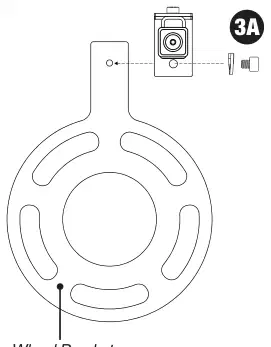
3A. For most applications with stock/standard wheels, attach the camera bracket assembly to the Wheel Bracket using a M6 x 1 screw and lock washer.

For applications with larger wheels and/or off-center wheel openings, see step 3B.

Wheel Bracket

Page 3 of the Echomaster Spare Tire Mount Camera (PCAM-JP3) user manual — Installation Guide
3ページ · クリックして拡大
3ページ

PCAM-JP3 Spare Tire Mount Camera

Echomaster Spare Tire Mount Camera (PCAM-JP3) — Installation Guide diagram (page 3)
図 4 · Installation Guide

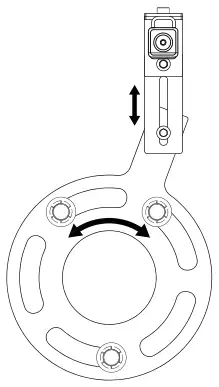
3B 3B. For larger wheels, attach the Riser Plate to the Wheel Bracket and attach the camera assembly to the Riser plate using M6 x 1 screws and lock washers.
Echomaster Spare Tire Mount Camera (PCAM-JP3) — Installation Guide diagram (page 3)
図 5 · Installation Guide
4. Place the completed assembly on the tire carrier wheel studs and install the supplied push nut retainers on the wheel studs.

Replace the spare tire. Position the camera as close to center as possible. This may require removing and rotating the wheel until a usable opening in the wheel is located at or near center and adjusting the pieces of the mount to achieve the desired view.

Once positioned, tighten all camera bracket hardware and lug nuts.

Page 4 of the Echomaster Spare Tire Mount Camera (PCAM-JP3) user manual — IG-PCAM-JP3 REV. 022321
4ページ · クリックして拡大
4ページ
Echomaster Spare Tire Mount Camera (PCAM-JP3) — Contact diagram (page 4)
図 6 · Contact

Parking Lines (Green) On - Joined (Default)

Contact

Technical Supportemail - support@ aampglobal.com tel - 1-800-477-2267 web - EchoMaster.com

15500 Lightwave Drive, Suite 202, Clearwater, Florida 33760 EchoMaster is a Power Brand of AAMP Global.

IG-PCAM-JP3 REV. 022321

Off - Cut

情報源

参考資料・リンク

この取扱説明書で参照されているリンク(メーカー、サポート、ダウンロード等)。

Echomaster Spare Tire Mount Camera (PCAM-JP3)について質問する

ユーザーまたはスタッフが通常1日以内に回答します。あなたの質問が次の人の助けにもなります。

Add your email to get notified when it’s answered — no spam, ever.

0 questions
Echomaster Spare Tire Mount Camera (PCAM-JP3)に関する質問はまだありません

最初の質問を投稿しましょう。他のユーザーや当チームが回答します。

原本

Echomaster Spare Tire Mount Camera (PCAM-JP3) 取扱説明書(PDF)

4 ページ·329 KB·カメラ·PDF
上のページをクリックするとここに表示されます
ページ 1 / …
100%
ページを読み込み中…