JA
Nokia logo
公式取扱説明書

Nokia PureBook Pro 17

6 ページ·329 KB·ノートパソコン·PDF·EN
Nokia PureBook Pro 17
目次 7セクション Quick start guide · Nokia PureBook Pro 17 · Top open view · Right and left side view · … 表示非表示
Page 1 of the Nokia PureBook Pro 17 user manual — Nokia PureBook Pro 17
1ページ · クリックして拡大
1ページ

Quick start guide

Nokia PureBook Pro 17

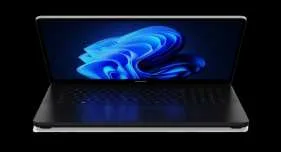
Nokia PureBook Pro 17 — Nokia PureBook Pro 17 diagram (page 1)
図 1 · Nokia PureBook Pro 17
Page 2 of the Nokia PureBook Pro 17 user manual — Top open view
2ページ · クリックして拡大
2ページ

Top open view

Caps lock status LED

Show 6 more labels / short text on this page
Microphone · Camera · LCD screen · Power button/fingerprint scanner · Keyboard · Touchpad
Page 3 of the Nokia PureBook Pro 17 user manual — Right and left side view
3ページ · クリックして拡大
3ページ

Right and left side view

USB Type-A USB Type-C*

Connects USB C devices. It combines functions of charging, data transfer and display

Charging indicator · Audio jack · Micro SD slot

Page 4 of the Nokia PureBook Pro 17 user manual — Setting up and getting started
4ページ · クリックして拡大
4ページ

Setting up and getting started

When using your laptop for the first time, connect it to the power adaptor, push the power button, and wait for the screen to turn on.

  • Then follow the onscreen instructions to complete the setup.
  • Windows 11 activation: when your computer is connected to the internet for the first time, Windows is activated automatically.

After the initial setup, you will be presented with Windows 11 desktop.

Windows 11 is a trademark of Microsoft Corporation.

Page 5 of the Nokia PureBook Pro 17 user manual — Know your keyboard
5ページ · クリックして拡大
5ページ

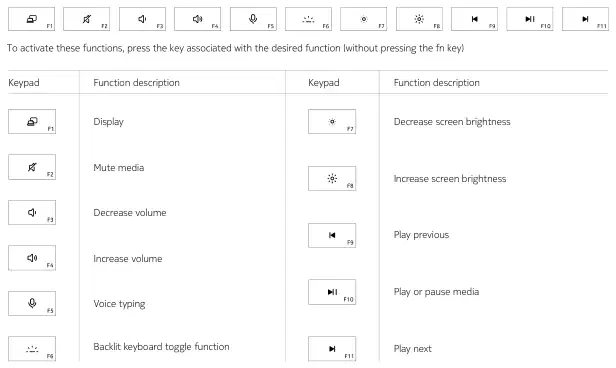
Know your keyboard

Nokia PureBook Pro 17 — Know your keyboard diagram (page 5)
図 2 · Know your keyboard
KeypadFunction descriptionKeypadFunction description Display Mute media Decrease volume Increase volume Voice typing Backlit keyboard toggle functionDecrease screen brightness Increase screen brightness Play previous Play or pause media Play next
Page 6 of the Nokia PureBook Pro 17 user manual — Care and support
6ページ · クリックして拡大
6ページ

Care and support

For a full user manual and additional information, please visit: www.off.global/support

To contact OFF Global, please visit: www.off.global/support or email us at: [email protected]

Nokia is a registered trademark of Nokia Corporation. OFF Global is a licensee of the Nokia brand for laptops and accessories.

Nokia PureBook Pro 17について質問する

ユーザーまたはスタッフが通常1日以内に回答します。あなたの質問が次の人の助けにもなります。

Add your email to get notified when it’s answered — no spam, ever.

0 questions
Nokia PureBook Pro 17に関する質問はまだありません

最初の質問を投稿しましょう。他のユーザーや当チームが回答します。

原本

Nokia PureBook Pro 17 取扱説明書(PDF)

6 ページ·329 KB·ノートパソコン·PDF
上のページをクリックするとここに表示されます
ページ 1 / …
100%
ページを読み込み中…