JA
Midea logo
公式取扱説明書

Midea Air Cooler (AC200-17JR)

6 ページ·1.2 MB·生活家電·PDF·EN
Midea Air Cooler (AC200-17JR)
目次 8セクション OWNER’S MANUAL · AIR COOLER MODEL: AC200-17JR · READ AND SAVE THESE INSTRUCTIONS · SAFETY INSTRUCTION · … 表示非表示
Page 1 of the Midea Air Cooler (AC200-17JR) user manual — READ AND SAVE THESE INSTRUCTIONS
1ページ · クリックして拡大
1ページ

OWNER’S MANUAL

AIR COOLER MODEL: AC200-17JR
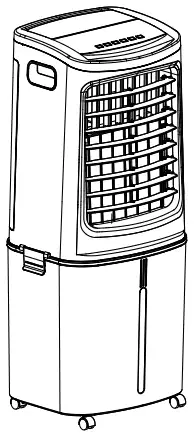
Midea Air Cooler (AC200-17JR) — OWNER’S MANUAL diagram (page 1)
図 1

READ AND SAVE THESE INSTRUCTIONS

Page 2 of the Midea Air Cooler (AC200-17JR) user manual — SAFETY INSTRUCTION
2ページ · クリックして拡大
2ページ
Midea Air Cooler (AC200-17JR) — SAFETY INSTRUCTION diagram (page 2)
図 2
Midea Air Cooler (AC200-17JR) — SAFETY INSTRUCTION diagram (page 2)
図 3

SAFETY INSTRUCTION

1. If the supply cord is damaged, it must be replaced by manufacturer,its service agent or a similarly qualified person in order to avoid a hazard. 2. This appliance is not intended for use by persons (including children) with reduced physical, sensory or mental capabili-

ties, or lack of experience and knowledge, unless they have been given supervision or instruction concerning use of the appliance by a person responsible for their safety. Children should be supervised to ensure that they do not play with the appliance. 3. Unplug the appliance during filling and cleaning. 4. Prior to cleaning or other maintenance, the appliance must be disconnected from the supply mains. 5. Correct Disposal of this product This marking indicates that this product should not be

disposed with other household wastes throughout the EU. To prevent possible harm to the environment or human health from uncontrolled waste disposal, recy- cle it responsibly to promote the sustainable reuse of material resources. To return your used device, please use the return and collection systems or contact the retailer where the product was purchased. They can take this product for environmental safe recycling. 6. CAUTION: In order to avoid a hazard due to inadvertent reset-

ting of the thermal cut-out, this appliance must not be supplied through an external switching device, such as a timer, or con- nected to a circuit that is regularly switched on and off by the utillty .

Page 3 of the Midea Air Cooler (AC200-17JR) user manual — INSTALLATION INSTRUCTIONS
3ページ · クリックして拡大
3ページ

INSTALLATION INSTRUCTIONS

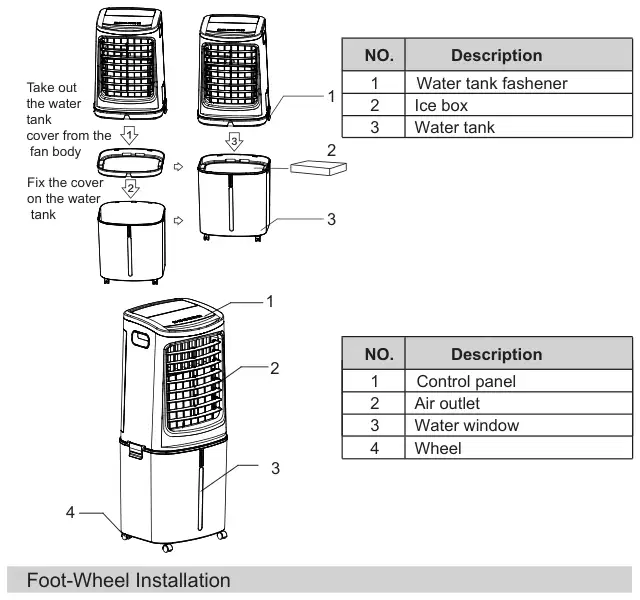
Installation of the water tank:

Midea Air Cooler (AC200-17JR) — INSTALLATION INSTRUCTIONS diagram (page 3)
図 4
NO.Description 1Water tank fashener 2Ice box 3Water tank

1 Take out the water tank cover from the fan body
NO.Description 1Control panel 2Air outlet 3Water window 4Wheel
Midea Air Cooler (AC200-17JR) — INSTALLATION INSTRUCTIONS diagram (page 3)
図 5

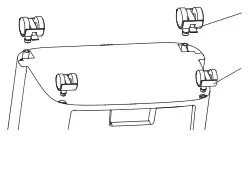
Name of components · Front Foot-wheel · Rear Foot-wheel

Page 4 of the Midea Air Cooler (AC200-17JR) user manual — INSTRUCTIONS FOR USE
4ページ · クリックして拡大
4ページ

INSTRUCTIONS FOR USE

Midea Air Cooler (AC200-17JR) — INSTRUCTIONS FOR USE diagram (page 4)
図 6

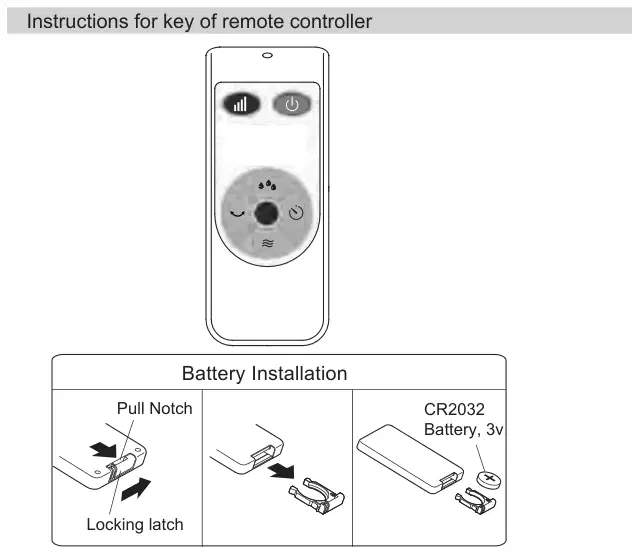
It uses one button battery of type "CR2032".

Considerate Hint: 1. Install the battery with positive side facing up. 2. Effective Range of Remote Control: within 5m distance and 30-degree deflection in front of Product.

Page 5 of the Midea Air Cooler (AC200-17JR) user manual — INSTRUCTIONS FOR USE
5ページ · クリックして拡大
5ページ

INSTRUCTIONS FOR USE

Midea Air Cooler (AC200-17JR) — INSTRUCTIONS FOR USE diagram (page 5)
図 7
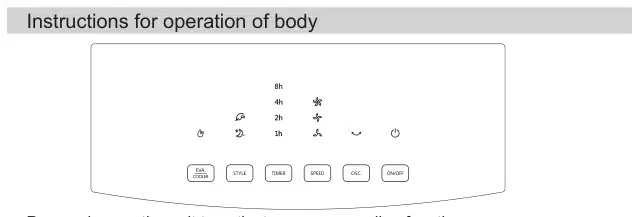
  • Press a key on the unit to activate a corresponding function. For instance:
  • Press [OSC.] Key to activate or deactivate Swing Function. (Note: Manual horizontal blade allows tilting flow direction.)
  • Press [SPEED] Key to adjust 3 speeds of air flow.
  • Press [STYLE] Key to switch between Normal, Natural and Sleep Functions.
  • Press [TIMER] Key to set 1-12 hour timer setting.
  • When [EVA./COOLER] Key is pressed, the indicator lights up constantly if the operation is normal; when the indicator flashes, it denotes a water shortage, please add water immediately.

Considerate Hint: Push Buttons on the unit may differ based on the actual product model.
Midea Air Cooler (AC200-17JR) — INSTRUCTIONS FOR USE diagram (page 5)
図 8

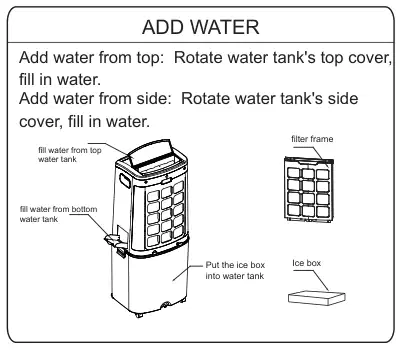
Add water from top: Rotate water tank's top cover, fill in water. Add water from side: Rotate water tank's side cover, fill in water.

Page 6 of the Midea Air Cooler (AC200-17JR) user manual — MAINTENANCE
6ページ · クリックして拡大
6ページ

INSTRUCTIONS FOR USE

Instructions for operation of body

  • Considerate Hint:
  • When humidifying, water level in the Water Tank must remain under MAX indication; replenish water if level gets lower than MIN indication.
  • The water level in the tank is below minimum scale marked on water display window, don’t use the humidification function.
  • When the tank water level is lower than the minimum scale, the unit shall make 3 seconds buzzing warnings sound, then the water pump stop running, this time need add water to run humidification function.
  • When the tank water level exceed the maximum, the unit shall make 10 seconds buzzing warnings sound, to prevent the water in a water flooded lead to overflow
Midea Air Cooler (AC200-17JR) — INSTRUCTIONS FOR USE diagram (page 6)
図 9
Midea Air Cooler (AC200-17JR) — INSTRUCTIONS FOR USE diagram (page 6)
図 10

TROUBLESHOOTING

In case the product cannot be operated normally after installation, checks shall be made for items described bellow: 1. Power cable unplugged or faulty contact. 2. Honeycomb filter assembly not properly installed. 3. Power Switch on the back of product or in the display panel not switched on. If product remains dysfunctional after checking, a local dealer shall be sought for assistance.

Midea Air Cooler (AC200-17JR) — TROUBLESHOOTING diagram (page 6)
図 11
Midea Air Cooler (AC200-17JR) — TROUBLESHOOTING diagram (page 6)
図 12

MAINTENANCE

Make sure power supply is disconnected before cleaning the product.

Never wash the unit in water. For cleaning, remove components (water tank, honeycomb filter, etc.) and clean them with water and soft brush. Allow them to air-dry before re-assembling.

Never clean the product with any abrasive tool or solvent. Clean with detergent and wipe dry with cloth immediately.

Never dismantle the product or attempt to make any modification. Regular check and cleaning of the product is recommended for prolonging its lifespan.

Midea Air Cooler (AC200-17JR)について質問する

ユーザーまたはスタッフが通常1日以内に回答します。あなたの質問が次の人の助けにもなります。

Add your email to get notified when it’s answered — no spam, ever.

0 questions
Midea Air Cooler (AC200-17JR)に関する質問はまだありません

最初の質問を投稿しましょう。他のユーザーや当チームが回答します。

原本

Midea Air Cooler (AC200-17JR) 取扱説明書(PDF)

6 ページ·1.2 MB·生活家電·PDF
上のページをクリックするとここに表示されます
ページ 1 / …
100%
ページを読み込み中…