



Quick Start Guide

*Read Manual Before Product Use*
The power supply is for indoor use only. Only use the power supply included with your product. Do not attempt to repair or use a damaged power supply. Do not immerse the power supply in water or subject it to physical abuse. Inspect the power supply regularly for cable, plug, and casing damage.
Improperly replaced batteries may present a risk of leak or explosion and personal injury. Mistreated rechargeable batteries may present a risk of fire or chemical burn. Do not disassemble or expose to conducting materials, moisture, liquid, or heat above 54° C (130° F). Do not use or charge the battery if it appears to be leaking, discolored, deformed, or in any way abnormal. Do not leave your battery discharged or unused for extended periods. Do not short circuit. Your device may contain an internal, rechargeable battery that is not replaceable. Battery life varies with usage. Non-operational batteries should be discarded according to local laws. If no laws or regulations govern, dispose of your device in a waste bin for electronics. Keep batteries away from children.
Safe Usage Guidelines for Products
Visit FTI webstie to download multi-language quick start guide

FunTech Innovation Compliance.
For Product Safety, EMC, RF and Energy information, go to www.funtechinnovation. com/compliance Maintenance is not required for product compliance. This product complies with relevant legal requirements for Restriction of Hazardous Substances (RoHS) and management of waste electronic and electrical equipment (WEEE). For RoHS and WEEE information, go to www.funtechinnovation.com/ compliance
This device complies with Industry Canada license exempt RSS standard(s) Operation is subject to the following two conditions: (1) this device may not cause interference, and (2) this device must accept any interference, including interference that may cause undesired operation of the device. Cordless (Radio Transmitter) products: Section A. RSS310 (27 MHz transmitters and receivers): This Category II radio communication device complies with Industry Canada Standard RSS310. Section B. RSS210 (2.4 GHz transmitters or transceivers): This Category I radio communication device complies with RSS210 of Industry Canada.
Batteries, electronic and electrical equipment should not be disposed of with household waste. Wherever possible, they should be segregated and brought to an appropriate collection point to enable recycling and avoid potential impacts on the environment and human health. For more information, contact your local authorities or place of purchase.
FunTech Innovation’s Limited Hardware Product Warranty - A Summary
This device complies with Part 15 of the FCC Rules. Operation is subject to the following two conditions: 1) this device may not cause harmful interference, and 2) this device must accept any interference received, including interference that may cause undesired operation. This equipment has been tested and found to comply with the limits for a Class B digital device, pursuant to part 15 of the FCC Rules. These limits are designed to provide reasonable protection against harmful interference in a residential installation. This equipment generates, uses and can radiate radio frequency energy. And, if not installed and used in accordance with the instructions, may cause harmful interference to radio communications. However, there is no guarantee that interference will not occur in a particular installation. If this equipment does cause harmful interference to radio or television reception, which can be determined by turning the equipment off and on, the user is encouraged to try to correct the interference by one or more of the following measures:
FunTech Innovation warrants that its hardware product shall be free from defects in materials and workmanship for the length of time identified on your product package beginning from the date of original retail purchase. See for specific warranty information about your product and procedures to act on a warranty claim.
FunTech Innovation’s entire liability and your exclusive remedy for any breach of warranty shall be, at FunTech Innovation’s option, to repair or replace a functional equivalent of the product, or to refund the price paid, it the hardware is returned to the point of purchase or such other place as FunTech Innovation may direct along with a receipt. Warranty protections are in addition to rights provided under local consumer laws and may vary among countries. See the full warranty information to know your consumer rights and the additional protections provided by this product warranty.
この装置は、クラスB 情報技術装置です。この装置は、家庭環境で使用すること を目的としていますが、この装置がラジオやテレビジョン受信機に近接して使用 されると、受信障害を引き起こすことがあります。取扱説明書に従って正しい取 り扱いをしてください。
Warning: Where shielded interface cables or accessories have been provided with the product or specified additional components or accessories elsewhere defined to be used with the installation of the product, they must be used in order to ensure compliance with FCC. Changes or modifications to product not expressly approved by Fun Technology Innovation Inc, could void your right to use or operate your product by the FCC.
Do not use/store the product in the following
・Near heat sources ・Near steam or greasy smoke ・Location with high humidity ・Sandy or dusty places
4 5 4 5
FCC Statement · Precaution

For your safety, please read the following instruction before you use the product. Serious injury or property damage may be caused by improper operations. Do not try to repair the product on your own.
Safety Instruction

Ideao Hub is a versatile 24” QHD interactive touch monitor to revolutionize the way you collaborate. With a simply plug of a cable, you can easily transform your PC to a giant touch screen, take notes on your document with full Windows Ink compatibility, extend connectivity with 10 I/O ports, and enjoy the smoothest touch and write experience with Ideao Hub.
Monitor Stand Neck Stand Base
Screwdriver x1 USB Cable (Type-C to Type-C)
USB Cable (USB 3.0 A to B)
For any product /warranty related question please visit www.funtechinnovation.com/support
AC/DC Adapter Quick Start Guide


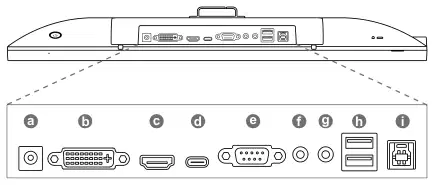
c a b e g i d f h


I/O Ports 6 · Speakers 3

Place the monitor on the foam to protect its surface.
Monitor 7 VESA Mount 100X100mm 8
Neck screws *4 (M4X10mm) 10
Ideao Pen (Optional) 14

Plug the power supply into the power outlet fully and plug the power connector into the side of the product. Ensure the power is in the range of 100V to 240V with frequency at 50Hz/60Hz ± 5%.
The power current must be grounded. Do not remove the ground prong / grounded contact.
For Japanese version, only the Type B power code is included in the box. This power cord support up to 100V and can be used in Japan only. For other countries, please use the corresponding power cord.
USB Type-C USB Type-C
Please ensure your computer USB Type-C end supports DP Alt- mode, in order to display properly. For more information, please check table in P.18.
Connecting the devices using a HDMI cable
Type F Grounded contact
Type G Ground prong
Type B Ground prong
(1) Connect your PC or Laptop to the Ideao Hub using a HDMI Cable. (2) To use the touch function, connect USB Type-B on the Ideao Hub to a USB-A port on the PC or laptop using the USB cable.
*HDMI cable is not included in the package.
Type I Grounded prong
Type M Ground prong
Type O Ground prong
Connect your PC or laptop to the Ideao Hub using a USB Type-C, HDMI/DVI, or VGA cable. Connecting ports may differ in different products.
HDMI
Connecting the devices using a USB Type-C cable
(1) USB Type-C port with video, audio touch and power (Alternate mode with DisplayPort 1.2, Power Delivery up to 65 W)
USB-A

Connecting the devices using a DVI or VGA cable

(1) Connect your PC or Laptop to the Ideao Hub using a DVI or VGA Cable for video source. (2) Connect Audio In on the Ideao Hub to an Audio Out on the PC or laptop using an audio cable for audio source. (3) To use the touch function, connect USB Type-B on the Ideao Hub to a USB-A port on the PC or laptop using the USB cable.
*DVI, VGA, and Audio cables are not included in the package.
Connect your smartphone using a USB-C cable.
*USB-C supports power supply. *Available for Android smartphones that support USB Type-C DisplayPort Alt Mode. *Touch back may vary depending on model.
DVI / VGA
USB-B
USB-A
USB Type-C USB Type-C
/ / · Audio In · Audio Out


Swivel · Lift & Tilt · 90°


Swipe down from the top right edge with two fingers to show OSD settings.

0-133.7 mm


Height · Signal source · Flip


Tilt (Forward/Back) 5º / 60º Vertical Rotation: 90º Swivel: -45° / 45° Height: 0 - 133.7 mm VESA Mount 100x100 mm
Dimension 540 x 456 x 266 mm (with Stand) 540 x 322 x 56 mm (monitor only)
Package Size 785 x 190 x 422 mm (with stand) 630 x 140 x 425 mm (monitor only)
Net Weight 8.5 kg (with stand) 4.0 kg (monitor only)
Button Power Kensington Lock Yes
Ideao Hub Power Cable Adapter USB-C 3.0 Cable (1M) USB-B to A 3.0 (1.5M) Stand
Please visit funtechinnovation.com/faq/

(日本語版)
Stand · Package Content

製品の安全性、EMC、RF、およびエネルギーに関する情報については、 www.funtechinnovation.com/compliance にアクセスしてください。製品のコンプライア ンスにメンテナンスは必要ありません。 この製品は、有害物質の制限(RoHS)および廃電子電気機器(WEEE)の管理に関する関連 する法的要件に準拠しています。RoHS およびWEEE 情報については、 www.funtechinnovation.com/compliance にアクセスしてください。
This device complies with Industry Canada license exempt RSS standard(s) Operation is subject to the following two conditions: (1) this device may not cause interference, and (2) this device must accept any interference, including interference that may cause undesired operation of the device. Cordless (Radio Transmitter) products: Section A. RSS310 (27 MHz transmitters and receivers): This Category II radio communication device complies with Industry Canada Standard RSS310. Section B. RSS210 (2.4 GHz transmitters or transceivers): This Category I radio communication device complies with RSS210 of Industry Canada.
This device complies with Part 15 of the FCC Rules. Operation is subject to the following two conditions: 1) this device may not cause harmful interference, and 2) this device must accept any interference received, including interference that may cause undesired operation. This equipment has been tested and found to comply with the limits for a Class B digital device, pursuant to part 15 of the FCC Rules. These limits are designed to provide reasonable protection against harmful interference in a residential installation. This equipment generates, uses and can radiate radio frequency energy. And, if not installed and used in accordance with the instructions, may cause harmful interference to radio communications. However, there is no guarantee that interference will not occur in a particular installation. If this equipment does cause harmful interference to radio or television reception, which can be determined by turning the equipment off and on, the user is encouraged to try to correct the interference by one or more of the following measures:
この装置は、クラスB 情報技術装置です。この装置は、家庭環境で使用することを目的とし ていますが、この装置がラジオやテレビジョン受信機に近接して使用されると、受信障害を引 き起こすことがあります。取扱説明書に従って正しい取り扱いをしてください。
Warning: Where shielded interface cables or accessories have been provided with the product or specified additional components or accessories elsewhere defined to be used with the installation of the product, they must be used in order to ensure compliance with FCC. Changes or modifications to product not expressly approved by Fun Technology Innovation Inc, could void your right to use or operate your product by the FCC.
Do not use/store the product in the following
・Near heat sources ・Near steam or greasy smoke ・Location with high humidity ・Sandy or dusty places
この取扱説明書で参照されているリンク(メーカー、サポート、ダウンロード等)。
ユーザーまたはスタッフが通常1日以内に回答します。あなたの質問が次の人の助けにもなります。
最初の質問を投稿しましょう。他のユーザーや当チームが回答します。