
The manufacturer reserves the right to make changes to the product, release firmware updates, and update this manual at any time. Visit ap-en.segway.com or check the Segway-Ninebot app to download the latest user materials. You must install the app, activate your KickScooter, and obtain the latest updates and safety instructions.
Manuel du produit Le fabricant se réserve le droit d'apporter des modifications au produit, de publier des mises à jour du firmware et de mettre à jour ce manuel à tout moment. Visitez ap-en.segway.com ou consultez l'application Segway-Ninebot pour télécharger les derniers documents destinés à l'utilisateur. Vous devez installer l'application, activer votre KickScooter et obtenir les dernières mises à jour et consignes de sécurité.
FR
ES
Manual del producto
製品マニュアル
ES
El fabricante se reserva el derecho de realizar cambios en el producto, fabricar actualizaciones de sus piezas y actualizar este manual en cualquier momento. Visite www.segway.com o consulte la aplicación Segway-Ninebot para descargar los materiales más recientes para el usuario. Debe instalar la aplicación, activar el KickScooter y obtener las últimas actualizaciones e instrucciones de seguridad.
Руководство по эксплуатации
メーカーは、製品の仕様変更、ファームウェアのアップデートのリリース、および本マニュアルの更新をいつでも行う権 利を有します。ap-en.segway.com にアクセスするか、Segway-Ninebot アプリを確認して、最新のユーザー資料をダウ ンロードしてください。アプリをインストールし、KickScooter をアクティベートし、最新のアップデートと安全上の説 明事項を入手する必要があります。
Производитель оставляет за собой право вносить изменения в изделие, выпускать обновления прошивки и обновлять данное руководство в любое время. Посетите сайт ap-en.segway.com или проверьте приложение Segway-Ninebot, чтобы загрузить новейшие материалы для пользователей. Необходимо установить приложение, активировать KickScooter и получить последние обновления и инструкции по безопасности.
The pictures shown are for illustration purposes only. The actual product may vary.
Les images sont présentées à titre indicatif uniquement. Le produit réel peut varier.
Las imágenes que se muestran son solo para fines ilustrativos. El producto real puede variar.
RU
Изображения приводятся исключительно в целях иллюстрации. Фактическое изделие может отличаться.
Raccolta Carta


Mode Switching Button
Throttle
NFC Area
Horn Button
Headlight (on) Headlight (off)
Direction Indicator Button
Direction Indicator Direction Indicator

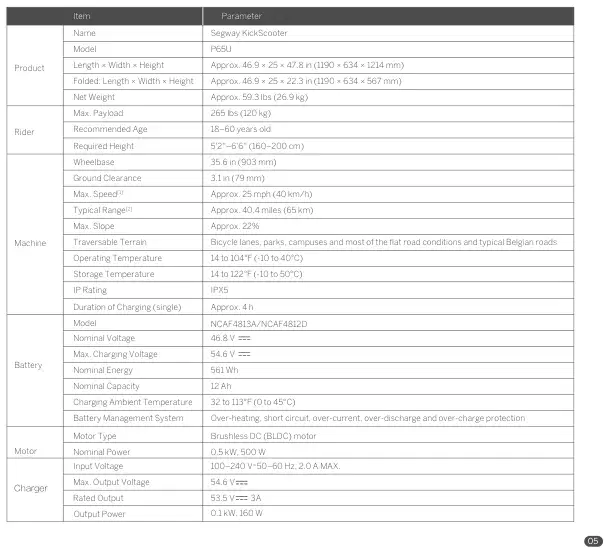

[1]: Max. Speed: tested while riding with a full battery, 75 kg (165 lbs) load on pavement. * Some of the factors that may affect the maximum speed include the rider's weight, remaining battery power, wind resistance, etc.
Warning: it is your legal duty to comply with your local traffic law and regulations when using this product. In the Unites States, in certain States, an electric kickscooter is not allowed to be used on public road (i.e., “on-road” ), if its maximum speed capacity, weight and/or other features do not comply with the mandatory requirements imposed by law. With respect to maximum speed capacity restriction, certain States require that an electric kickscooters’ maximum speed capacity shall be capped at / limited to a specific miles per hour if it is for on-road use, and the cap / limit varies in different States. By way of examples, the States that impose such maximum speed capacity restriction include New York, Florida, Arizona, New Jersey etc. In the event you intend to use this product on-road in a State that imposes such maximum speed capacity restriction, you MUST select a proper lower speed mode of this Product to assure that the product’ s maximum speed capacity under such speed mode complies with the law. In the event the maximum speed capacity of the lowest speed mode of this product nevertheless exceeds the maximum speed capacity restriction imposed by a State for on-road use, you shall not use this product on-road in that State. Furthermore, a State may have other law regulating on-road use of this product, such as maximum speed requirement and/or helmet requirement. In addition to State law, there may be further restrictions or prohibition on use of electric kickscooters by local law and/or regulations. For off-road use of this product, there may be other restrictions and/or limitations imposed by the property owner or others. The App of the product may provide additional useful information related to this matter. Disclaimer: this is not a legal opinion or legal advice. The information provided herein (including in the App) is for your convenience and information purpose only. It is not intended to cover every piece of law and/or regulation that may be applicable to this product. Segway and Ninebot explicitly hereby disclaim any and all warranty and/or representation, express or implied, related to completeness, accuracy, up-to-date of such information. Segway and/or Ninebot reserves the right but not obligation to correct, implement and/or update the information. You shall use the information at your own risk. It is your sole responsibility to learn and understand any and all the law and/or regulation, requirements, prohibition, restriction and/or limitation imposed by either law, government authority, court, private party or the others that may apply to your use of this product.
Disclaimer: this is not a legal opinion or legal advice. The information provided herein (including in the app) is for your convenience and information purpose only. It is not intended to cover every piece of law and/or regulation that may be applicable to this product. Segway and Ninebot explicitly hereby disclaim any and all warranty and/or representation, express or implied, related to completeness, accuracy, up-to-date of such information. Segway and/or Ninebot reserves the right but not obligation to correct, implement and/or update the information. You shall use the information at your own risk. It is your sole responsibility to learn and understand any and all the law and/or regulation, requirements, prohibition, restriction and/or limitation imposed by either law, government authority, court, private party or the others that may apply to your use of this product.
[2]: Typical Range: tested while riding with a full battery, 165 lbs (75 kg) load, 77°F (25°C), at the speed of 9.9 mph (16 km/h) on average on pavement. * Some of the factors that affect range include speed, number of starts and stops, ambient temperature, etc.

Certifications 4 Le présent appareil est conforme aux CNR d'Industrie Canada applicables aux appareils radio exempts de licence.
L'exploitation est autorisée aux deux conditions suivantes : (1) l'appareil ne doit pas produire de brouillage, et (2) l'utilisateur de l'appareil doit accepter tout brouillage radioélectrique subi, même si le brouillage est susceptible d'en compromettre le fonctionnement.
This product is certified to ANSI/CAN/UL-2272. The battery complies with UN/DOT 38.3. The battery complies with ANSI/CAN/UL-2271.
Neither Segway Inc. nor Ninebot is responsible for any changes or modifications not expressly approved by Segway Inc. or Ninebot. Such modifications could void the user's authority to operate the equipment.
Federal Communications Commission (FCC) Compliance Statement for USA
This device complies with part 15 of the FCC rules. Operation is subject to the following two conditions: (1) This device may not cause harmful interference, and (2) this device must accept any interference received, including interference that may cause undesired operation.
Any Changes or modifications not expressly approved by the party responsible for compliance could void the user's authority to operate the equipment.
Trademark 5
This equipment has been tested and found to comply with the limits for a Class B digital device, pursuant to part 15 of the FCC Rules. These limits are designed to provide reasonable protection against harmful interference in a residential installation. This equipment generates, uses and can radiate radio frequency energy and, if not installed and used in accordance with the instructions, may cause harmful interference to radio communications. However, there is no guarantee that interference will not occur in a particular installation. If this equipment does cause harmful interference to radio or television reception, which can be determined by turning the equipment off and on, the user is encouraged to try to correct the interference by one or more of the following measures: —Reorient or relocate the receiving antenna. —Increase the separation between the equipment and receiver. —Connect the equipment into an outlet on a circuit different from that to which the receiver is connected. —Consult the dealer or an experienced radio/TV technician for help.
Segway and the Rider Design are the trademarks of Segway Inc.; Android is the trademark of Google Inc., App Store is a service mark of Apple Inc. The respective owners reserve the rights of their trademarks and copyrights, etc. referred to in this manual.
We have attempted to include descriptions and instructions for all the functions of the KickScooter at the time of printing. However, due to constant improvement of product features and changes of design, your KickScooter may differ slightly from the one shown in this document. Visit the Apple app Store (iOS) or the Google Play Store (Android) to download and install the Segway-Ninebot App. Please note that there are multiple Segway and Ninebot models with different functions, and some of the functions mentioned herein may not be applicable to your unit. The manufacturer reserves the right to change the design and functionality of the KickScooter product and documentation without prior notice. (※The Segway-Ninebot App can support KickScooter with built-in Bluetooth)
This equipment complies with FCC radiation exposure limits set forth for an uncontrolled environment. This equipment should be installed and operated with minimum distance 20cm between the radiator & your body. Cet équipement est conforme aux limites d'exposition aux radiations de la IC définies pour un environnement non contrôlé. Cet équipement doit être installé et utilisé à une distance minimale de 20 cm entre le radiateur et votre corps.
© 2022 Ninebot (Beijing) Tech Co. Ltd. All rights reserved.
Industry Canada (IC) Compliance Statement for Canada
This device complies with Industry Canada license-exempt RSS standard (s). Operation is subject to the following two conditions: (1) this device may not cause interference, and (2) this device must accept any interference, including interference that may cause undesired operation of the device.
この取扱説明書で参照されているリンク(メーカー、サポート、ダウンロード等)。
ディスプレイに表示されるエラーコードの意味と解除方法。
| コード | 意味 | 対処法 | |
|---|---|---|---|
| 10 | BLE Bluetooth communication error | p.5 | |
| 11 | Motor 1A phrase current sampling failure | p.5 | |
| 12 | Motor 1B phrase current sampling failure | p.5 | |
| 13 | Motor 1C phrase current sampling failure | p.5 | |
| 14 | Throttle Hall sensor abnormality | p.5 | |
| 15 | Brake Hall sensor abnormality | p.5 | |
| 18 | Hall sensor abnormality | p.5 | |
| 21 | BMS communication error | p.5 | |
| 22 | BMS password error | p.5 | |
| 23 | BMS default serial number | p.5 | |
| 24 | System voltage detection abnormality | p.5 | |
| 26 | Flash storage error | p.5 | |
| 27 | Control board password error | p.5 | |
| 28 | Motor MOS driver upper bridge short circuit | p.5 | |
| 29 | Motor MOS driver lower bridge error | p.5 | |
| 31 | Program skip error | p.5 | |
| 35 | Vehicle default serial number | p.5 | |
| 39 | Battery temperature sensor error | p.5 | |
| 41 | Direction indicators abnormality | p.5 | |
| 42 | Headlight abnormality | p.5 | |
| 45 | Abnormal bus current op-amp circuit | p.5 |
ユーザーまたはスタッフが通常1日以内に回答します。あなたの質問が次の人の助けにもなります。
最初の質問を投稿しましょう。他のユーザーや当チームが回答します。