
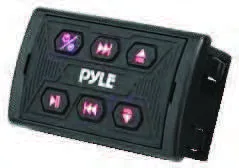


PLMRBTSQ1 Wireless BT Audio Controller Waterproof-Rated Marine Receiver Remote Control for Car, Truck, Boat, 4x4,

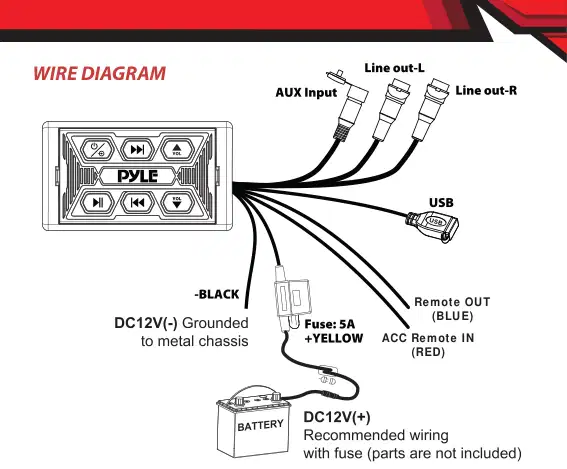
Wire Color Yellow Black White Red Red Blue
Description Battery (+), 12dc Battery (-), Ground Line out- L Line out- R ACC REMOTE
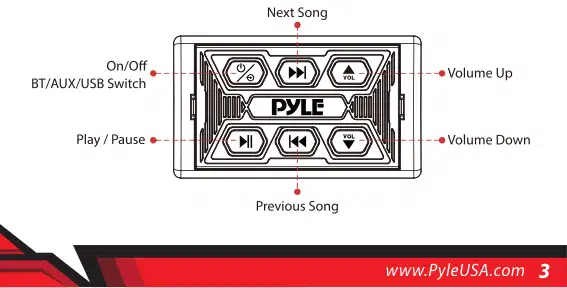
WIRELESS BT PAIRING AND CONNECTION Power: 1. Press and hold to power ON/OFF.
Wireless BT Streaming Connection: a. Ensure BT ability is activated, then search for the PLMRBTSQ1 from your BT-enabled device. The light will turn blue and blinks while waiting for BT connection. b. The PLMRBTSQ1 BT Network Name will appear as "PyleUSA" (No password is required for connecting). c. When the BT is connected, the light will turn blue and stops blinking.

AUX-IN/USB Short press to switch BT mode to Aux-in mode I USB mode.
Auto Reconnection a. When the device is out of BT range, BT will be disconnected automatically, the light turns blue while blinking. b. BT will automatically reconnect when detected in range again in 10 minutes. c. Disconnected BT after 10 minutes, you need to process BT connection steps (above) to reconnect BT again. d. If the other device occupied the BT during this period (10mins), you need to process BT connection steps (above).
Short press to switch in BT/AUX IN/USB mode
Press and hold for LED off/on
Press and hold to continuously increase volume
Press and hold to continuously decrease volume





We are here to help! Phone: (1) 718-535-1800 Email: support@pyleusa.com
Questions? Issues?
この取扱説明書で参照されているリンク(メーカー、サポート、ダウンロード等)。
ユーザーまたはスタッフが通常1日以内に回答します。あなたの質問が次の人の助けにもなります。
最初の質問を投稿しましょう。他のユーザーや当チームが回答します。

