JA
Dometic logo
公式取扱説明書

Dometic Center Console Refrigerator (CCF-T CPV)

60 ページ·11.9 MB·生活家電·PDF·EN
Dometic Center Console Refrigerator (CCF-T CPV)
目次 38セクション Contents · 1 Explanation of Symbols and Safety Instructions · 1.1 Recognize Safety Information · 1.2 Understand Signal Words · … 表示非表示
Page 1 of the Dometic Center Console Refrigerator (CCF-T CPV) user manual — ES
1ページ · クリックして拡大
1ページ

CPV CENTER CONSOLE REFRIGERATOR

CCF-T

EN CCF-T Refrigerator Installation and Operation Manual 2

FR CCF-T Réfrigérateur Manuel d’installation et d’utilisation 17

CCF-T Nevera Manual de instalación y uso 31

ES

CCF-T ثالجة AR 45 .................................. دليل التركيب والتشغيل

WARNING

Cancer and Reproductive Harm

www.P65Warnings.ca.gov

Revision A Form No. 3317634.000 | 04/2021 | ©2021 Dometic Corporation

Page 3 of the Dometic Center Console Refrigerator (CCF-T CPV) user manual — 1 .4 General Safety Messages
3ページ · クリックして拡大
3ページ

CCF-T Refrigerator Intended Use

  • Do not modify this product in any way. Modification can be extremely hazardous.
  • Do not immerse this product in water.
  • Do not use this product for any purpose other than as a mobile cooling device.
  • Use care when diagnosing and/or adjusting components on a powered unit.

I Indicates additional information that is not related

  • Park the vehicle in a well-ventilated area during the installation process.

to physical injury.

  • Ensure the vehicle is in Park with the emergency brake engaged at all times during the installation process.
  • Follow all vehicle manufacturer safety procedures.

1 .3 Supplemental Directives

To reduce the risk of accidents and injuries, please observe the following directives before proceeding to install and operate this product:

  • Read and follow all safety information and instructions.
  • Read and understand these instructions before installing and operating this product.
  • The installation must comply with all applicable local or national codes, including the latest edition of the following standard:
  • Do not use a power strip or two-way splitter.
  • Do not use power cord adapters other than those provided by the manufacturer.

U .S .A .

  • Do not fill this product with ice cubes or water. If frost or condensation accumulates inside this product, wipe dry with a soft sponge or microfiber cloth.

– ANSI/NFPA70, National Electrical Code (NEC)

1 .4 General Safety Messages

2 Intended Use

The center console refrigerator (or “refrigerator”) provides vehicle passengers with easy access to refrigerated items from within the comfort of the vehicle cabin. The refrigerator is designed to fit within the existing console footprint and to provide an automatically controlled cooling environment for packaged items. This refrigerator is only suitable for the intended purpose and application in accordance with these instructions.

  • Use only Dometic replacement parts and components that are specifically approved for use with the appliance.
  • Avoid improper installation, adjustment, alterations, service, or maintenance of the unit. Service and maintenance must be performed by a qualified service person only.
Page 4 of the Dometic Center Console Refrigerator (CCF-T CPV) user manual — 3 .1 Tools and Materials
4ページ · クリックして拡大
4ページ

General Information CCF-T Refrigerator

This manual provides information that is necessary for proper installation and/or operation of the refrigerator. Poor installation and/or improper operating or maintenance will result in unsatisfactory performance and a possible failure. The manufacturer accepts no liability for any injury or damage to the product resulting from:

3.5 in. Hole Saw Drill Bit Vacuum or Shop Vac

Phillips Screwdriver Removable Tape

  • Incorrect assembly or connection, including excess voltage

3 .2 Model Identification

This section provides the location of the refrigerator model identification label. Have this information readily available if you have to call the Dometic Customer Support Center.

  • Incorrect maintenance or use of spare parts other than original spare parts provided by the manufacturer
  • Alterations to the product without express permission from the manufacturer
Range: CoolFreeze Max Total Gross Volume: 7.5L Inpu Climatic class: N or T Rate Refrigerant: R 1234yf / 0.026kg Insulation Blowing Gas:C5H10. Pressure: ND 11 bar/HD 25 bar t Voltage: DC 13.5 V d Current: 5.6 A Contains fluorinated greenhouse gases covered by the Kyoto Protocol. Type and amount of refrigerant see product label. Hermetically sealed. Dometic.com wwMwa.ddeo imne Ctihci.ncoam 0
  • Use for purposes other than those described in this manual

Dometic reserves the right to change product appearance and product specifications.

3 General Information

This section provides information on the included parts, installation tools and materials, component locations, and the refrigerator.

I The images used in this document are for reference

1 Model ID Label Location

purposes only. Components and component locations may vary according to specific product models. Measurements may vary ±0.38 in. (10 mm).

3 .3 Component Locations

This section identifies the refrigerator’s main components.

3 .1 Tools and Materials

Dometic recommends using the following tools and materials while installing the refrigerator.

Top Closeout Tray 1

Front Fan with Housing 1

Front Fan - Template 1

Foam Console Wall Spacer 1 (Right-hand), 1 (Left-hand)

Show 6 more labels / short text on this page
Recommended Tools · Drill Pen · Multimeter · Included Parts Quantity · Refrigerator Unit 1 · Rubber Mat 1
Page 5 of the Dometic Center Console Refrigerator (CCF-T CPV) user manual — a Power Retaining Latch
5ページ · クリックして拡大
5ページ

CCF-T Refrigerator General Information

Dometic Center Console Refrigerator (CCF-T CPV) — 3.4 External Dimensions diagram (page 5)
図 1 · 3.4 External Dimensions

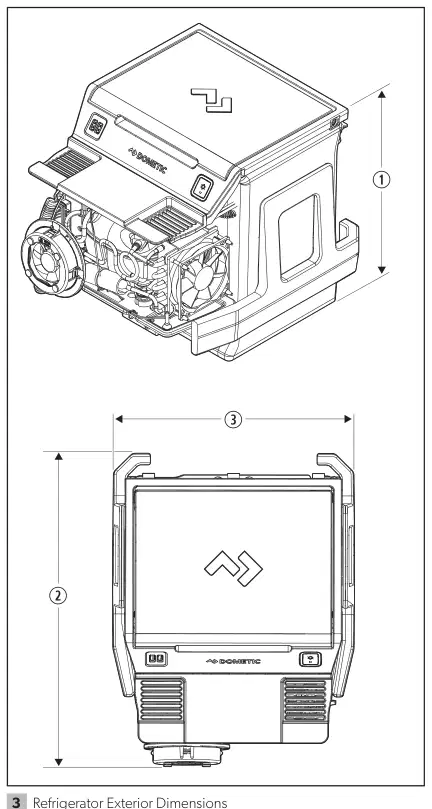
3 .4 External Dimensions

This section identifies the refrigerator’s external dimensions.
Dometic Center Console Refrigerator (CCF-T CPV) — 3 .4 External Dimensions diagram (page 5)
図 2 · 3 .4 External Dimensions

2 Refrigerator Component Locations

q EPP Foam Wall

Spacers u Twist Lock

w Refrigerator Unit i Front Fan e USB Port(s)1 o Condenser Fan r ON/OFF Button

a Power Retaining Latch

t Closeout Tray s 12 VDC Power Plug y 12 VDC Power Cord d Rubber Feet

1USB ports will vary by vehicle trim package.

3 Refrigerator Exterior Dimensions

q Height: 13 in. (320 mm) w Depth: 16 in. (404 mm) e Width: 12 in. (310 mm)

with LED

Page 6 of the Dometic Center Console Refrigerator (CCF-T CPV) user manual — 4 Specifications
6ページ · クリックして拡大
6ページ

4 Specifications

This section provides the physical and electrical specifications for the refrigerator.

Weight14.3 lbs (6.5 kg) Voltage Input12.3 –16.0 VDC Low Voltage Protection12.3 VDC Energy Consumption at Startup5.6 A Energy Consumption during Operation at 90 °F Ambient and 23 °F Internal Temperatures4.5 A Storage/Internal Volume8 L Beverage Storage• 6 - 20 oz (0.6 L) bottles • 12 - 12 oz (0.4 L) cans RefrigerantR1234YF 1 oz (26 g) Internal Operating Temperature Range (Auto-Controlled)32–41 °F (0–5 °C) Vehicle Models1• Ford F-150 (2015-2020) • Ford Super Duty F-250/350/450/550 (2017 and newer) • Ford Expedition (2018 and newer)

1Only available for models with a floor console configuration.

Specifications CCF-T Refrigerator

Page 7 of the Dometic Center Console Refrigerator (CCF-T CPV) user manual — 5 Wiring Diagram
7ページ · クリックして拡大
7ページ

CCF-T Refrigerator Wiring Diagram

5 Wiring Diagram

Dometic Center Console Refrigerator (CCF-T CPV) — 5 Wiring Diagram diagram (page 7)
図 3 · 5 Wiring Diagram
3. White 5 - Black 6 - Black
5 - Black 8 4- Red - Gray Brown

4 Refrigerator Wiring Diagram

Page 8 of the Dometic Center Console Refrigerator (CCF-T CPV) user manual — I The console lid should remain open during the pre-
8ページ · クリックして拡大
8ページ

6 Pre-Installation

5. Confirm the blue LED is illuminated on the refrigerator unit’s ON/OFF button. If not, press and hold the button for one second, and then release.
6. Listen for the condenser fan to start. See “Troubleshooting” on page 14 if the condenser fan does not start.
  • Park the vehicle in a well-ventilated area during the installation process.
7. Turn the vehicle engine OFF.
  • Ensure the vehicle is in Park with the emergency brake engaged at all times during the installation process.
8. Press and hold the ON/OFF button to turn the refrigerator unit OFF.
9. Unplug the 12 VDC power cord.
10. Set the refrigerator unit away from the console.

6 .3 Preparing the Front Fan Location

This section describes the assessment and location preparations to install the refrigerator.

6 .1 Assessing the Installation Location

1. Confirm your vehicle is the correct model, model year, and trim level to accept the refrigerator. See “Specifications” on page 6 for more information. Only trim packages with an integrated center floor console are eligible.
2. Verify you have the correct parts and tools to perform the refrigerator installation. See “Tools and Materials” on page 4 for more information.

6 .2 Testing the Refrigerator

5 Using the Front Fan Template q 2.4 in. (60 mm) e 2.6 in. (67 mm) w 6.2 in. (158 mm)

1. Open the console lid and remove all items stored in the console bin, including the original trim tray and the console floor liner.
1. Tape the front fan template to the inside, front wall of the console bin.

I The console lid should remain open during the pre-

installation and installation procedures.

2. Using a pen, trace the center point opening from the template onto the console bin wall.
2. Place the refrigerator unit in an upright position on a stable surface next to the console.
3. Insert the refrigerator unit’s 12 VDC power cord plug into the vehicle’s 12 VDC power receptacle.
4. Start the vehicle engine.

Pre-Installation CCF-T Refrigerator

Page 9 of the Dometic Center Console Refrigerator (CCF-T CPV) user manual — 7 Installation
9ページ · クリックして拡大
9ページ
Dometic Center Console Refrigerator (CCF-T CPV) — 7 Installation diagram (page 9)
図 4 · 7 Installation

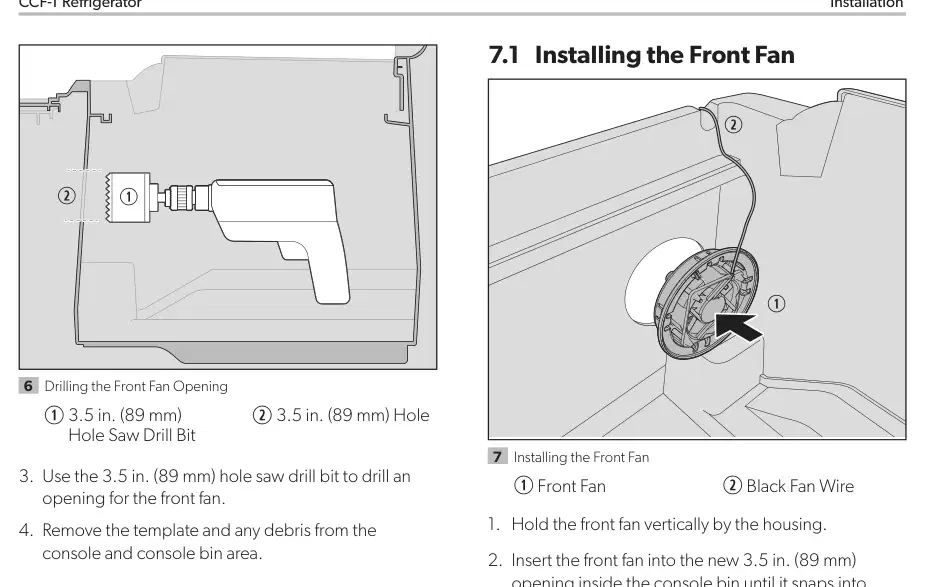
6 Drilling the Front Fan Opening q 3.5 in. (89 mm)

Hole Saw Drill Bit w 3.5 in. (89 mm) Hole

7 Installing the Front Fan q Front Fan w Black Fan Wire

3. Use the 3.5 in. (89 mm) hole saw drill bit to drill an opening for the front fan.
1. Hold the front fan vertically by the housing.
4. Remove the template and any debris from the console and console bin area.
2. Insert the front fan into the new 3.5 in. (89 mm) opening inside the console bin until it snaps into place.

7 Installation

3. Tape the black fan wire to the top right lip of the console bin to hold it in place and to protect it from damage.

This section describes how to install and wire the fan and the refrigerator unit, and how to install the foam protection material.

CCF-T Refrigerator Installation

Page 10 of the Dometic Center Console Refrigerator (CCF-T CPV) user manual — r
10ページ · クリックして拡大
10ページ

7 .2 Installing the Foam Spacers

7 .3 Installing the Refrigerator Unit

9 Engaging the Receptacle Locks q 12 VDC Power Plug w Power Supply

1. Set the refrigerator unit upright near the console bin and insert the 12 VDC plug into the power supply.

8 Placing the Foam Spacers q Foam Spacer w Console Bin Ledge

1. Peel off the tape covering from the right-hand foam spacer.
2. Affix the right-hand foam spacer to the inside of the right-hand console bin wall:

a. Hold the foam spacer inside the console bin with

r

the 45 degree angled corner to the rear of the console bin.

b. Rest the foam spacer on the console bin ledge.

c. Press the 45 degree angled corner of the foam

spacer into the rear corner. d. Press the entire foam spacer into place.

3. Repeat steps 1 and 2 to apply the left-hand foam spacer to the left-hand console bin wall.

10 Lowering the Refrigerator Unit into the Console Bin q Refrigerator Unit e Console Bin Frame Lip w Left Foam Spacer r Power Retaining Latch

2. Note the power retaining latch located at the bottomleft corner of the refrigerator unit. 3. Gently rock the refrigerator unit from left to right while lowering the refrigerator unit into the console bin.

Installation CCF-T Refrigerator

Page 11 of the Dometic Center Console Refrigerator (CCF-T CPV) user manual — 11 Engaging the Receptacle Locks q Receptacle Locks (2) w Console Bin
11ページ · クリックして拡大
11ページ
Dometic Center Console Refrigerator (CCF-T CPV) — 7.4 Connecting Power to the Fan diagram (page 11)
図 5 · 7.4 Connecting Power to the Fan
4. Use a screwdriver to rotate the power retaining latch 180 degrees from the refrigerator unit. The top lip of the latch will secure the 12 VDC plug into the power supply.

11 Engaging the Receptacle Locks q Receptacle Locks (2) w Console Bin

5. Continue to lower the refrigerator unit until it is fully seated with the receptacle locks engaged. The top edges of both the refrigerator unit and the console bin should be level.

12 Connecting the Front Fan q Front Fan e Black Fan Wire w Fan Power Plug

1. Remove the temporary tape holding the black fan wire in place.
2. Locate the fan power plug below the USB port.
3. Routing the black fan wire away from the fan blades, connect it to the fan power plug.
4. Gently push the connected fan wires back into the opening, protecting the wires from the fan blades.
5. Start the vehicle engine.
6. Press and hold the ON/OFF button for one second to turn the refrigerator unit on and to listen for the condenser fan to start. See “Troubleshooting” on page 14 if the condenser fan does not start.
7. Press and hold the ON/OFF button for one second to turn the refrigerator unit OFF.
8. Turn the vehicle engine OFF.
Page 12 of the Dometic Center Console Refrigerator (CCF-T CPV) user manual — 14 Installing the Closeout Tray q Closeout Tray
12ページ · クリックして拡大
12ページ

8 Operation

  • This refrigerator must be properly installed and located in accordance with these instructions before it is used.

q q

  • Do not store gasoline or other flammable vapors and liquids in this refrigerator.
  • Do not store explosive substances, such as aerosol cans with a flammable propellant, in this refrigerator.

13 Securing the Twist Locks q Twist Locks (2)

9. At the front edge of the refrigerator unit, ensure the twist lock horizontal tabs fit underneath the front lip of the console bin.

This section provides instructions on the proper use of the refrigerator.

10. Using a Phillips screwdriver, turn each twist lock clockwise until the horizontal tabs are snug against the console bin.

8 .1 Turning the Refrigerator ON

Press and hold the ON/OFF button for one second, and then release. The button’s blue LED indicator will illuminate when the refrigerator is ON.

7 .5 Completing the Installation

The refrigerator will remain ON until it is manually turned OFF. If the refrigerator is ON and the vehicle engine is turned OFF:

  • The refrigerator will continue to draw power from the battery until the voltage drops below 12 V. If this threshold is reached, the refrigerator will cycle OFF until the engine restarts.
  • The refrigerator will return to an ON status when the engine restarts.

8 .2 Turning the Refrigerator OFF

Press and hold the ON/OFF button for one second, and then release. The button’s blue LED indicator will not illuminate when the refrigerator is OFF.

14 Installing the Closeout Tray q Closeout Tray

The refrigerator will remain OFF until it is manually turned ON. If the refrigerator is OFF and the vehicle engine is turned OFF, the refrigerator unit will maintain the OFF status.

Align the vented closeout tray over the fan housing and snap it into place.

Operation CCF-T Refrigerator

Page 13 of the Dometic Center Console Refrigerator (CCF-T CPV) user manual — 9 Maintenance
13ページ · クリックして拡大
13ページ

8 .3 Adjusting the Refrigerator Temperature

The maintenance and cleaning instructions provided in this section should be performed at the intervals indicated, or as needed depending on the frequency of use. Failure to properly maintain the appliance may void the warranty and could result in unsafe operation. Preventive maintenance is not covered under the warranty.

The cooling temperature is automatically maintained and is not adjustable.

8 .4 Opening and Closing the Refrigerator

9 .1 Cleaning the Refrigerator

Open and close the refrigerator by lifting the console lid and then lifting the refrigerator lid.

I Be sure the console lid does not interfere with the

refrigerator’s lid when opening or closing.

If the refrigerator becomes dirty, wipe clean with a damp, soft sponge or microfiber cloth.

I The refrigerator lid is designed to remain closed

unless held open manually. When the refrigerator lid is open, an LED illuminates the interior.

If condensation or liquid accumulates in the interior, remove it with a soft sponge or microfiber cloth.

8 .5 Storing Refrigerated Goods

9 .2 Maintaining the Refrigerator When Not in Use

For optimal use of the refrigerator, observe the following instructions:

For optimal care of the refrigerator when not in use, observe the following instructions:

  • Avoid placing materials 75 °F (24 °C) or warmer in the refrigerator. For optimal use, allow materials to cool to 50 °F (10 °C ) or cooler before placing them inside the refigerator.
  • Clean and dry the interior of the refrigerator to avoid lingering odor.
  • Never put hot liquids or food in the interior.
  • Avoid storing refrigerated goods in the refrigerator when it is not turned ON.
  • Never put ice or uncontained liquids in the interior.
  • Avoid storing any sharp items or items not intended for refrigeration in the refrigerator .
  • The total amount of goods placed into the interior should not exceed its storage volume.
  • To maintain constant temperature, minimize the amount of time the lid stays open.

9 Maintenance

CCF-T Refrigerator Maintenance

Page 14 of the Dometic Center Console Refrigerator (CCF-T CPV) user manual — 10 Troubleshooting
14ページ · クリックして拡大
14ページ

10 Troubleshooting

Problem Possible Cause Recommended Solution

The refrigerated goods are not cold.

  • The refrigerator is not turned ON.
  • Confirm the refrigerator is ON.
  • See “Turning the Refrigerator ON” on page 12.

The refrigerator is not receiving power.

  • Remove the closeout tray and confirm the power cord and fan wires are not damaged.
  • Use a multimeter to test for power. The fan is not operating.

There is condensation around the refrigerator unit lid.

The refrigerator lid is not closing properly.

  • Remove any obstructions from around the refrigerator lid and console lid to allow both lids to close completely.

The lid gasket is damaged. • Inspect and replace the lid if the gasket is damaged.

There is an electronic control unit (ECU) malfunction.

  • Contact a qualified service technician.

The USB port does not work.

The refrigerator is not receiving power.

1. Confirm the refrigerator is OFF. 2. Remove the closeout tray and confirm the power cord and fan wires are not damaged. • Use a multimeter to test for power.

The fan is noisy. There is an obstruction. 1. Confirm the refrigerator is OFF. 2. Remove the closeout tray and remove any obstruction from the fan or the fan blades. • If Contact a qualified service technician.

There is an odor coming from the refrigerator interior.

Residue has built up inside the refrigerator.

  • Clean the interior of the refrigerator. See “Cleaning the Refrigerator” on page 13.

Troubleshooting CCF-T Refrigerator

Page 15 of the Dometic Center Console Refrigerator (CCF-T CPV) user manual — 12 .2 All Other Regions
15ページ · クリックして拡大
15ページ

11 Disposal M

Place the packaging material in the appropriate recycling waste bins, whenever possible. The refrigerant circuit contains R1234yf. Consult a local recycling center or specialist dealer for details about how to dispose of the product in accordance with all applicable national and local regulations.

12 Warranty Information

Refer to the sections below for information about warranty and warranty support in the US, Canada, and all other regions.

12 .1 United States and Canada

LIMITED WARRANTY AVAILABLE AT DOMETIC.COM/ EN-US/TERMS-AND-CONDITIONS-CONSUMER/ WARRANTY.

IF YOU HAVE QUESTIONS, OR TO OBTAIN A COPY OF THE LIMITED WARRANTY FREE OF CHARGE, CONTACT:

DOMETIC CORPORATION CUSTOMER SUPPORT CENTER 5155 VERDANT DRIVE ELKHART, INDIANA, USA 46516 1-800-544-4881 OPT. 1

12 .2 All Other Regions

The statutory warranty period applies. If the product is defective, please contact the manufacturer’s branch in your region or your retailer (see the back of this instruction manual for the web addresses to locate your region or retailer).

For repair and guarantee processing, please include the following documents when you send in the device:

  • A copy of the receipt with purchasing date
  • A reason for the claim or description of the fault

CCF-T Refrigerator Disposal

Page 16 of the Dometic Center Console Refrigerator (CCF-T CPV) user manual — 11 Disposal
16ページ · クリックして拡大
16ページ

Disposal CCF-T Refrigerator

情報源

参考資料・リンク

この取扱説明書で参照されているリンク(メーカー、サポート、ダウンロード等)。

トラブル解決

トラブルシューティング

よくあるトラブル、考えられる原因、対処法。

問題考えられる原因対処法
The refrigerator is not turned ON. p.14
The refrigerator is not receiving power. p.14
The fan is not operating. p.14
The refrigerator lid is not closing properly. p.14
The lid gasket is damaged. p.14
There is an electronic control unit (ECU) malfunction. p.14
There is an obstruction. p.14
Residue has built up inside the refrigerator. p.14

Dometic Center Console Refrigerator (CCF-T CPV)について質問する

ユーザーまたはスタッフが通常1日以内に回答します。あなたの質問が次の人の助けにもなります。

Add your email to get notified when it’s answered — no spam, ever.

0 questions
Dometic Center Console Refrigerator (CCF-T CPV)に関する質問はまだありません

最初の質問を投稿しましょう。他のユーザーや当チームが回答します。

原本

Dometic Center Console Refrigerator (CCF-T CPV) 取扱説明書(PDF)

60 ページ·11.9 MB·生活家電·PDF
上のページをクリックするとここに表示されます
ページ 1 / …
100%
ページを読み込み中…